Tag: iPhone screen

  • Samsung Galaxy S9/S9+ Cracked Screen Glass Only Repair – Refurbishing Solution V5.0

    Samsung Galaxy S9/S9+ Cracked Screen Glass Only Repair – Refurbishing Solution V5.0

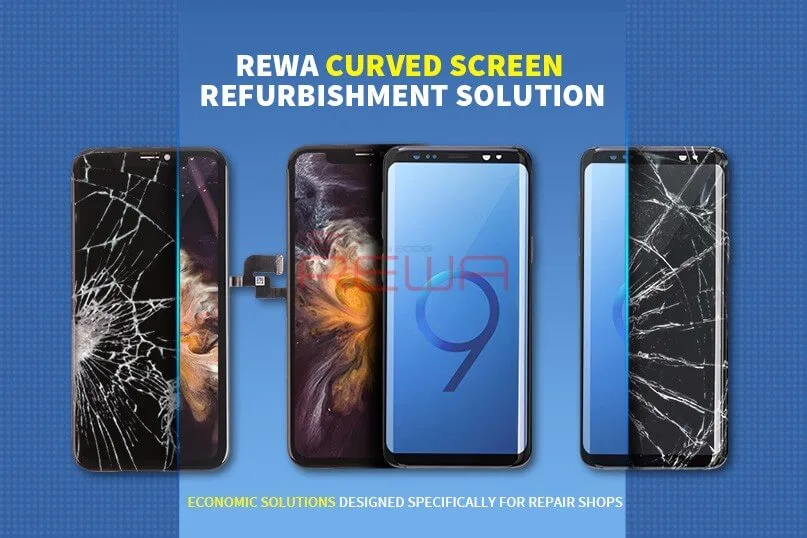
    With the emergence of more and more curved-screen mobile phones on the market, curved-screen technology becomes more and more complicated, adding the difficulty of curved-screen refurbishing. The release of the Samsung S9 series also brings a new challenge since traditional curved-screen refurbishing solutions with freeze assistance cannot meet its need. That’s why we bring you this latest curved-screen refurbishing solution with heat assistance, which can meet the refurbishing needs of most curved-screen and flexible-screen mobile phones.

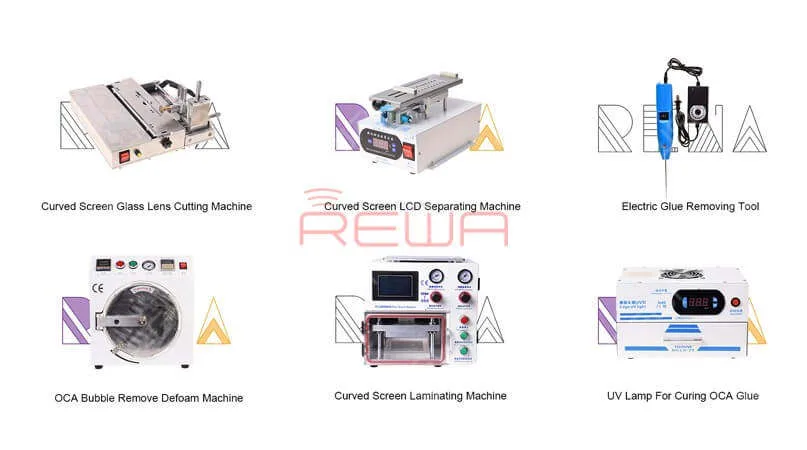
    This Refurbishing Solution V5.0 mainly uses the following equipment:
    Samsung Galaxy S9/S9+ Cracked Screen Glass Only Repair - Refurbishing Solution V5.0

    Samsung Galaxy S9/S9+ Cracked Screen Glass Only Repair - Refurbishing Solution V5.0

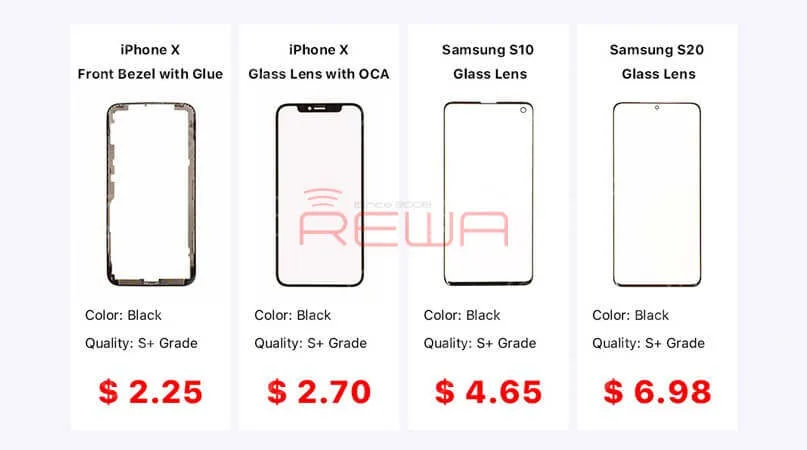
    Glass Lens For Samsung & iPhone

    Curved Screen Glass Lens Cutting Machine

    Rotatable Curved Screen LCD Separating Machine

    Electric Glue Removing Tool

    Curved Screen Laminating Machine

    High Power UV Lamp

    Bubble Removing Machine

    For more detailed info on each product, contact us at sales@rewatechnology.com, or go to the shop.rewa.tech to learn more!


    Samsung Galaxy S9/S9+ Cracked Screen Glass Only Repair - Refurbishing Solution V5.0

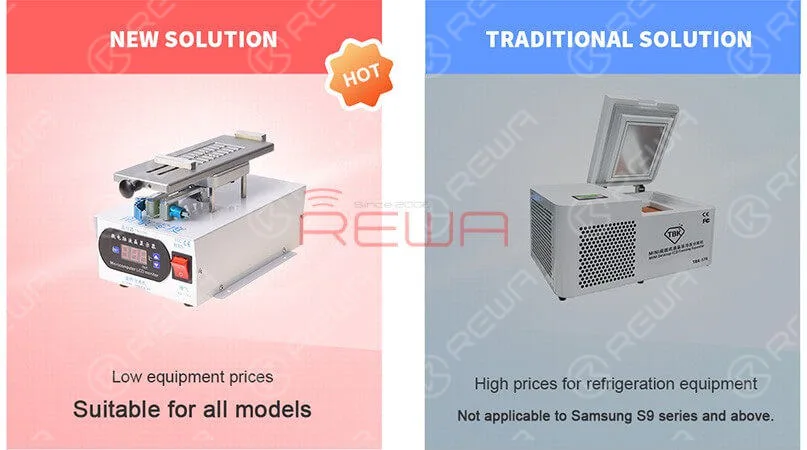
    Compared to a traditional solution, the Refurbishing Solution V5.0 is suitable for all models. Especially suitable for the Samsung S9 series and above. The new solution can solve the problem of LCD layering, avoiding cold damage to the LCD. Also, the overall equipment price is lower than traditional solutions. Better than any other solution on the market, we provide the best technical support which includes online customer service and a full range of instructional video services.


    Samsung Galaxy S9/S9+ Cracked Screen Glass Only Repair - Refurbishing Solution V5.0

    Better than any other solution on the market, we provide the best technical support which includes online customer service and a full range of instructional video services.

    For more details on the operation, watch the video below:

  • iPhone 11 Pro Max Screen Refurbishing

    iPhone 11 Pro Max Screen Refurbishing

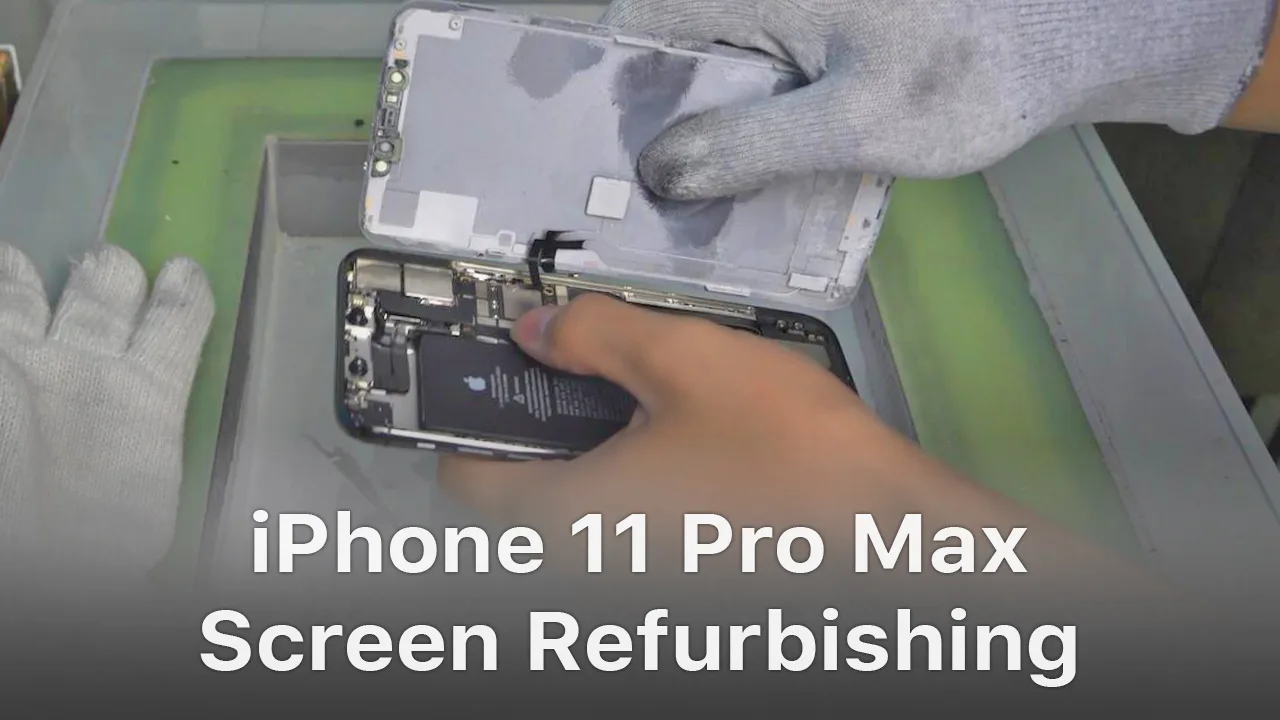
    For iPhone X and later iPhone models, the bracket covering the bottom flex cable bonding area is adhered to by cold adhesive. The traditional method with heating assistance when removing bezel might damage the screen. After several attempts, REWA LAB found that the new method with cold assistance can improve the success rate and efficiency of screen refurbishing. For details, please check our video today – iPhone 11 Pro Max screen refurbishing.

    Tools & Parts used to refurbish iPhone 11 Pro Max:

  • Tips & Tricks For iPhone Screen/Battery Replacement

    Tips & Tricks For iPhone Screen/Battery Replacement

    No matter you are a repair shop owner or a customer of a mobile phone, there’s more than one reason you might need to replace the iPhone screen or the battery.

    Screen/battery replacement is an essential business for repair shops. Professional replacing techniques can not only reduce the failure rate of screen/battery replacement and save time, but also highlight the professional image of the repair shop and gain favorable feedback from customers.

    In this article, we take iPhone X as an example to show you tips and tricks for screen/battery replacement of iPhone X/XS/XS Max.

    Follow our steps and power your repair shop now.

    Finding the Right Tools, Screen, Battery, and Instructions

    Once you’re ready to replace the screen or the battery, research the recommended tools and battery options for each phone individually, as they’re all slightly unique.

    REWA is dedicated to providing products and services for business clients(repair shops, refurbishing factories, etc.) and data recovery services for individual clients.

    As for other repair demands of individual clients, repair shops nearby would be a good choice for you.

    What Will You Need to Replace The Screen/Battery of Your iPhone X

    New iPhone X Screen

    New iPhone X Battery

    New iPhone X Battery Adhesive Strips

    Hot Air Gun

    Plastic Pry Piece

    Straight Tweezers

    Plastic Suction Cup

    Plastic Pry Bar

    Anti-static Wrist Strap – protect components from accidental ESD damage

    Tri-point Screwdriver

    Phillips Screwdriver

    Pentagon Screwdriver

    iPhone Screen Replacement Steps Overview

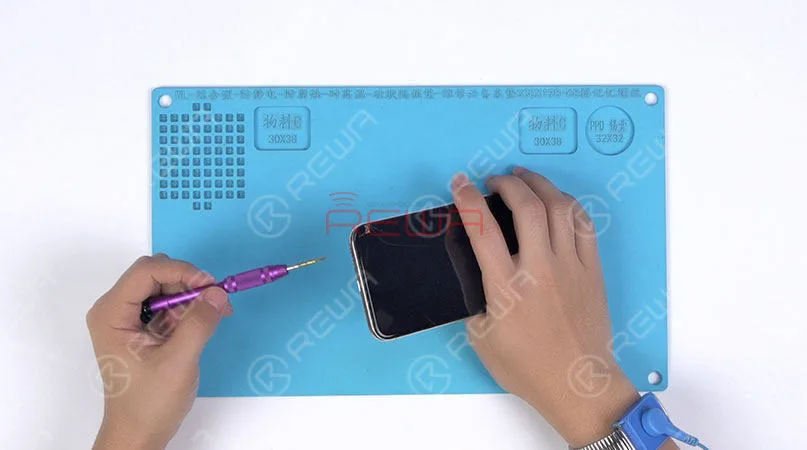
    1.Pentalobe Screws Removing and Hot Air Gun Heating

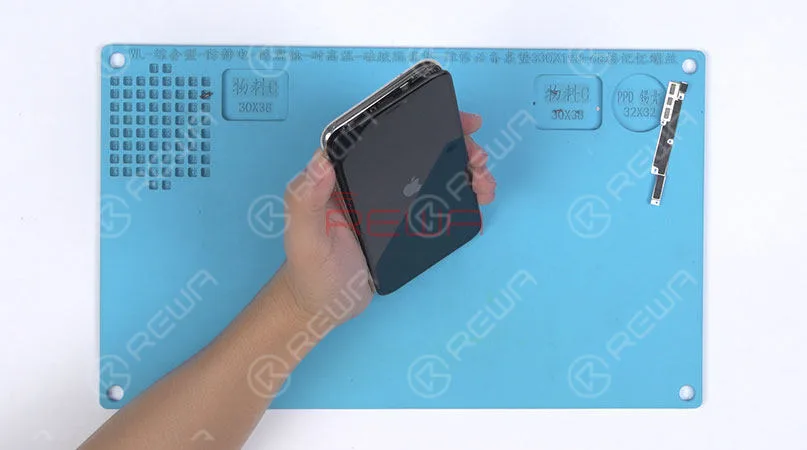
    Remove the two pentalobe screws with the pentagon screwdriver at the bottom edge of the phone.

    Since there are waterproof seals between the screen and the back glass assembly, you need to heat and soften up the waterproof seals with the hot air gun at 120℃-150℃ for 1 minute.

    Remove the two pentalobe screws with the pentagon screwdriver at the bottom edge of the phone. Since there are waterproof seals between the screen and the back glass assembly, you need to heat and soften up the waterproof seals with the hot air gun at 120℃-150℃ for 1 minute.

    2. Open The Screen

    Press the suction cup firmly onto the screen, and insert the pry piece to slice through the adhesive holding the screen.

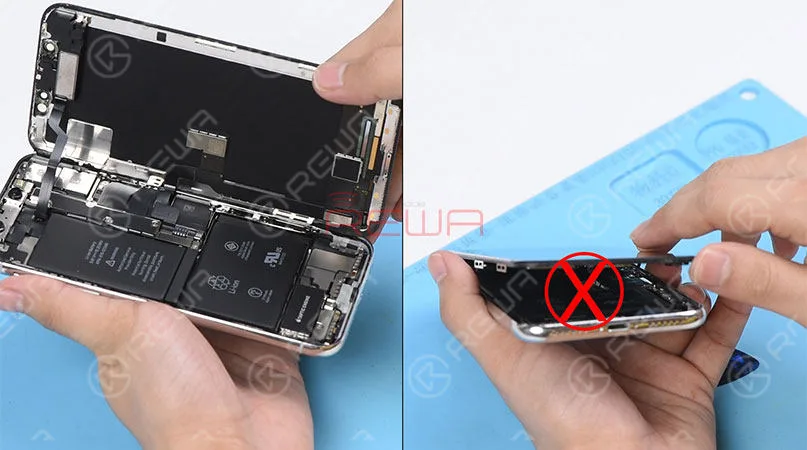
    Note: Do not swing the screen up from the bottom side.

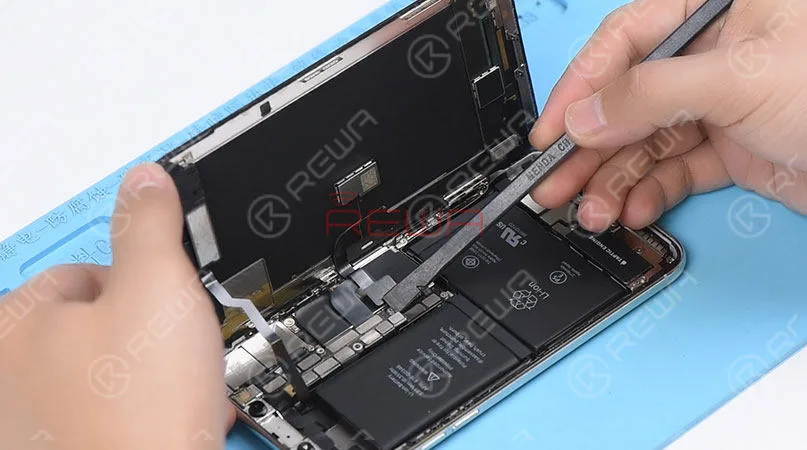
    As the flex cables of iPhone x are mainly arranged on the right side, to avoid tearing off these cables, we need to open the phone by swinging the screen up from the left side.

    Press the suction cup firmly onto the screen, and insert the pry piece to slice through the adhesive holding the screen. Note: Do not swing the screen up from the bottom side. As the flex cables of iPhone x are mainly arranged on the right side, to avoid tearing off these cables, we need to open the phone by swinging the screen up from the left side.

    ♥Tips: Please be careful with the force applied when replacing the screen.

    Otherwise, the phone might be stuck in touch/display issues. Because the bottom area of the screen(with ICs bonded here) and the Face ID area are fragile.

    3. Connector Bracket And Screen Removing

    (Watch the video to get details – at the ending of the article)

    Remove screws securing the connector bracket with the tri-point screwdriver

    Pry the battery connector up from its socket

    Disconnect the OLED panel cable connector

    Pry the digitizer cable connector up from its socket And then disconnect the front panel sensor assembly flex cable
    Pry the digitizer cable connector up from its socket And then disconnect the front panel sensor assembly flex cable

    ♥Tips: The front panel sensor assembly flex cable is secured by the double-sided tape. Please lift the cable carefully when removing the screen.

    4. Earpiece Speaker And Sensor Assembly Removing & Installation

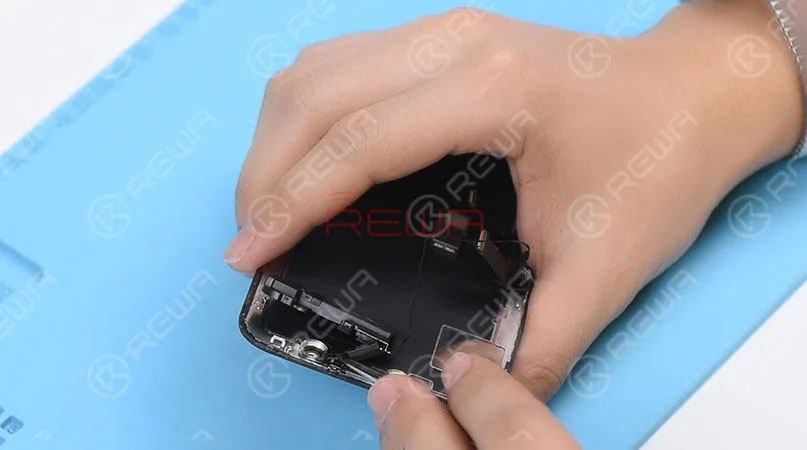
    Remove screws securing the front panel sensor assembly flex cable with the tri-point screwdriver. Heat with the Hot Air Gun at 120℃-150℃ first to soften the adhesive, then remove the front panel sensor assembly flex cable with tweezers.
    Remove screws securing the front panel sensor assembly flex cable with the tri-point screwdriver. Heat with the Hot Air Gun at 120℃-150℃ first to soften the adhesive, then remove the front panel sensor assembly flex cable with tweezers.

    ♥Tips: there is double-sided tape securing the Flood Illuminator Module area.

    Get the earpiece speaker and sensor assembly installed onto the new screen

    Get the front panel sensor assembly flex cable, the digitizer cable connector the OLED panel cable connector and the battery connector connected

    5.Phone Assembling

    Please test the screen before the reassembly process.

    Please test the screen before the reassembly process.

    ♥Tips: the waterproof seals might get damaged when replacing the screen. If so, clean the residual waterproof seals at first, then stick new waterproof seals.

    The true tone-capable display of iPhone 7 – XS Max is missing after screen replacement. So we highly suggest that repair shops restore the true tone with the True Tone Programmer after screen replacement.

    iPhone X/XS/XS Max Screen Replacement Tips & Tricks

    1. Wear Anti-static Wrist Strap

    2. Power off the phone before the disassembly

    3. Pre-heat with hot air gun

    4. Open the phone by swinging the screen up from the left side

    5. Pay attention to the bottom area of the screen (ICs Bonding Area)

    6. Pay attention to the top area of the screen(Face ID area)

    7. Disconnect the battery flex cable first

    8. Pre-heat before removing earpiece speaker and sensor assembly

    9. Test the screen before the reassembly process

    iPhone Battery Replacement Steps Overview

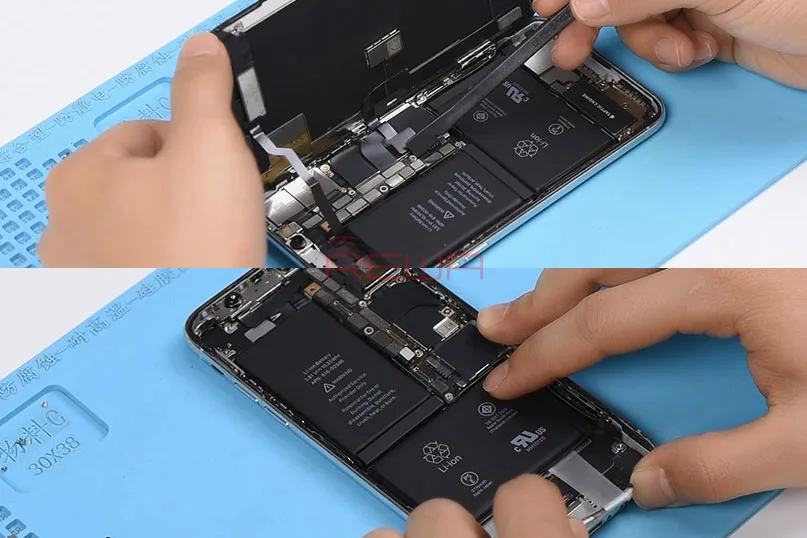
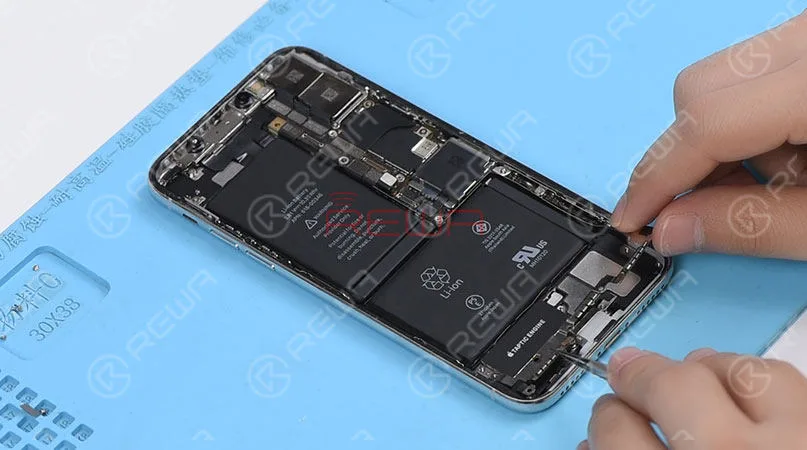
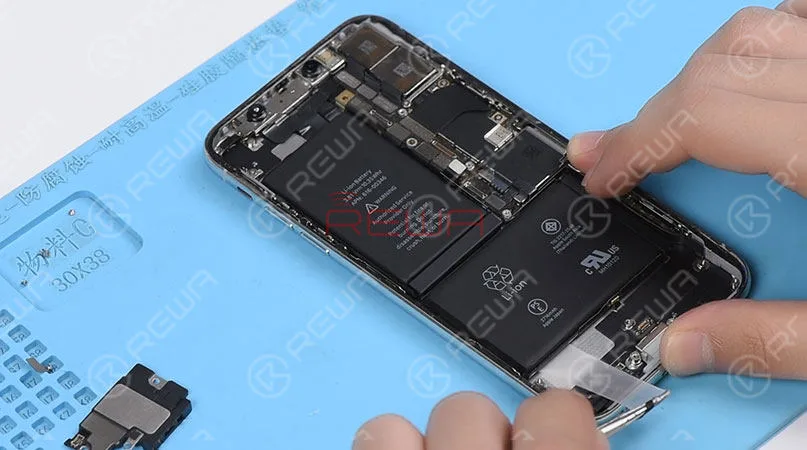
    ♥Tips: To remove the battery adhesive strips easily, please remove the Taptic Engine and speaker at first.

    1.Taptic Engine And Speaker Removing

    Please be noted that there are many screws detached in this step, we highly suggest that you place these screws in order.
    1.Taptic Engine And Speaker Removing   Please be noted that there are many screws detached in this step, we highly suggest that you place these screws in order.

    2.Battery Adhesive Strips Removing

    Wrap the battery adhesive strips with tweezers and pull the strips out slowly and parallelly.
    2.Battery Adhesive Strips Removing Wrap the battery adhesive strips with tweezers and pull the strips out slowly and parallelly.

    3.Battery Adhesive Strips & Battery Adhering

    Adhere new battery adhesive strips to the battery.

    4.Taptic Engine And Speaker Installation

    iPhone X/XS/XS Max Battery Replacement Tips & Tricks

    1. Taptic Engine and speaker removing first

    2. Place screws in order

    3. Pull the strips out slowly and parallelly.

    Conclusion

    In addition to professional techniques, high-quality and reliable third-party suppliers are also extremely important for repair shops. Choose REWA, choose the quality you want.

    For individual clients and repair enthusiasts, REWA online shop with iPhone screens of different quality grade and replacement batteries are here for your choice.

    Why hesitating? Place your order now! For certified iPhone Screens, replacement batteries and repair tools, please place an order on REWA ONLINE SHOP.

  • REWA High-end iPhone Aftermarket In-cell Screen – OEM Quality With Better Price

    REWA High-end iPhone Aftermarket In-cell Screen – OEM Quality With Better Price

    For most customers, the iPhone aftermarket screen is definitely a cost-effective choice. However, the quality of iPhone aftermarket screens on the market also varies from one to another. As a professional solution provider, REWA has devoted to providing cost-effective and competitive products for our clients. After a series of tests conducted by REWA LAB, we are happy to recommend our high-end iPhone in-cell screens covering from iPhone 6 to iPhone 8 Plus.

    REWA In-cell Screen Test Report

    Cosmetic Inspection

    ① The surface of glass lens is not damaged, off paint, or with bubbles inside. The glass lens has been manufactured under high-temperature tempering to be sturdy and durable.

    ② Without adhesive failure, the front bezel is not damaged or screw hole blocked.

    ③ Flex cables are not broken or damaged. The display flex cable and the touch flex cable are bonded together just like the OEM New.

    ④ The backlight has adhered tightly that cannot be separated easily.

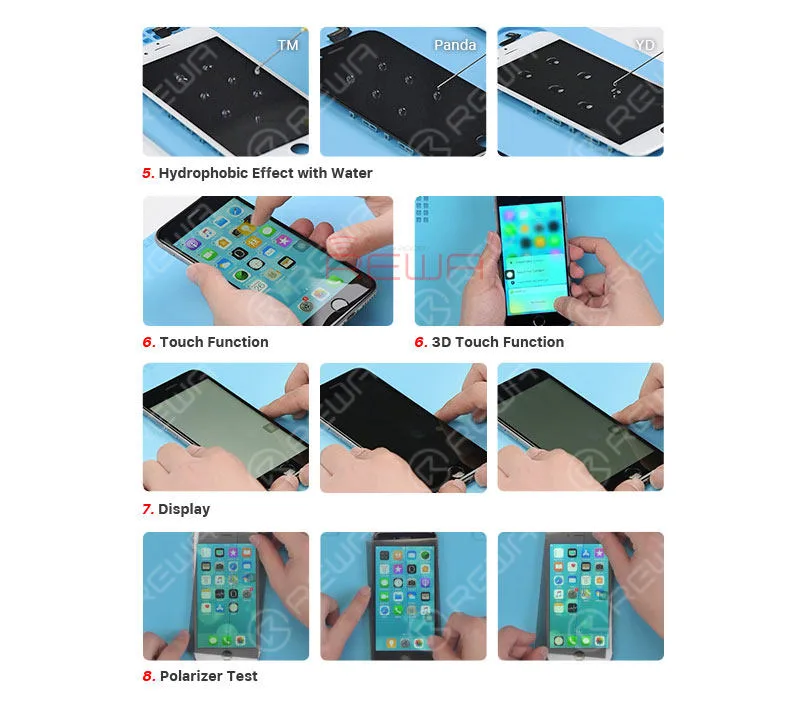
    ⑤ Coated with fingerprint oil, the screen performs perfectly in the hydrophobic effect test.

    Screen Fitness

    The screen fitness is decided by the thickness of the screen, IC size and bezel adhesion.

    ① Screen Thickness Manufactured with the original material&structure&technology, the thickness of REWA high-end iPhone in-cell screen is close to the OEM New.

    ② IC Size ICs on the screen feature normal size that won’t affect screen installation.

    ③ Installation The phone features smooth edges without protuberance/gap. There is no light-leaking or backlight oppression.

    Display Comparison

    ① Display Effect With wide color gamut and ESR backlight support, the screen is close to the OEM New in display effect and backlight brightness.

    ② Polarizer Test The screen performs well at all angles under the sunglasses just like the OEM New.

    Function Test

    ① Touch & 3D Touch & Keyboard Manufactured with the original material &s tructure & technology, REWA high-end iPhone in-cell screen features smooth and stable touch just like the OEM New.

    ② The screen runs smoothly when playing videos/games just like the OEM New.

    ③ Measure temperature after the phone has run for half an hour. The measured value is close to the OEM New.

    Aging & Vibrating Test

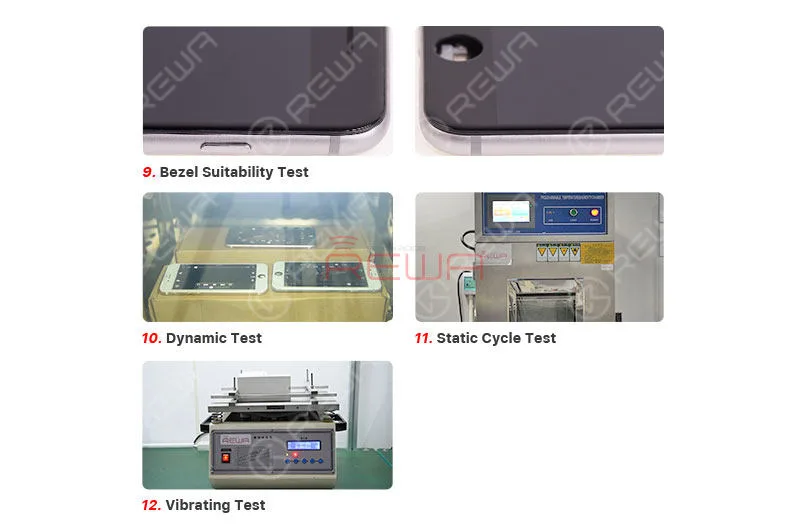
    After the Static Cycle Test (Condition: -20℃/2Hrs, +55℃55%RH/2Hrs, +55℃/4Hrs), the Dynamic Test (Condition: +45℃; playing video for 2Hrs) and the Vibrating Test (Amplitude: 2mm, Frequency: 50HZ, Time:1H), REWA high-end iPhone in-cell screen performs well in the display/function test and features normal backlight adhesion.

    Conclusion

    Manufactured with the original material&structure&technology, REWA high-end iPhone in-cell screen performs perfect in touch, 3D touch, screen fitness, display, function test, etc.. Featuring performance close to OEM New, the screen also supports true tone restore. With a relatively low price, REWA high-end iPhone in-cell screen is definitely a qualified alternative to the OEM screen.

    REWA High-end iPhone Aftermarket In-cell Screen - OEM Quality With Better Price

    We provide a one-year warranty for our products and four rounds of quality control process before shipment. REWA certified products, trustworthy and reliable.

    For quick order, please visit REWA online shop! For bulk order, please feel free to contact your REWA account manager to get a discount!

  • Do I have to choose an original iPhone screen?

    Do I have to choose an original iPhone screen?

    There are varies of aftermarket iPhone screens in the market. They are made of different raw materials with different techniques. And also different prices. Some technicians may be confused and even fraud by such a mess quality grades definition. So as to choose the original screen only. But are the original screens really your best choice? Check this video for the answer.


  • Which iPhone X Screen REWA Recommended So Far?

    Which iPhone X Screen REWA Recommended So Far?

    Have you ever been confused by different iPhone X screens in the market? OEM New, AA Grade, Aftermarket Flexible OLED, Aftermarket Rigid OLED, etc. Actually, it is not such a bad thing for customers to have different choices as long as they can distinguish one from another. Well, hope the comprehensive and in-depth comparison test on different iPhone X screens presented by REWA LAB will help you find the right iPhone X screen you need.

  • OLED vs. LED: Impact on Eye Health Explored

    OLED vs. LED: Impact on Eye Health Explored

    Statista’s statistic shows the total number of mobile phone users worldwide from 2015 to 2020. In 2019 the number of mobile phone users is forecast to reach 4.68 billion.

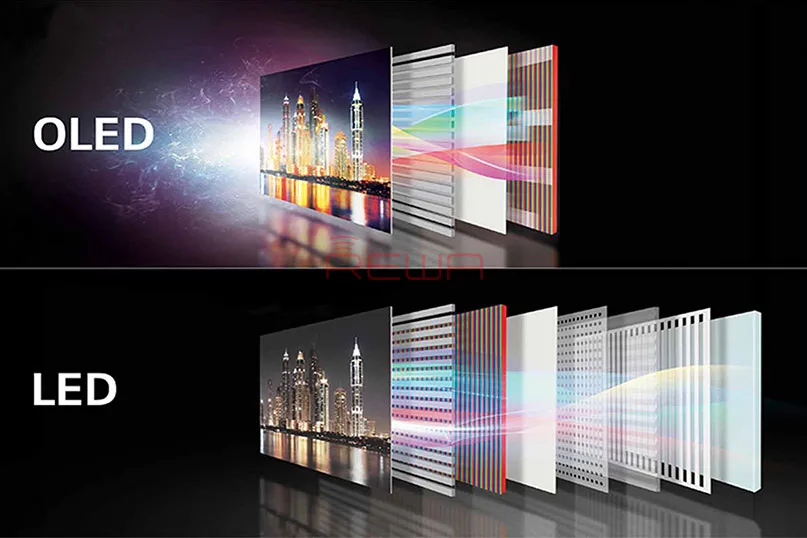
    In recent years OLED technology has emerged as the leading smartphone display technology, and the world’s most popular phone vendors are all shipping AMOLED smart phones.

    The AMOLED displays are thought to cause ‘eyes hurt’ because of low-frequency dimming by AMOLED manufacturers. so here comes the question, which one is more harmful to eyes? OLED or LED?

    The two factors that causes ‘eyes hurt ‘are blue light and flicker.

    Blue light is high energy visible light, widely acknowledged to bear harmful effects like discomfort to the eye and damage to the retina, as well as serve as a contributing factor to diseases such as cancer, diabetes, heart disease, obesity and insomnia.

    Children seem to have delicate retinas that are highly susceptible to the dangers of blue light.
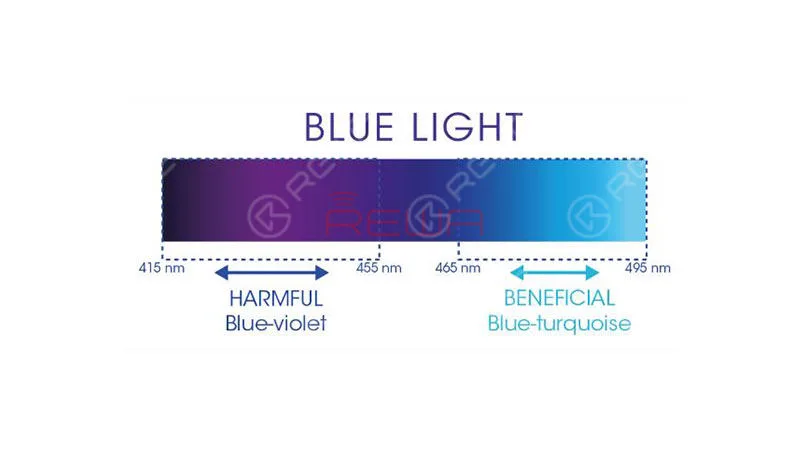
    highly susceptible to the dangers of blue light.

    Intertek, an independent quality assurance specialist firm in the UK also concluded that OLED lights emit merely 10% of the blue light emitted by LED lights with the same luminance and color temperature.
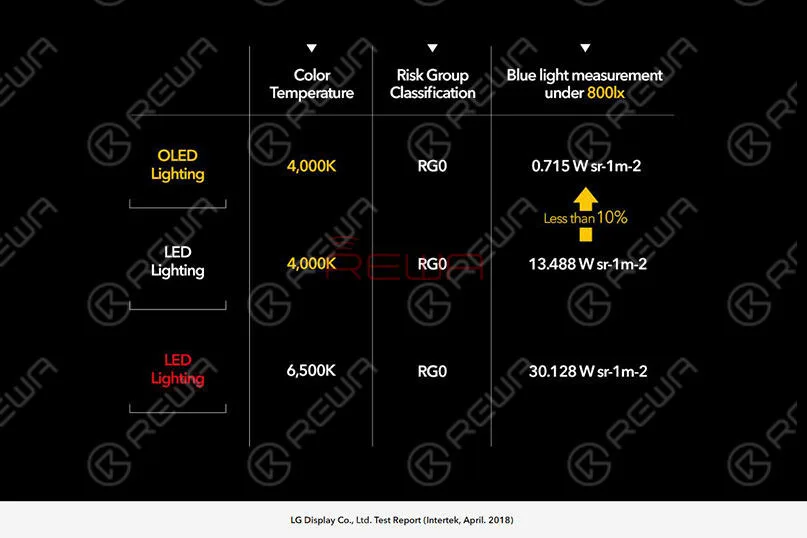
    LED lights with the same luminance and color temperature.

    How to deal with blue light and avoid damage caused by HEV?

    1. Use Flux or a similar application on your computer or laptop to reduce the amount of blue light emitted by the screen

    2. Use an app on your mobile device to reduce the amount of blue light emitted by the screen.

    3. Use HEV-filtering glasses or contact lenses

    4. Use blue filter covers

    The other factor that causes ‘eyes hurt’ is flicker.

    Flicker is a visible change in brightness between cycles displayed on video displays.

    It applies especially to the refresh interval on Cathode ray tube (CRT) televisions and computer monitors, as well as Plasma based computer screens and televisions.

    The switching light source causes flickering.

    The faster the switching speed, the faster the screen flicker. Most mobile phones adopt DC dimming and PWM dimming.

    DC dimming is a technology that adjusts the brightness by directly controlling the currents on both sides of the light-emitting device.

    The smaller the current, The lower the brightness.

    IEEE PAR1789 recommends practices for modulating current in High Brightness LEDs for mitigating health risks to viewers.

    LCD screens mostly use DC dimming.

    DC dimming itself is a very straightforward method.

    But it has obvious drawbacks.

    As the wavelengths of the three primary colors are different, DC dimming can cause inevitable color casts at the extremely low brightness.

    AMOLED displays use low-frequency PWM dimming technology.

    The lower the screen brightness, the lower the strobe rate, and the greater the possibility of human eyes being able to perceive, making it easier for sensitive people.

    PWM dimming is a technique that adjusts the brightness by fast flickering, even if the human eyes cannot perceive the screen changes in the switching process, our brain responds to this phenomenon.

    Frequent flickering cause fatigue, which stimulates the refraction system to work together to accelerate the aging of vision.

    The picture following is the Duty Cycle PWM Waveform.
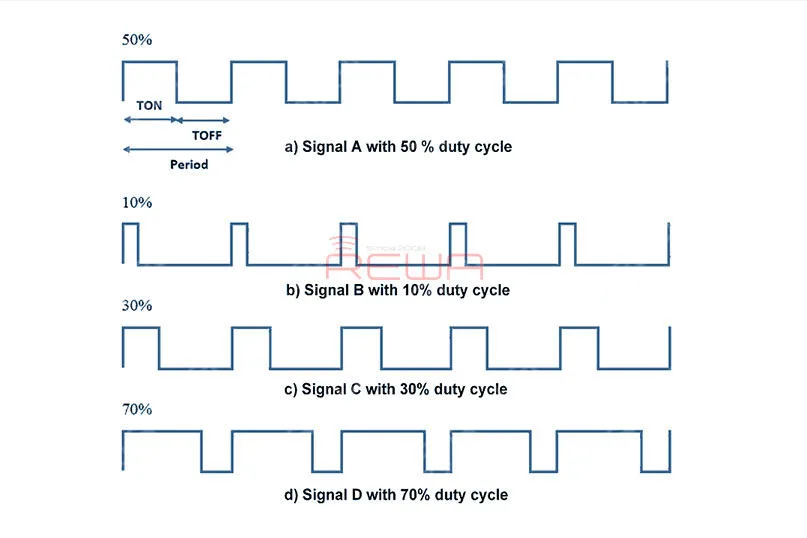
    The picture following is the Duty Cycle PWM Waveform.

    Why DC dimming is not adopted by AMOLED displays?

    AMOLED displays are self-illuminating technologies that rely on organic materials.

    The display quality of the AMOLED display is directly related to the quality of the screen materials.

    The color difference between pixels will be clearly demonstrated.

    Under DC dimming, early models such as the Galaxy S, S2, and Note suffered from uneven white color and serious color casts.

    What’s sadder, this problem has not been solved well even so far.

    However, the PWM dimming reference solves the problem of the early low-brightness color cast in the AMOLED display, and in fact further improves the color stability.
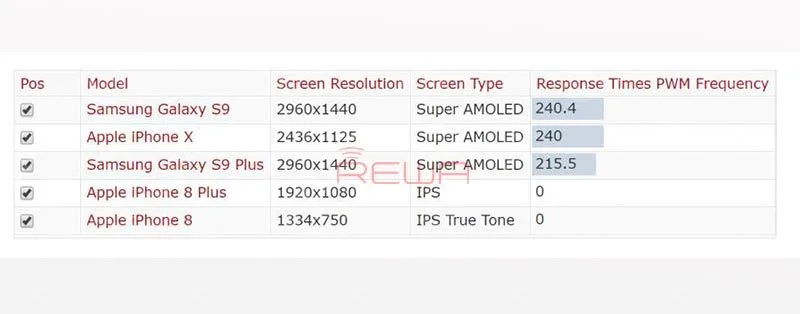
    fact further improves the color stability

    How to avoid flicker damage?

    1. To minimize flicker effects, do not watch the display in the dark.

    2. Don’t sit too close to the display.

    3. To minimize PWM flicker, operate the display at its maximum brightness because that provides the highest duty cycle.

    4. For TVs, monitors and laptops, look for published screen refresh rates of 120 Hz or greater. For PCs, set the highest available refresh rate.

    5. People with very high flicker sensitivity may need to switch to LCD displays, which have relatively slow response times that will dampen any flicker.

    The LCDs should have full 24-bit color without Frame Rate Control (FRC) found in 18-bit (or less) displays.

    There is also some advice about how to protect your eyes when using a mobile phone.

    1. Get an anti-glare screen protector

    2. Blink frequently/splash your eyes with water

    3. Follow the 20/20/20 rule

    With the mobile phone, there is the so-called 20/20/20 rule.

    Basically it means that every twenty minutes you need to look at something at least twenty feet away for at least twenty seconds.

    4. Adjust the brightness, contrast, and text size.

    5. Keep your screen clean

    6. Keep the right distance

    What’s your opinion on the topic? Share your thoughts in comments below!

    Need LCD screen assembly replacement?

    REWA offers kinds of mobile phone repair screen replacement and tools for 10 years.

    Our newly launched online store – shop.rewa.tech provides the best cell phone repair replacement parts with affordable prices.

    What’s more, it ha flash sale untimely. Don’t miss out!

    Cell Phone Repair Courses:
  • iPhone X Aftermarket Screens Full Tests and Comparisons

    iPhone X Aftermarket Screens Full Tests and Comparisons

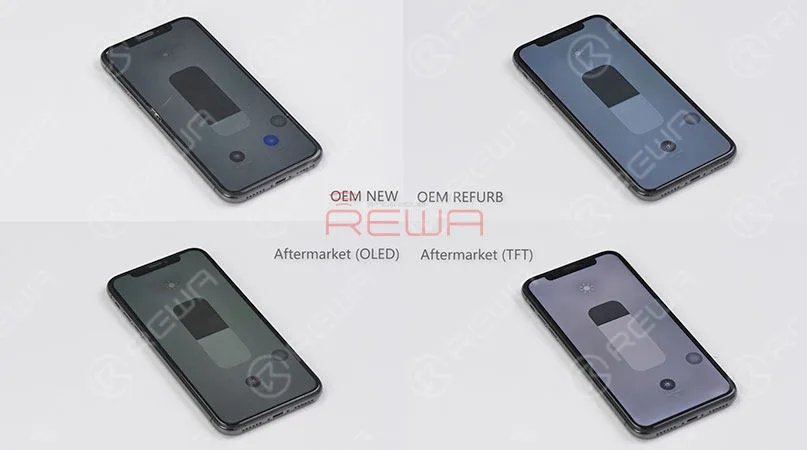
    Nowadays, more and more iPhone X aftermarket screens emerge in the market. Different structures as they share, they are also different in qualities. As to brightness issues and display issues most concerned by our clients, REWA LAB has conducted strict tests and comparison on iPhone X screens and we are happy to share with you the results as follows.

  • First-hand Test on New iPhone Aftermarket Screen – Panda Screen

    First-hand Test on New iPhone Aftermarket Screen – Panda Screen

    Recently, a newly developed iPhone Aftermarket screen – Panda screen has appeared in the market with iPhone 6/6s/7/8 models. REWA LAB has carried out a series of tests on our exclusive Panda screen samples. Let’s take a look at the test result with iPhone 6s as an example.

    COSMETIC INSPECTION

    Test on New iPhone Aftermarket Screen

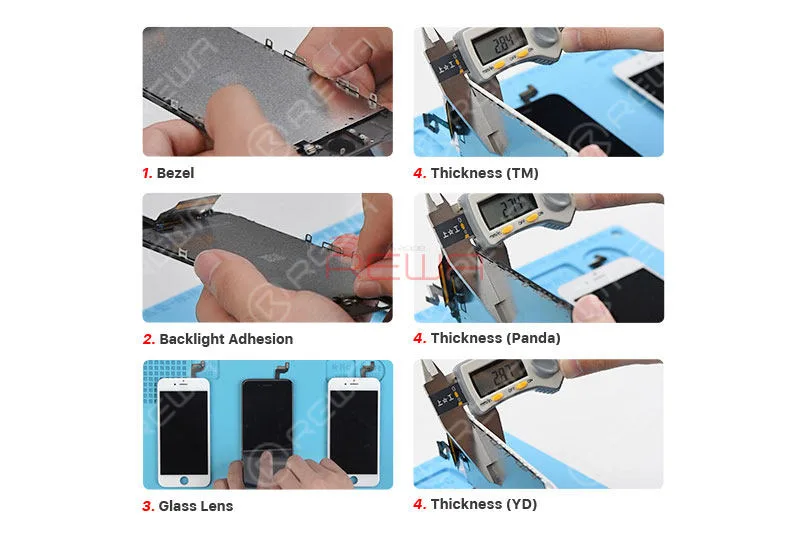
    The bezel, glass lens and backlight adhesion are qualified.

    The thickness of Panda screen is 2.74mm, which is thinner than the other two screens.

    FUNCTION TEST

    Test on New iPhone Aftermarket Screen

    Panda screen has higher hydrophobicity than the other two screens.

    It has a stable reaction sensitivity of touch and 3D touch function.

    The pure color performance is qualified but some of the Panda screen samples have polarizer problem under POL Film. It is uncertain if it will be improved when it comes to full production or not.

    INSTALLATION TEST

    Test on New iPhone Aftermarket Screen

    The bezel fits good with no seam.

    After 2-hour Dynamic test, 8-hour Static Cycle test, and 1-hour Vibrating test, all the functions performs normally.

    The Panda screen samples performed well during the test. Still, as a new product, there lies the uncertainty about its quality. The recommendation, therefore, is for you to get some samples or try with a small quantity if have any interests. Bulk stock is not suggested.

    More Panda Screen details or sample needs please contact our account manager.

  • REWA iPhone Screen & Flex Compatibility Test On iOS 12

    REWA iPhone Screen & Flex Compatibility Test On iOS 12

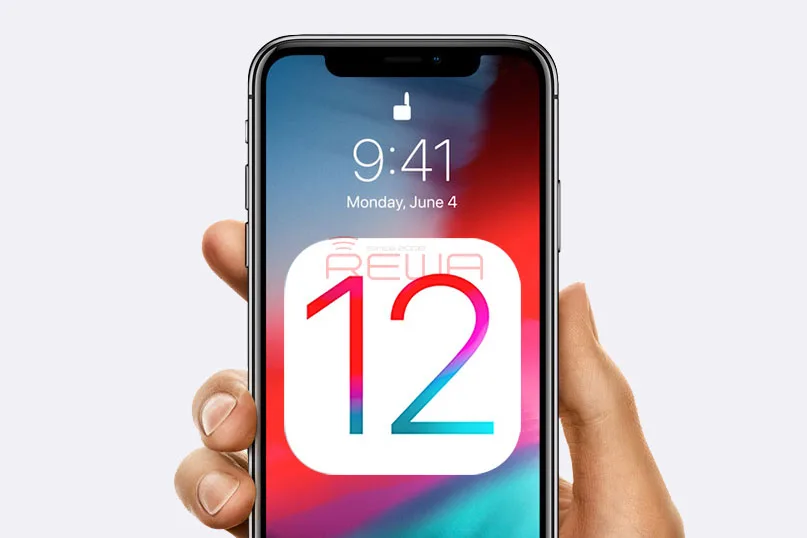
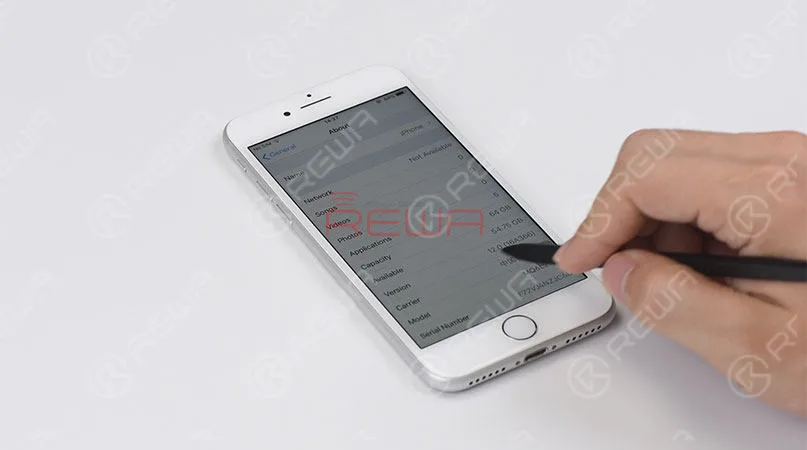
    Since iOS 12 has been released recently, REWA LAB has conducted a series of compatibility tests for iPhone series from iPhone 6s to iPhone X with OEM NEW, OEM REFURB and aftermarket screens respectively. According to the test results, common functionality like touch functionality, 3D Touch, proximity sensor functionality and light sensor functionality function normally on iOS 12. Now, let’s take iPhone 8 and iPhone X as examples and show you how the test goes. 

  • REWA iPhone Screen & Flex Compatibility Test On iOS 12

    REWA iPhone Screen & Flex Compatibility Test On iOS 12

    Apple iOS 12 soft update is already available today with a lot of adding new features for supported iPhone, iPad and iPod devices. Compared with former iOS versions, iOS 12 catches full attention of most iPhone users since iOS 11 actually has some problems. REWA also focuses heavily on a bunch of new features of iOS 12, like the new UI design, new features, and the operating speed on the older devices, but what we concern most like those in aftermarket industry is that whether it can compatible with our screens properly. Therefore, REWA LAB has immediately carried out a series of tests with iPhone 6s – X screens on newly launched iOS 12.

    iPhone Screen & Flex Compatibility Test

    Update to iOS 12

    iPhone Screen & Flex Compatibility Test

    Touch and 3D touch function test

    iPhone Screen & Flex Compatibility Test

    Proximity sensor test

    iPhone Screen & Flex Compatibility Test

    Ambient light sensor test on iOS 12

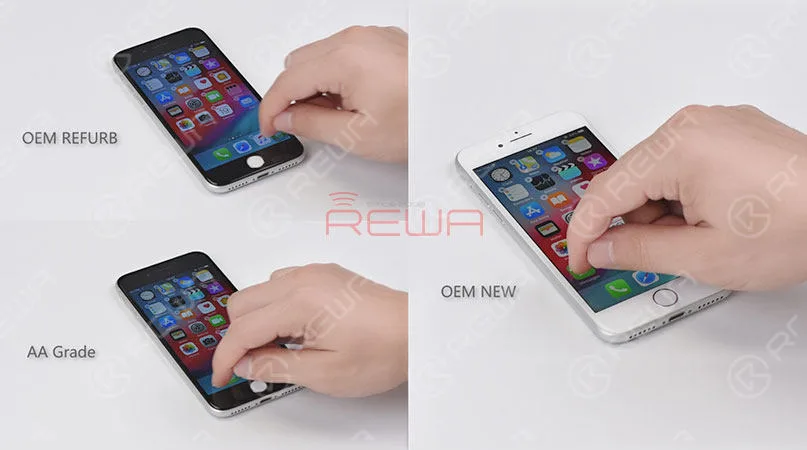
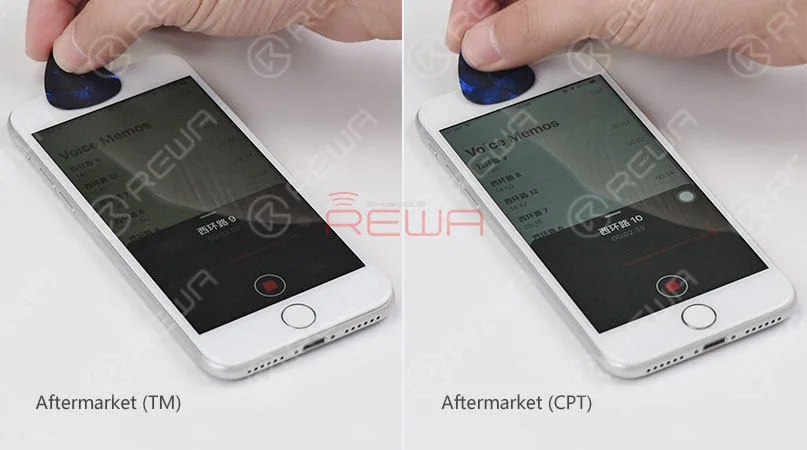
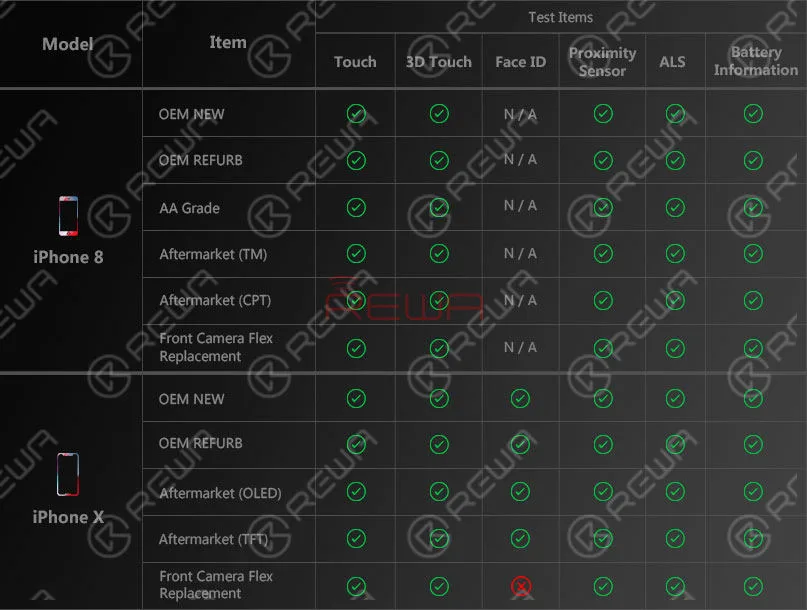
    The tests have involved OEM New, OEM Refurb, AA Grade, aftermarket screens and front camera flex replacement from iPhone 6s to iPhone X, with iOS 12, updated, covering test items like proximity sensor, ALS, touch function, 3D touch, battery information face ID etc..

    Let’s take the iPhone 8 and iPhone X as examples.

    iPhone Screen & Flex Compatibility Test

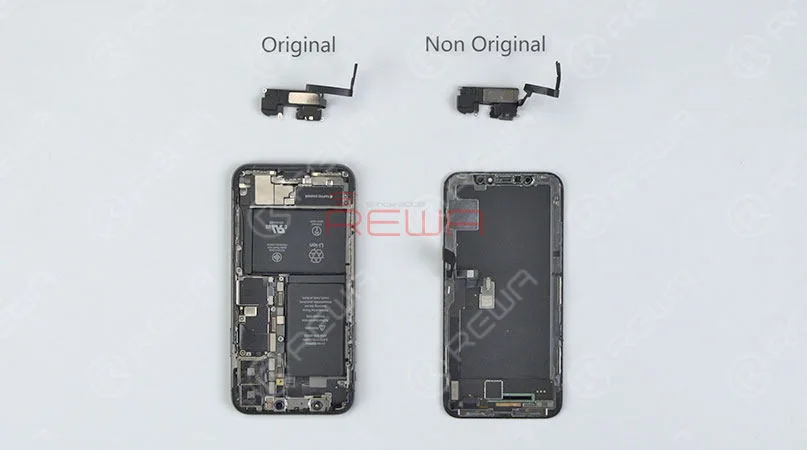
    Front camera flex replacement

    iPhone Screen & Flex Compatibility Test

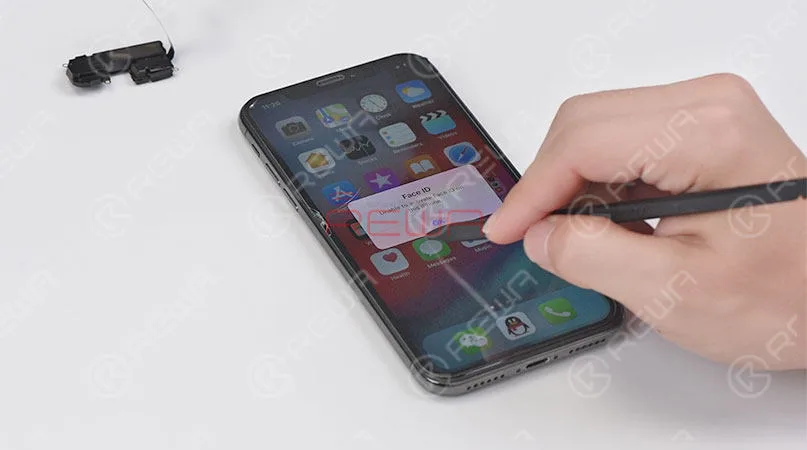
    iPhone X face ID failed after front camera flex replacement

    Following is the test report for your reference.

    iPhone Screen & Flex Compatibility Test

    Test Report

    For detailed testing procedures, please check the video below.

    From the tests, we can see that all the screens of various quality levels from REWA can compatible with the newly released iOS 12. Proximity sensor, ALS, touch function, 3D touch and battery information work normally so far after updated. Whereas we have also noted that iPhone X face ID failed after front camera flex replacement. What’s more, on iOS 12, WiFi icon is disappeared, and true tone function is not available after screen replacement. Has your iPhone device been updated to the iOS 12 already? Any problems popped up? Leave us a comment about your experience.

  • Don’t Be fooled by Unclear quality Grades of iPhone Screens

    Don’t Be fooled by Unclear quality Grades of iPhone Screens

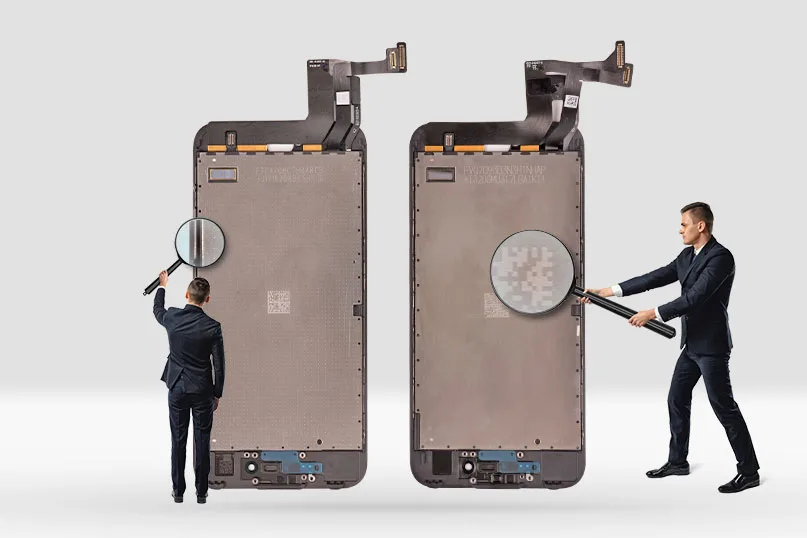
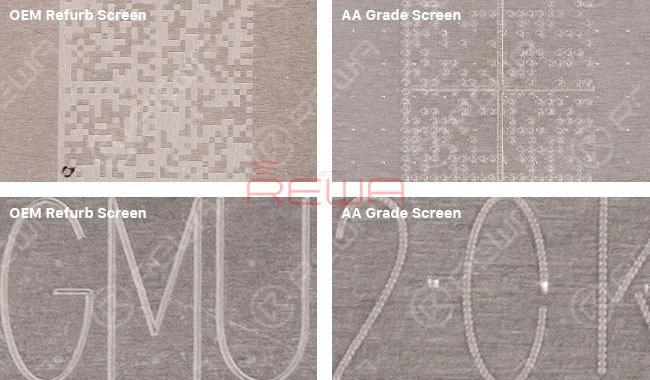
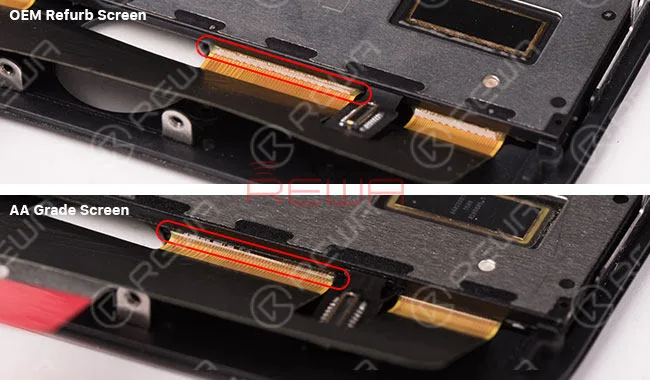
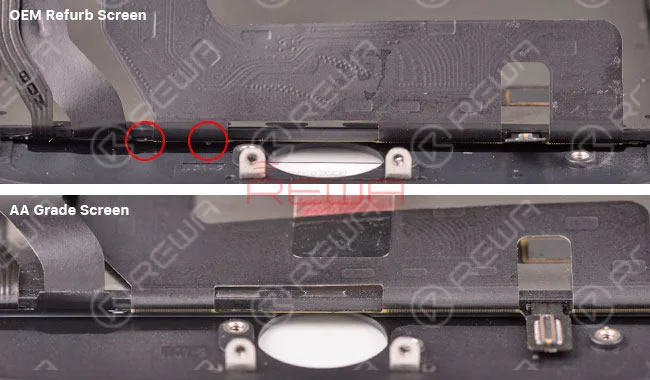
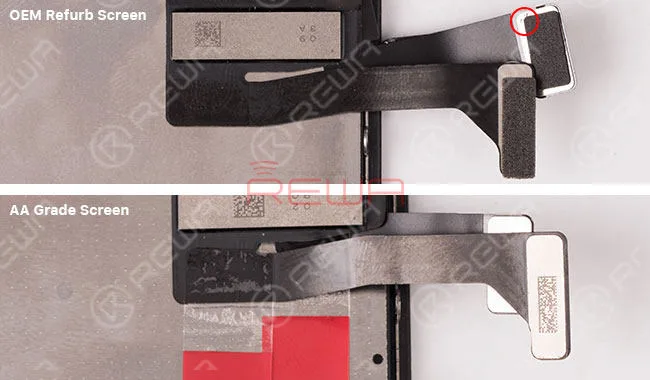
    Have you ever been confused by can’t tell iPhone OEM Refurb Screen(Glass-only replaced) and AA Grade Screen (original LCD+original/compatible flex cable assembled by third-party)? Though the two kinds of screens are hard to tell, there are still some details to distinguish them. Now REWA will share with you these tips and help you to get the exact quality of display assemblies you want.

    Checking QR Code

    OEM Refurb Screen backlight has a unique QR code with exquisite and clear lines.

    AA Grade Screen backlight has the same QR code yet with blur and not exquisite lines.

    Don't Be fooled by Unclear quality Grades of iPhone Screens

    Checking ACF Bonding

    OEM Refurb Screen has few UV glues overflowing and the shape of ACF bonding is regular and serrated. Usually, AA Grade Screen has some UV glue overflowing and the shape of ACF bonding is irregular or texture is brighter than OEM Refurb.

    Don't Be fooled by Unclear quality Grades of iPhone Screens

    Checking OCA residue:

    OEM Refurb Screen only replaced the lens, so there is still more or less OCA residue left. AA Grade Screen not only replaced lens but also replaced backlight, so there is no OCA residue left.

    Don't Be fooled by Unclear quality Grades of iPhone Screens

    Checking the foam sponge:

    Normally the foam sponge of OEM Refurb Screen will be retained. The foam sponge of AA Grade Screen will be torn off.

    Don't Be fooled by Unclear quality Grades of iPhone Screens

    We kindly suggest you combine with these checking points together to distinguish iPhone OEM Refurb Screens and AA Grade Screens.