Tag: iphone battery

  • iPhone 18 Pro Teardown: What Changed Inside and How Does It Affect Repairability

    iPhone 18 Pro Teardown: What Changed Inside and How Does It Affect Repairability

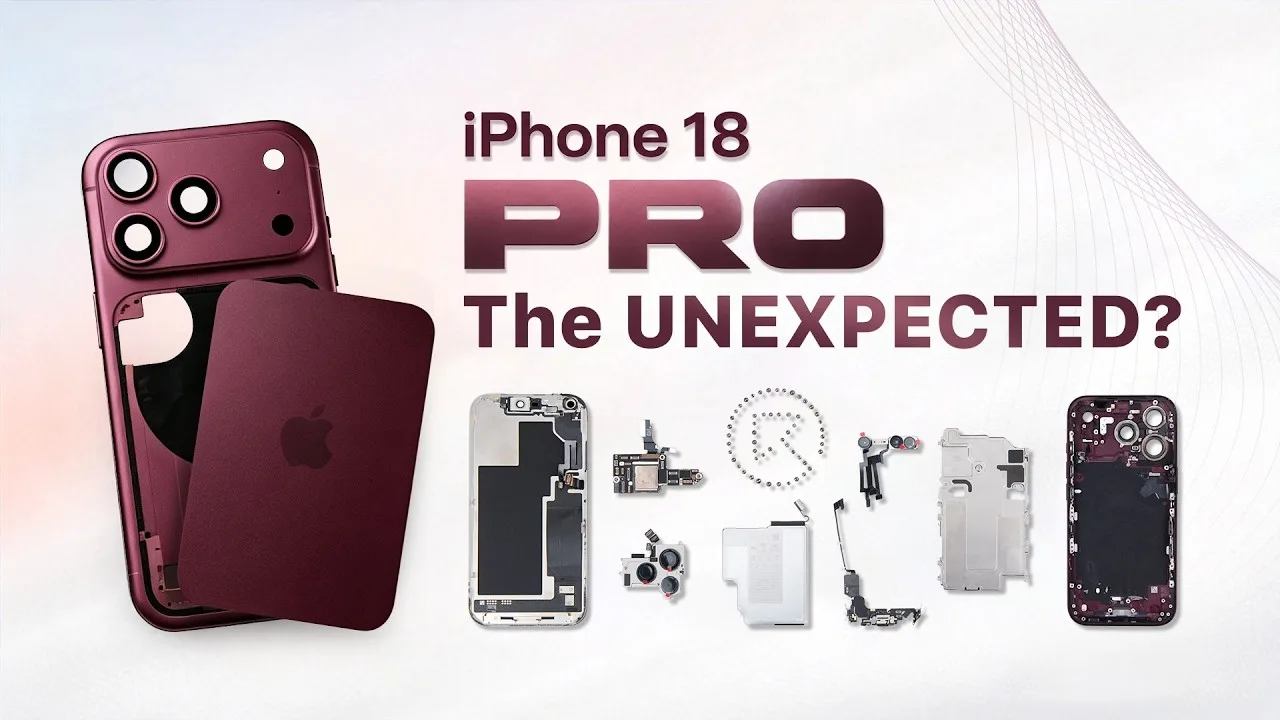
    The iPhone 18 Pro brings several significant changes beneath its familiar exterior. From a smaller Dynamic Island and a new under-display infrared camera to a dramatically larger vapor chamber and a redesigned motherboard layout, Apple has changed more than just the phone’s appearance.

    In this full teardown by REWA Lab, we dive deep into the internal structural changes and analyze what these updates mean for third-party repair shops and aftermarket component manufacturers.

    Step-by-Step Disassembly Process

    Opening the iPhone 18 Pro requires specialized repair tools and a cautious approach to avoid damaging internal flexes and sensors. Standard safety and prep steps are as follows:

    Preparation Before Teardown: Power off the device and remove the bottom screws with the Pentalobe screwdriver.
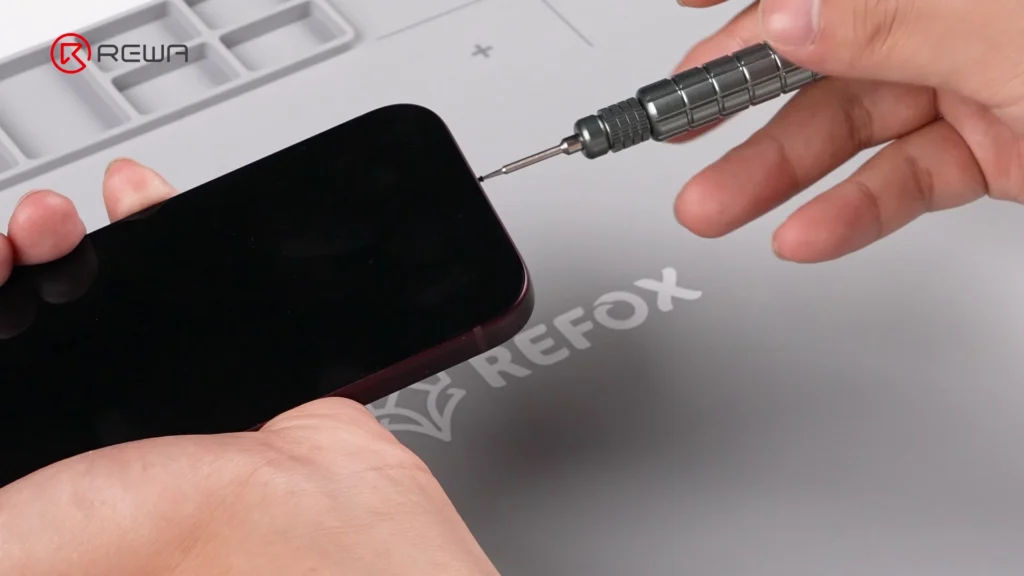
    Removing the bottom screw of an iPhone using a precision Pentalobe screwdriver

    Screen Removal: Heat the screen to soften the perimeter waterproof adhesive. Use an opening tool with suction cup and isopropyl alcohol to gently slice through the seal with an opening pick.

    Camera Protection: Cover the front camera module with protective sponge stickers to prevent dust or scratches.

    Bracket & Flex Cable Disconnection: Unscrew and remove the battery and display connector bracket. Disconnect the battery flex cable, display cable, and front sensor cable to free the screen.

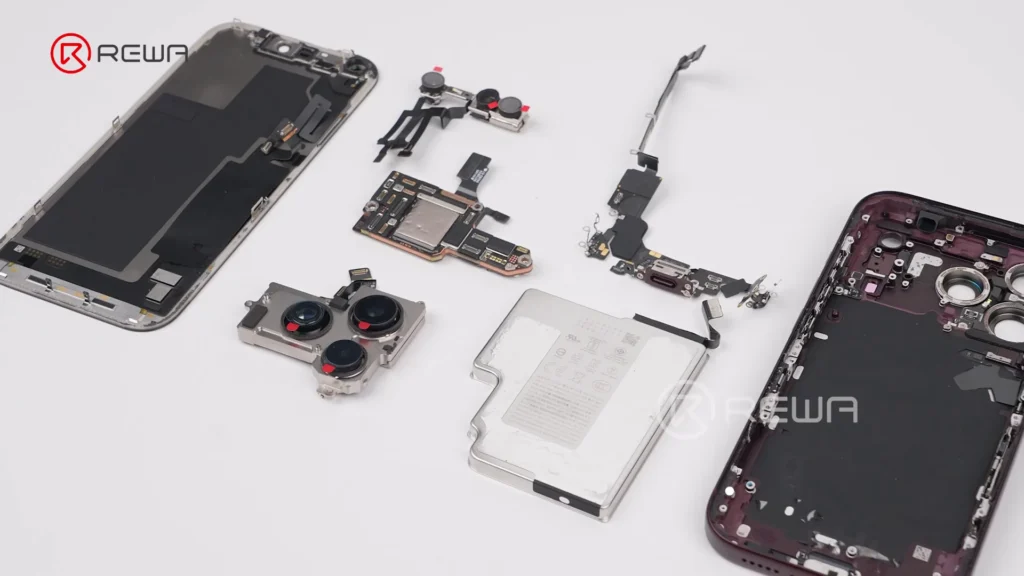
    Vapor Chamber & Cameras: Unscrew the vapor chamber using a 4IP screwdriver. Disconnect and remove the front / rear camera modules.
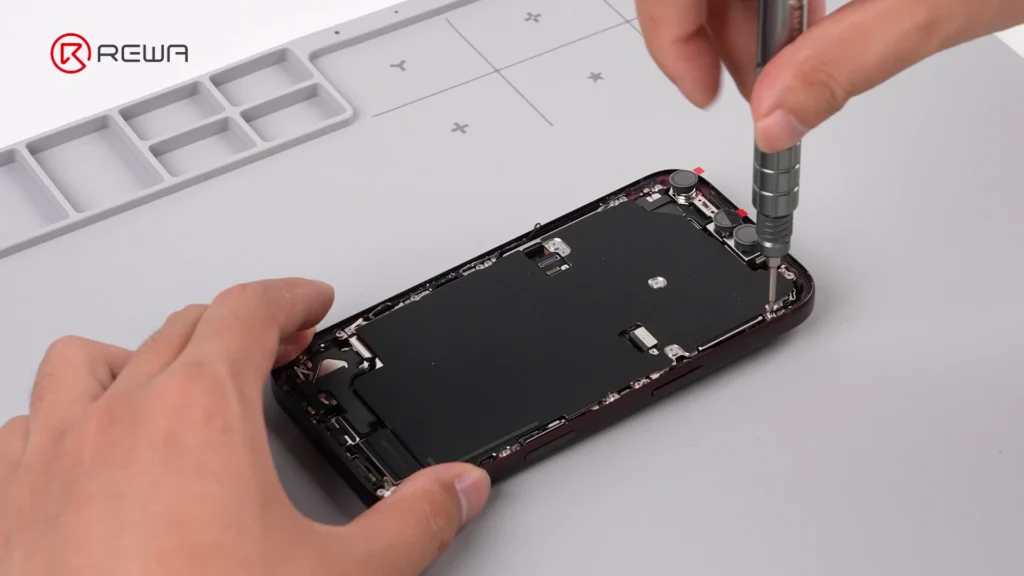
    using a screwdriver to open iPhone 18 Pro for teardown

    Motherboard & Peripheral Removal: Unscrew and flip over the motherboard to disconnect the wireless charging coil. Remove flashlight, LiDAR, SIM tray, SIM card reader, bottom speaker, charging port, Taptic Engine, and microphone in sequence.
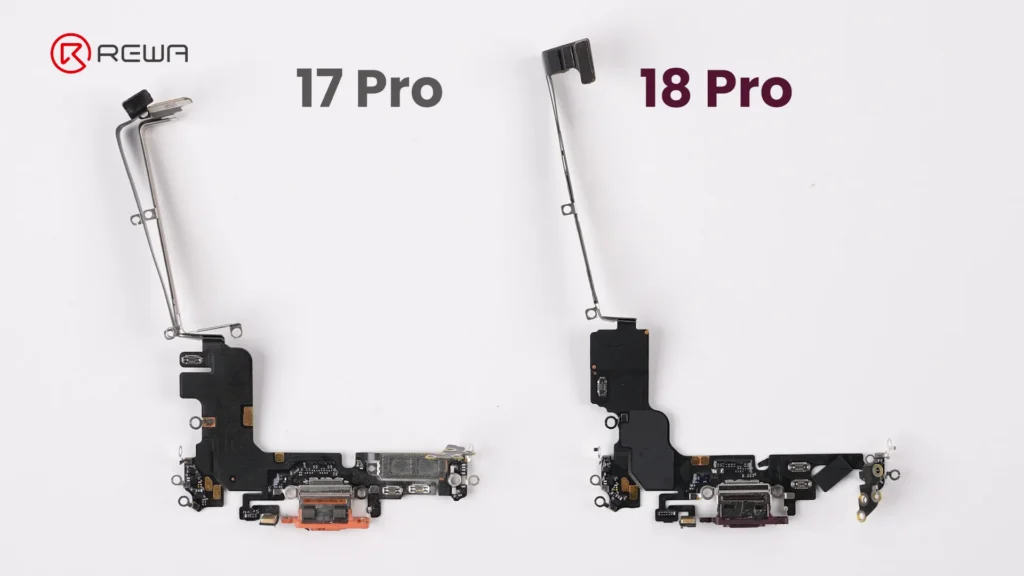
    iphone 18 pro teardown what changed inside how does it affect 3

    Battery Debonding: Apply a 9V DC voltage between the silver battery tab (positive probe) and the vapor chamber (negative probe) to electronically deactivate the adhesive, allowing easy battery removal.
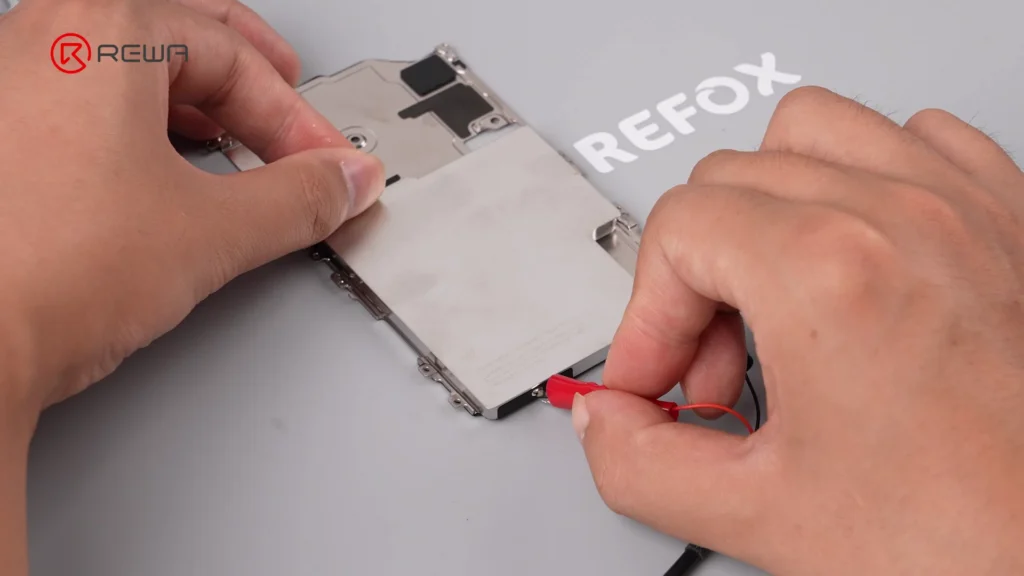
    iphone 18 pro teardown what changed inside how does it affect 4

    Display & Dynamic Island: Under-Display Infrared Tech

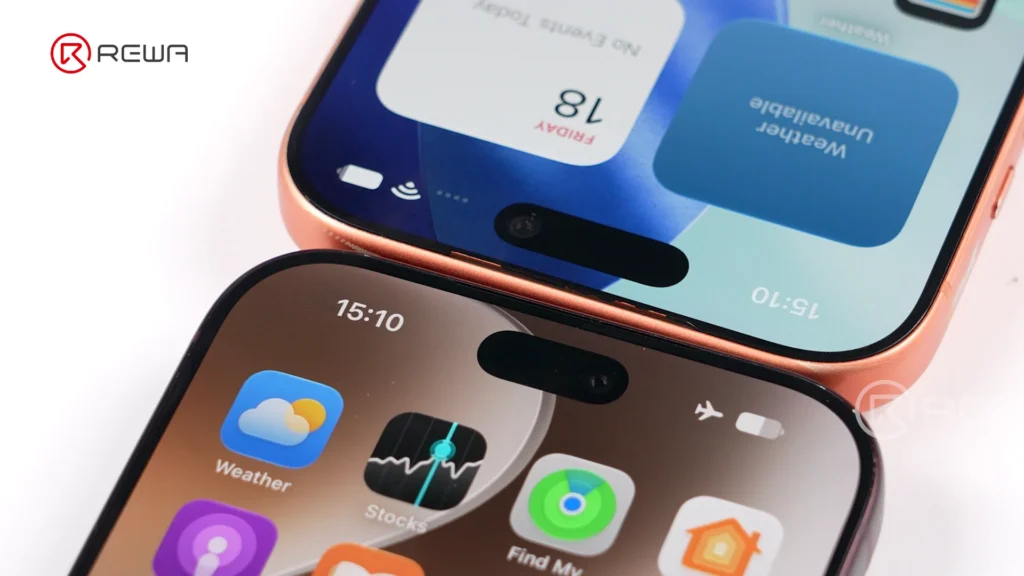
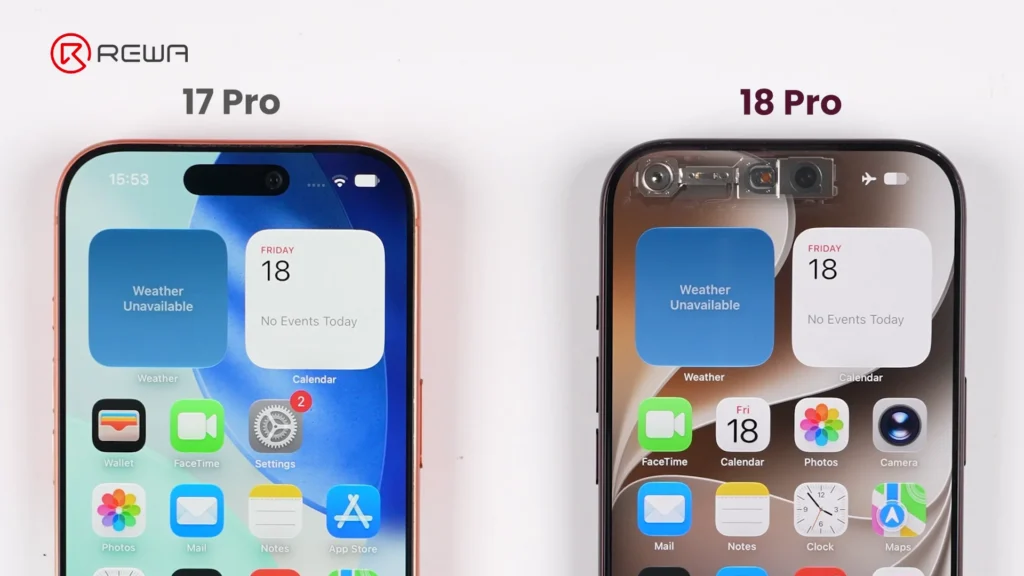
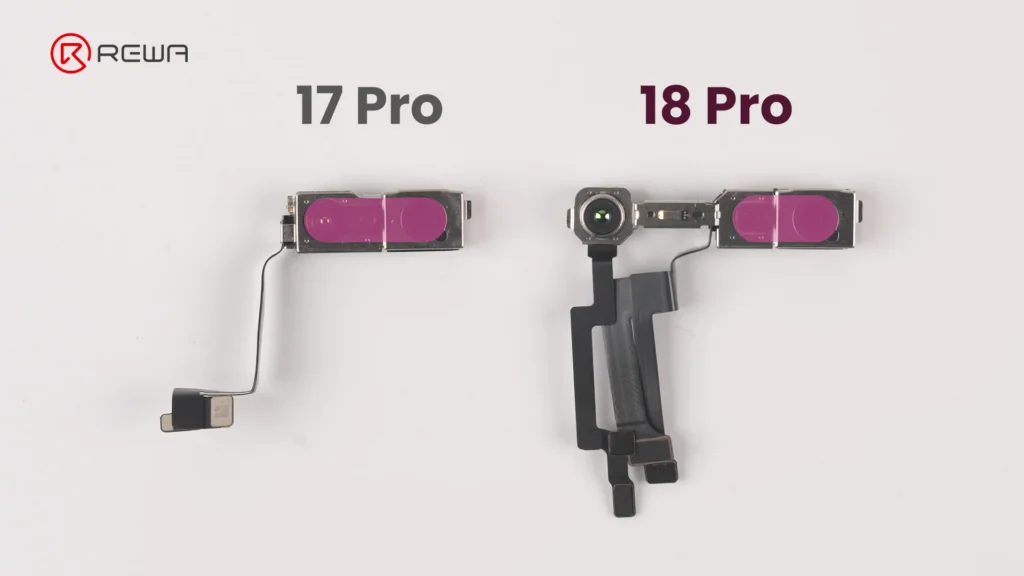
    Apple’s smaller Dynamic Island introduces a more complex under-display optical structure, creating new challenges for display refurbishment. This shrink is achieved by relocating the infrared camera under the display assembly and positioning it near the screen corner.
    iphone 18 pro teardown what changed inside how does it affect 5
    iphone 18 pro teardown what changed inside how does it affect 6

    Key display architecture updates include:

    Adjusted Pixel Matrix: The display above the infrared camera features a modified pixel density and arrangement to allow infrared light transmission for Face ID functionality.

    iphone 18 pro teardown what changed inside how does it affect 7

    Unfixed Flex Cable: The display flex cable is no longer secured with heavy adhesive, making screen separation cleaner during repair and refurbishment.

    Aftermarket Challenge: Third-party display manufacturers will face higher precision requirements to replicate the light-transmitting pixel window for Face ID functionality.

    Motherboard Architecture: Higher Difficulty for Micro-Soldering

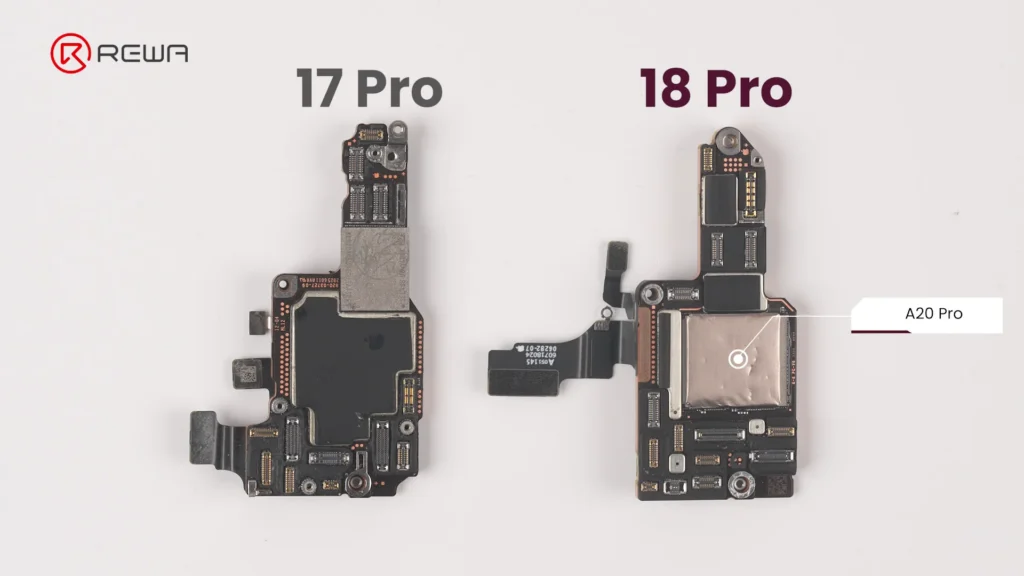
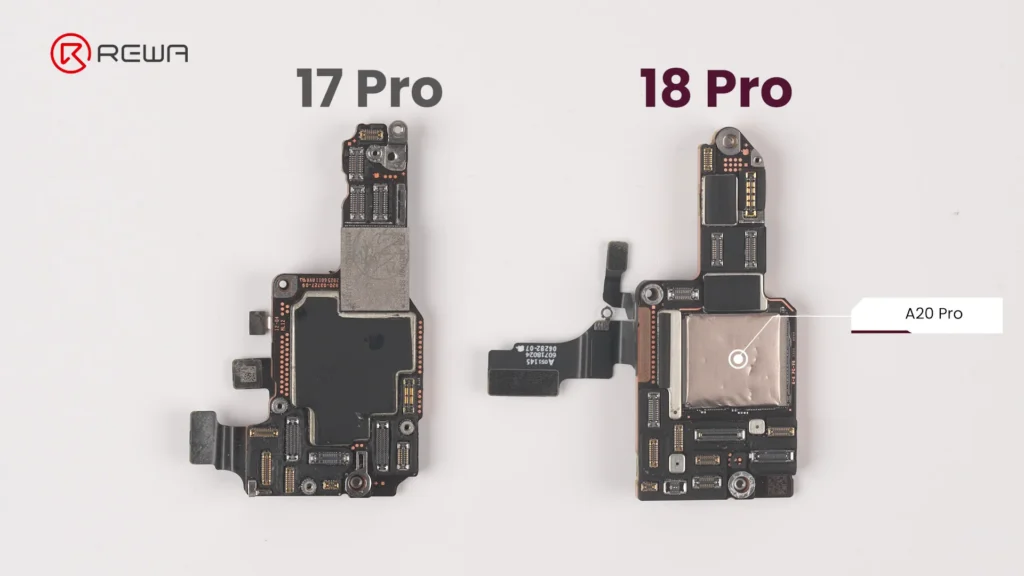
    The updated motherboard layout places crucial chips in vulnerable locations while sandwiching NAND and power IC between layers. For micro-soldering technicians, the iPhone 18 Pro motherboard presents an elevated level of complexity.
    iphone 18 pro teardown what changed inside how does it affect 8

    Apple has reorganized chip placement and shielding:

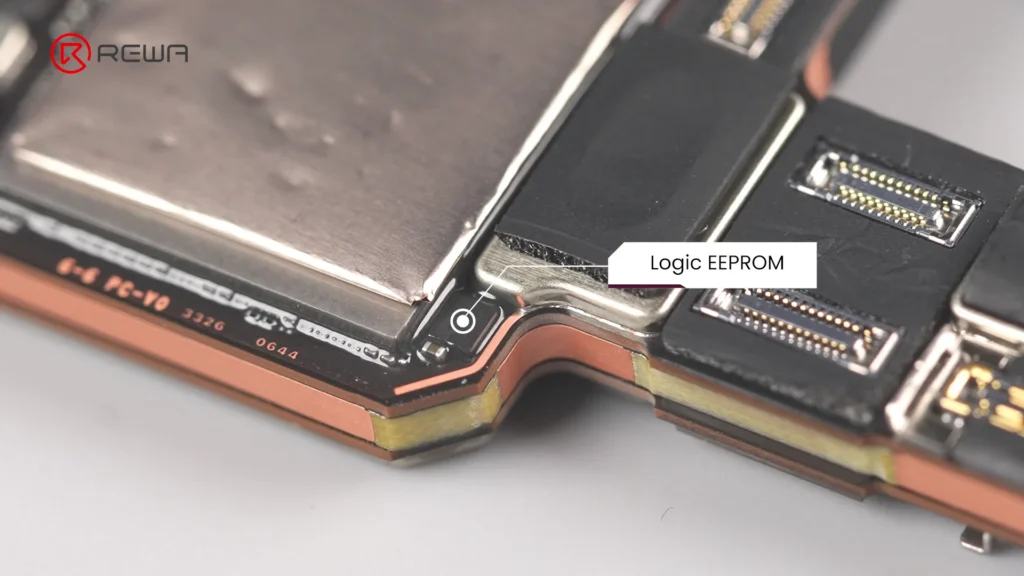
    Exposed Logic EEPROM: The Logic EEPROM chip on the board surface lacks a protective metal shield, leaving it significantly more susceptible to physical damage and technician error.
    iphone 18 pro teardown what changed inside how does it affect 9

    Layered Sandwich Design: The NAND storage chip and Power IC are sandwiched inside the multi-layer PCB structure. Replacing or repairing these components requires demanding motherboard desoldering and reballing.

    Relocated A20 Pro Chip: The main processor sits directly on the motherboard surface, and in direct contact with the vapor chamber for substantial improvement in thermal performance.
    iphone 18 pro teardown what changed inside how does it affect 10

    Upgraded Camera Modules

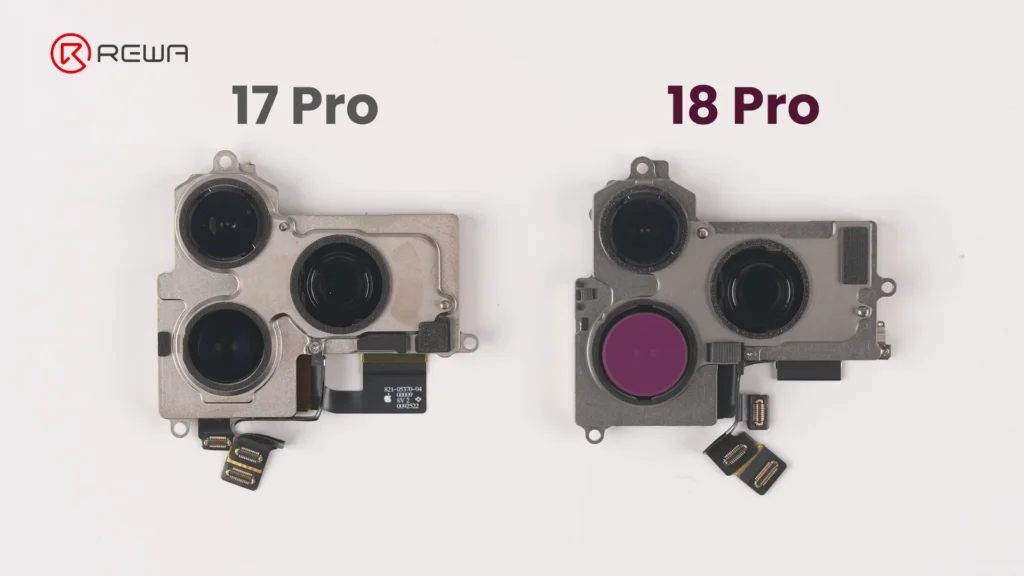
    The iPhone 18 Pro’s camera modules feature noticeable changes in mechanical design, module size, and cable layout.

    Fusion Main Camera: The rear camera module features a variable aperture for greater control over depth of field.
    iphone 18 pro teardown what changed inside how does it affect 11

    Separated Infrared Sensor: The front camera and under-display infrared camera are connected via three separate flex cables, bridged across a wider distance to facilitate the shrunken Dynamic Island.
    iphone 18 pro teardown what changed inside how does it affect 12

    Thermal Management & Battery Changes

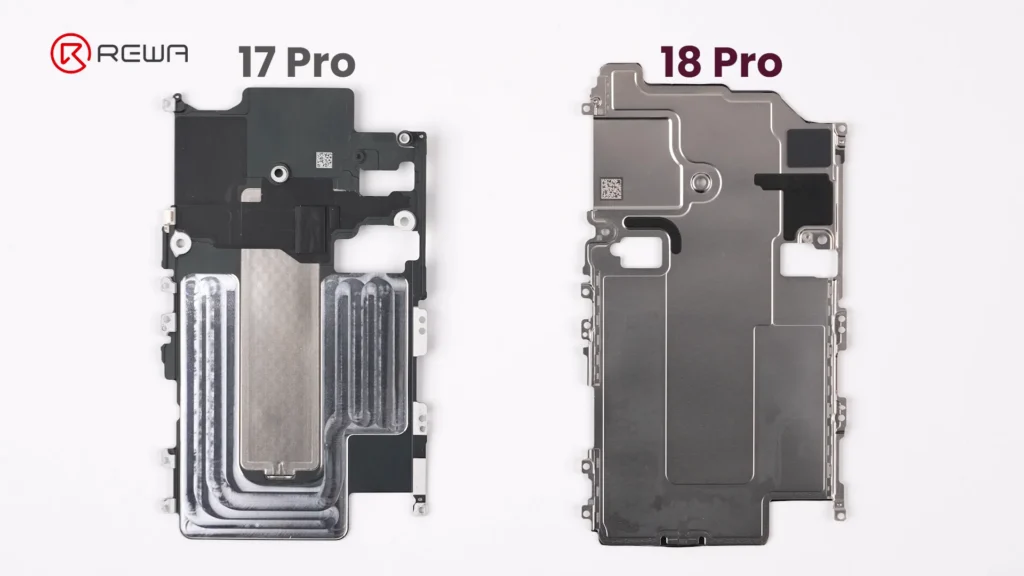
    Vapor chamber on the iPhone 18 Pro receives its largest redesign in years. Apple has integrated a significantly larger vapor chamber, with three times the surface area of the one used in the iPhone 17 Pro.
    iphone 18 pro teardown what changed inside how does it affect 13

    Simply Put:

    A vapor chamber is a flat, sealed metal enclosure containing a small amount of liquid. When the chips heat up, the liquid absorbs heat and evaporates. The vapor then spreads through the chamber, transferring heat to cooler areas where it condenses back into liquid. This helps the phone maintain stable performance under sustained workloads.

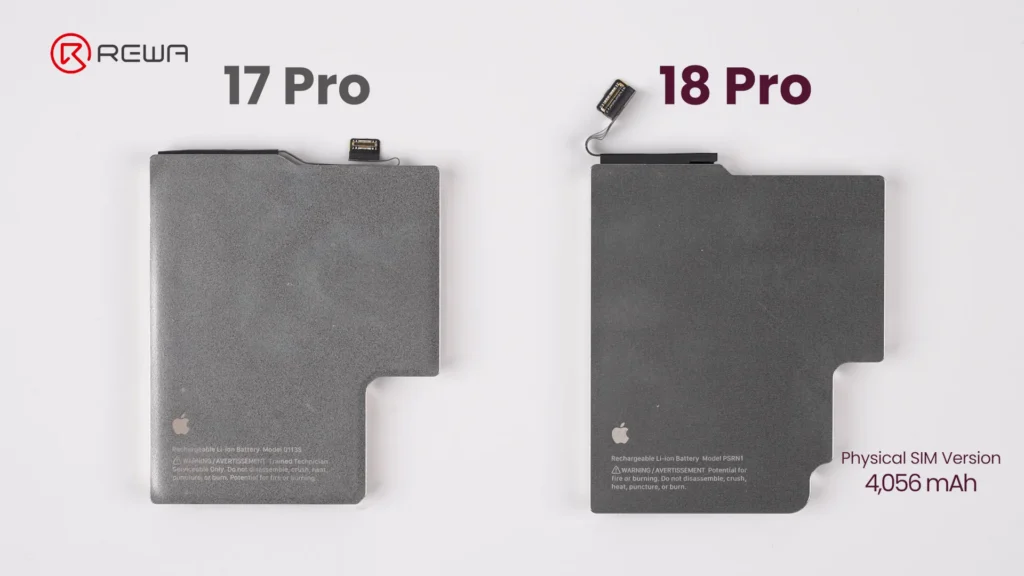
    The battery capacity of iPhone 18 Pro is slightly bigger than that on iPhone 17 Pro. In physical SIM version, it packs 4,056mAh, achieving about 1.7% increase over previous generation. Apple officially confirms that the redesigned battery architecture and charging system enable faster charging, reaching 50% in approximately 15 minutes.
    iphone 18 pro teardown what changed inside how does it affect 14

    Repair Difficulty Assessment: Pros & Cons

    A concise summary of what makes repairing the iPhone 18 Pro easier or harder for repair professionals.

    Component Changes Made Repair Difficulty
    Screen
    • Smaller Dynamic Island
    • Under-display infrared camera
    • Display flex cable not fixed with adhesive
    Easy
    Battery
    • Larger capacity: 4,056mAh (SIM tray version)
    • Larger connector
    • Multi-layer cable
    Easy
    Front Camera Module
    • Infrared camera moved to the corner
    • Three separate cables
    Very Easy
    Rear Camera Module
    • Larger Fusion Main Camera
    • Cable layout changed
    Hard
    Motherboard
    • A20 Pro chip on the surface
    • Logic EEPROM chip without a shield
    • NAND and Power IC sandwiched inside
    Very Hard

    Frequently Asked Questions (FAQs)

    Why is iPhone 18 Pro motherboard repair more difficult?

    The main reason is the new layered motherboard architecture. NAND storage and the power IC are positioned between PCB layers, meaning technicians need to separate the board layers to access them. This increases the complexity, heat exposure, labor, and risk involved in component-level repair.

    Why is the Dynamic Island smaller on the iPhone 18 Pro?

    The infrared camera used for Face ID has been moved under the display and toward the corner. The display uses a modified pixel arrangement in this area to allow infrared light to pass through. This allows Apple to reduce the size of the visible Dynamic Island.

    How big is the iPhone 18 Pro battery?

    The iPhone 18 Pro shown in the REWA Lab teardown is the physical-SIM version and has a 4,056mAh battery, approximately 1.7% higher than the iPhone 17 Pro. Battery capacity varies by regional configuration; in eSIM-only version, the iPhone 18 Pro has a 4,288mAh battery.

    How much larger is the iPhone 18 Pro vapor chamber?

    iPhone 18 Pro vapor chamber has three times the surface area of the vapor chamber in the iPhone 17 Pro. Apple says the redesigned thermal system enables up to 40% better sustained performance compared with the previous generation.

    What is the biggest repair challenge revealed by REWA Lab’s iPhone 18 Pro teardown?

    For board-level technicians, the layered motherboard architecture is one of the most significant challenges because it complicates access to NAND and power-management components. For aftermarket parts manufacturers, the new under-display infrared camera arrangement creates another major challenge because display structure, optical transmission, and Face ID compatibility must all work together.

    Did Apple make major changes to the iPhone 18 Pro’s frame and back cover?

    No. The iPhone 18 Pro retains a largely similar frame and back cover structure to the iPhone 17 Pro. The back cover uses a more color-matched aluminum and glass design in iPhone 18 Pro.

    Conclusion

    The iPhone 18 Pro showcases impressive internal engineering, highlighted by under-display Face ID technology, triple-sized vapor chamber, and larger variable-aperture main camera.
    iphone 18 pro teardown what changed inside how does it affect 15

    However, for the independent repair industry, these advancements come with obvious challenges: motherboard layering makes micro-soldering more demanding, and screen replacement requires precise technical alignment and careful handling to ensure proper Face ID functionality.

    As phone architectures become more complex, having high-grade repair tools, reliable replacement parts, and advanced technical training is essential, please contact us for OEM/aftermarket replacement parts, professional repair tools, and step-by-step technical guides.
  • How iPhone Aftermarket Battery BMS Boards Are Made

    How iPhone Aftermarket Battery BMS Boards Are Made

    When choosing an iPhone aftermarket battery, the BMS board (Battery Management System board) plays an important role in battery performance. So, what makes a third-party battery board reliable?

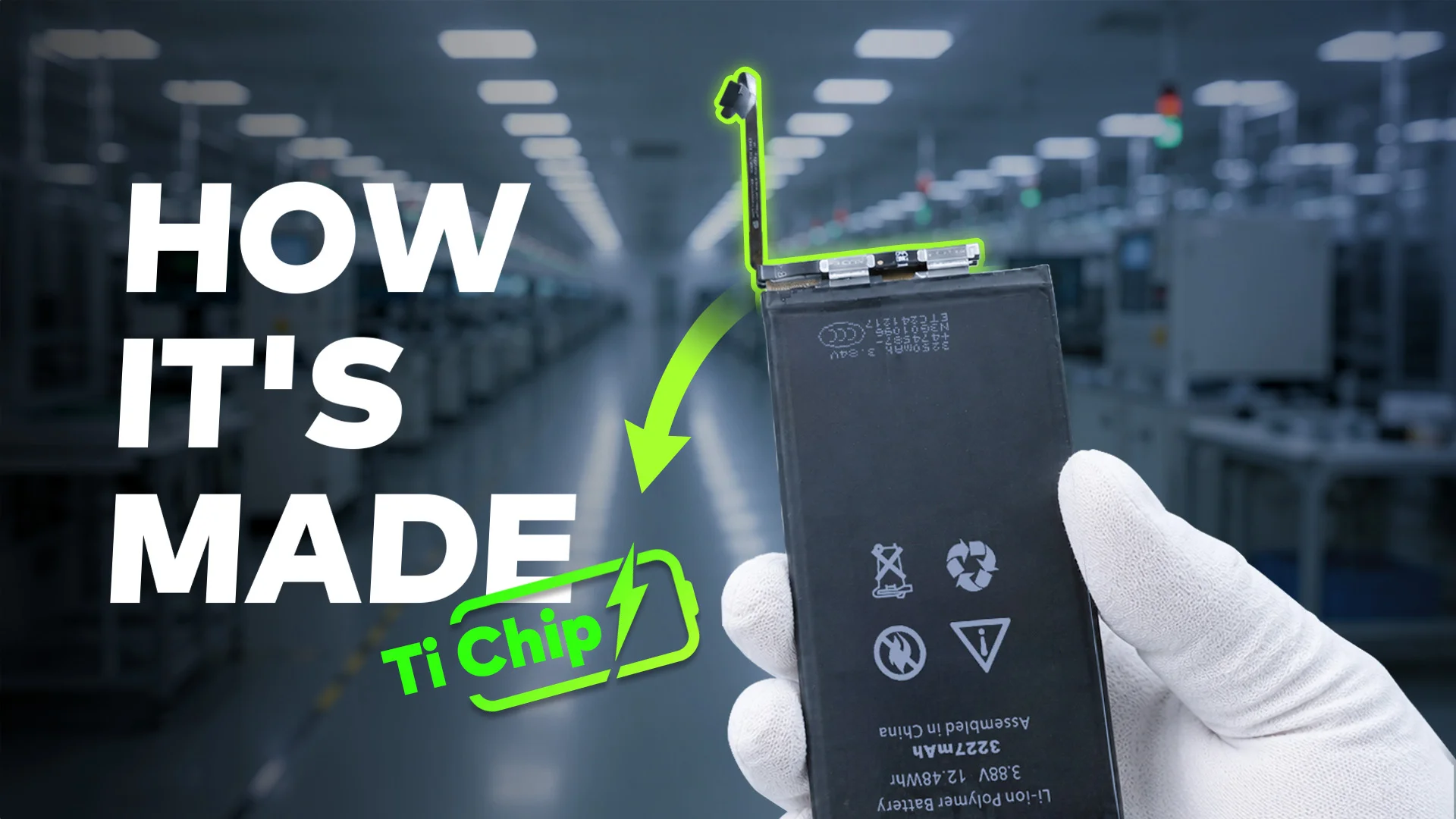
    In this article, REWA Lab takes you to explore how an iPhone aftermarket battery BMS board is manufactured, from bare PCB assembly and TI chip placement to firmware programming, functional testing, battery cell assembly, and final strict quality inspection.

    how iphone aftermarket battery bms boards made the crucial stages to

    What Is an iPhone Battery BMS Board?

    The BMS board is the control and protection system of a rechargeable battery, helping monitor the battery and protect it during charging and use.

    For an aftermarket iPhone battery, the BMS board works alongside the battery cell. While the cell stores the electrical energy, the BMS board manages and monitors important battery-related functions.

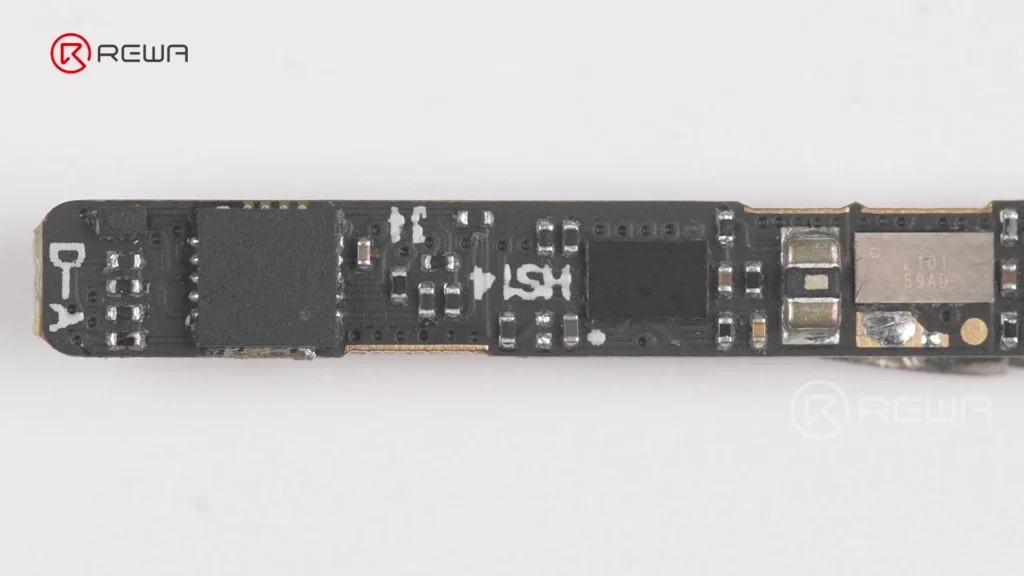
    Close-up view of a populated black iPhone battery BMS circuit board with surface-mounted chips and electronic components

    Depending on the design, a battery BMS board can help with functions such as:

    • Battery voltage & current monitoring
    • Temperature-related protection
    • Overcharge & short-circuit protection
    • Battery data and state-of-charge estimation
    • Communication between the battery and device

    This is why two aftermarket batteries using cells with similar specifications can still have different real-world performance and reliability.

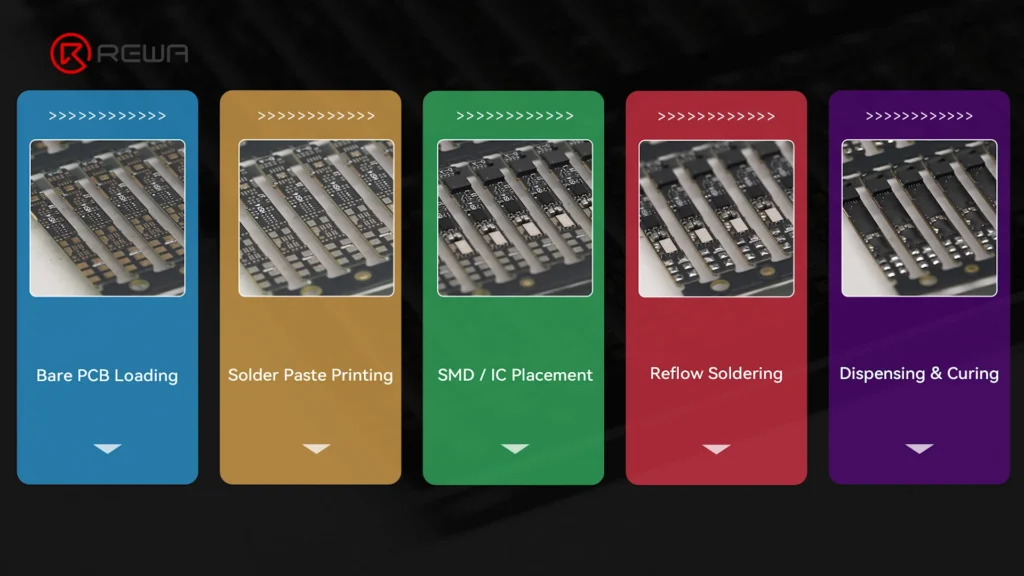
    Step 1: Bare PCB Preparation and SMT Assembly

    The manufacturing process starts with a bare PCB, which is the foundation of the BMS board. Before production begins, the factory receives bare PCBs that have already passed IQC inspection and loads them onto SMT feeder racks for automated component placement.

    Simply put:

    SMT stands for Surface Mount Technology. It is a manufacturing method that places tiny electronic components directly onto the surface of a circuit board.

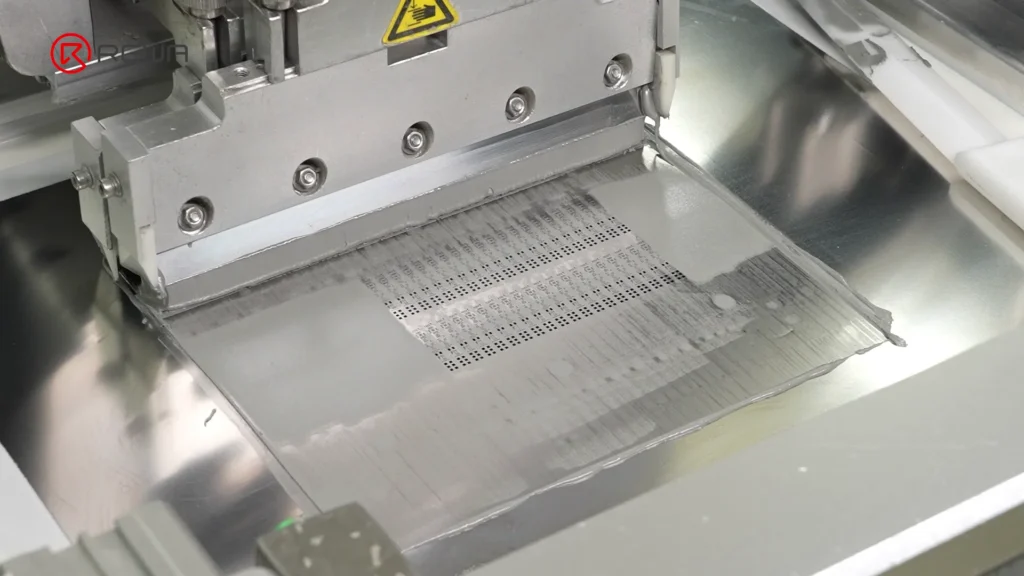
    The basic process begins with solder paste printing. The PCB is positioned against a stencil, and solder paste is applied to precisely defined positions on the board.

    Automated SMT squeegee applying gray solder paste over a stencil onto a BMS circuit board

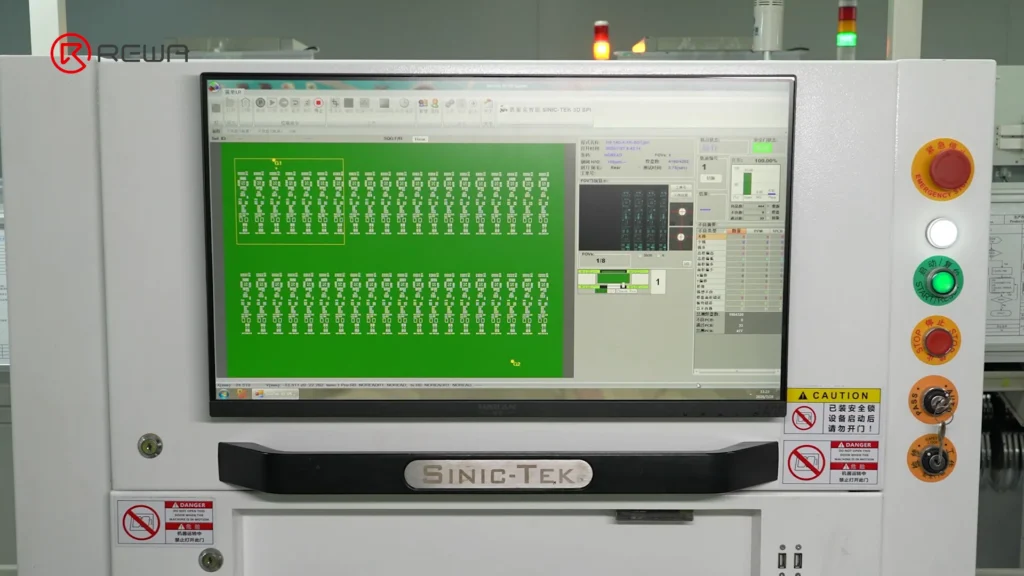
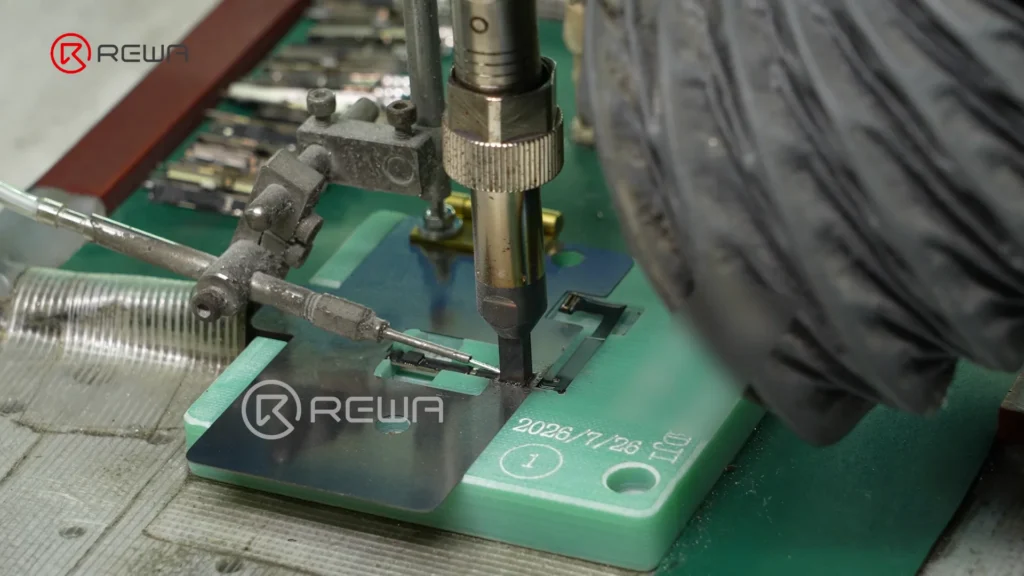
    Infrared marking helps identify the positions of the solder pads, while an SPI system checks the printed solder paste to identify issues such as:

    • Solder paste offset
    • Insufficient solder paste
    • Excessive solder paste
    • Solder bridging
    A Sinic-Tek 3D SPI machine monitor displaying a panel inspection layout for solder paste quality control

    This inspection is important because inaccurate solder paste printing can affect the quality of component soldering later in the process.

    Step 2: High-Speed Component Placement

    After solder paste printing, SMT machines precisely place resistors, capacitors, inductors, and other components onto their designated positions on the PCB.

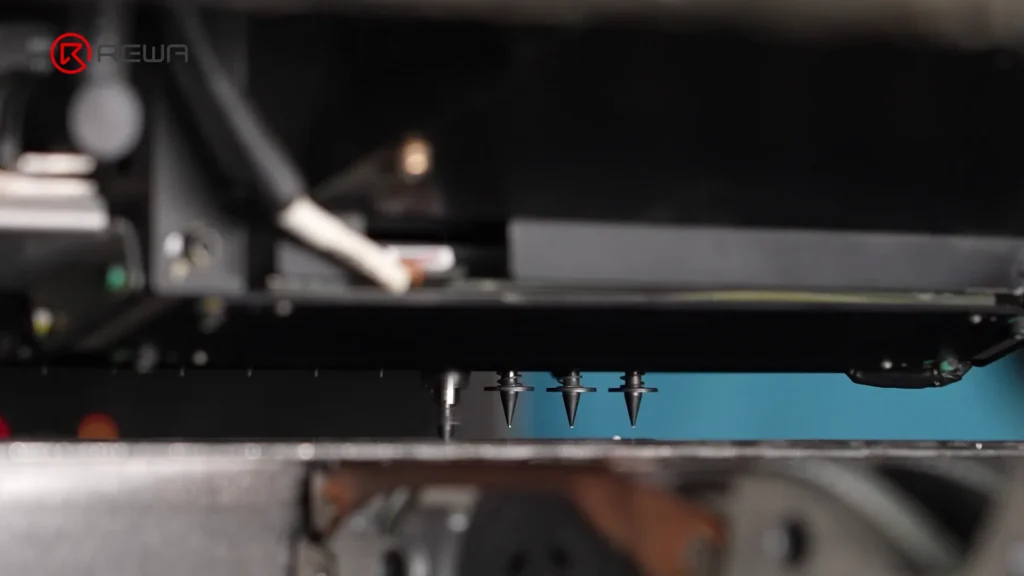
    High-speed nozzles pick up individual components and place them according to the programmed layout of the PCB. Infrared reference marks help the equipment maintain accurate positioning.

    Automated SMT pick-and-place nozzles positioned above a circuit board

    For battery BMS boards, precise component placement is essential because the board contains many small components within a compact design.

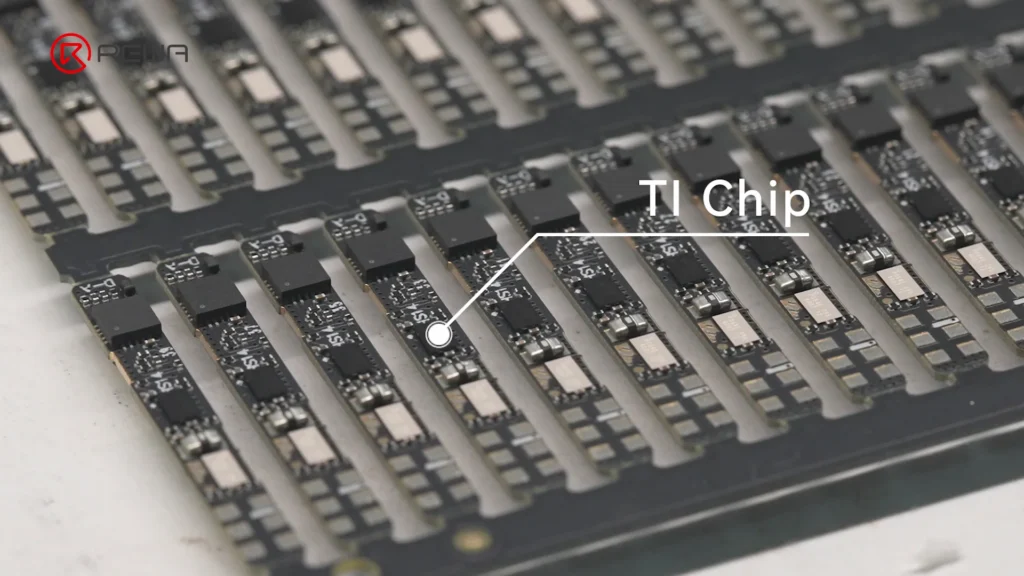
    Step 3: Installing the TI Battery Management Chip

    One of the key components on the board is the TI chip. As a key control component of the battery management system, it serves as the “brain” of the BMS, helping monitor and manage battery performance.

    Array of BMS circuit boards with a callout label pointing to the installed TI chip

    The REWA Selected battery board uses a custom TI chip with an Impedance Track algorithm.

    Simply put:

    The algorithm helps the battery system estimate the battery’s remaining capacity more accurately by tracking the battery’s electrical characteristics, including impedance.

    Battery impedance changes as the battery operates and ages. Monitoring these characteristics allows the battery management system to make more informed estimates of the battery’s actual state.
    Step 4: Reflow Soldering and AOI Inspection

    Once the components have been placed, the PCB enters the reflow soldering process. The board passes through a controlled thermal profile consisting of preheat, soak, reflow, and cooling stages, permanently connecting the components to the PCB.

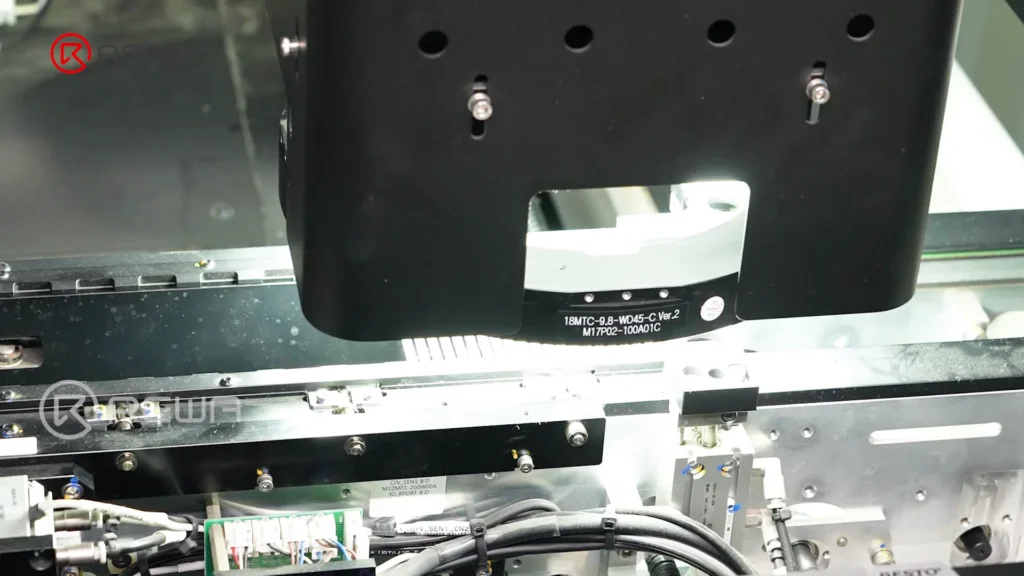
    Afterward, the board undergoes AOI (Automated Optical Inspection) scanning.

    Simply put:

    AOI uses cameras to inspect the board automatically and compare the soldered components and joints against predefined standards or a golden sample.

    Automated optical inspection machine head scanning circuit boards under bright light on an assembly line

    If the system identifies an NG (No Good) board, the board is manually reviewed to separate real defects from false positives.

    Step 5: Underfill Reinforces BGA Component Connections

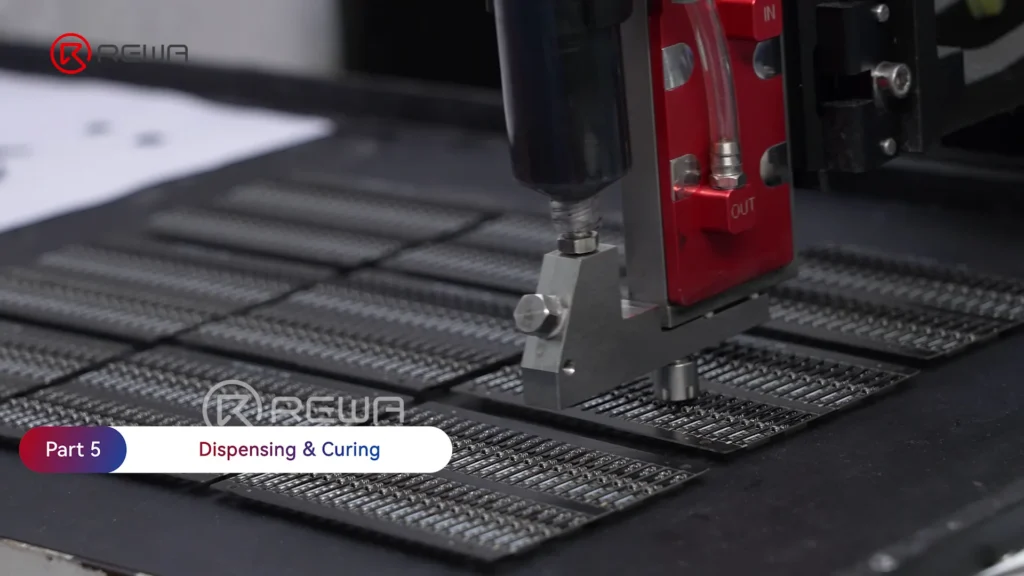
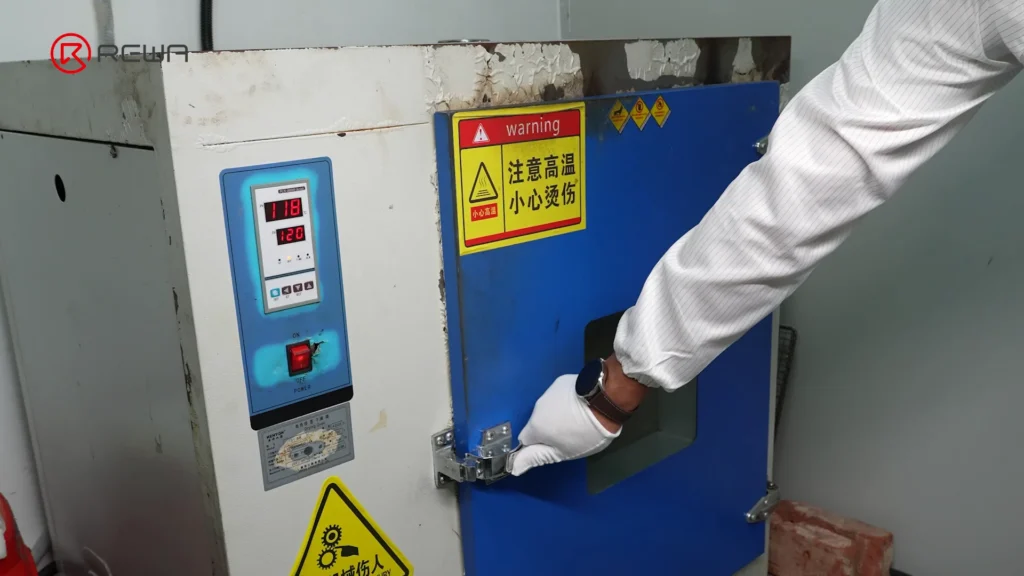
    After solder inspection, automated equipment applies underfill along the edges of BGA components before the adhesive is cured in an oven, which helps provide additional mechanical support.

    For battery BMS boards, this stage can improve resistance to physical shock and vibration, helping strengthen the connection between the component and PCB during handling and use.

    How iPhone Aftermarket Battery BMS Boards Are Made
    A gloved worker closing the door of an industrial drying oven used to cure underfill adhesive

    Step 6: Firmware Programming and Flex Cable Bonding

    The completed PCB is programmed with firmware before its flex cable is bonded using controlled heat and pressure. To put it simply, firmware is the embedded software that controls how the hardware operates.

    How do the controlled heat and pressure achieve?

    Through a hot-bar bonding process, the controlled heat and pressure are used to bond the flex cable to the PCB.

    bonding flex cable

    After bonding, the flex cable connection is verified through FCT (Functional Circuit Test) to check whether the assembled board actually functions as intended.

    Step 7: Battery Cell and BMS Board Assembly

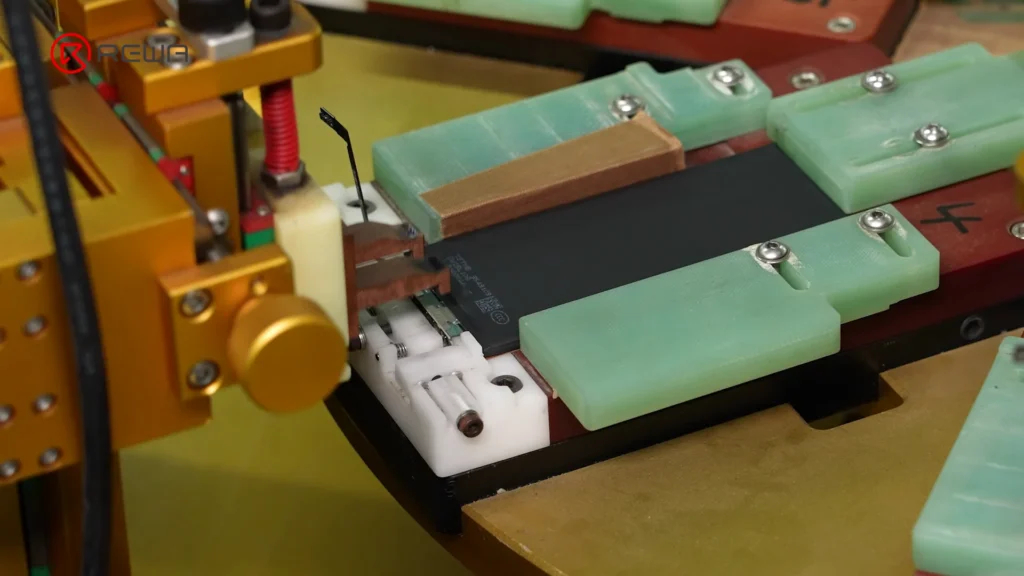
    In the assembly stage, the factory first uses capacity-matched cells. The cell tabs are then cut before the cell is connected to the BMS board through fiber laser spot welding.

    Why Is Weld Quality Important?

    The weld connects the battery cell to the BMS board, so the quality of this connection directly affects the electrical and mechanical integrity of the battery pack.

    Automated spot welding equipment connecting a battery cell to a BMS board held in an assembly fixture

    After welding, each weld joint is checked for durability. The battery pack then receives insulation tape and a rubber casing as part of the assembly process, helping provide both electrical insulation and physical protection.

    Step 8: Final Quality Inspection and Battery Testing

    Manufacturing does not end when the battery pack is assembled. A strict final quality inspection is performed before the battery is considered ready for shipment.

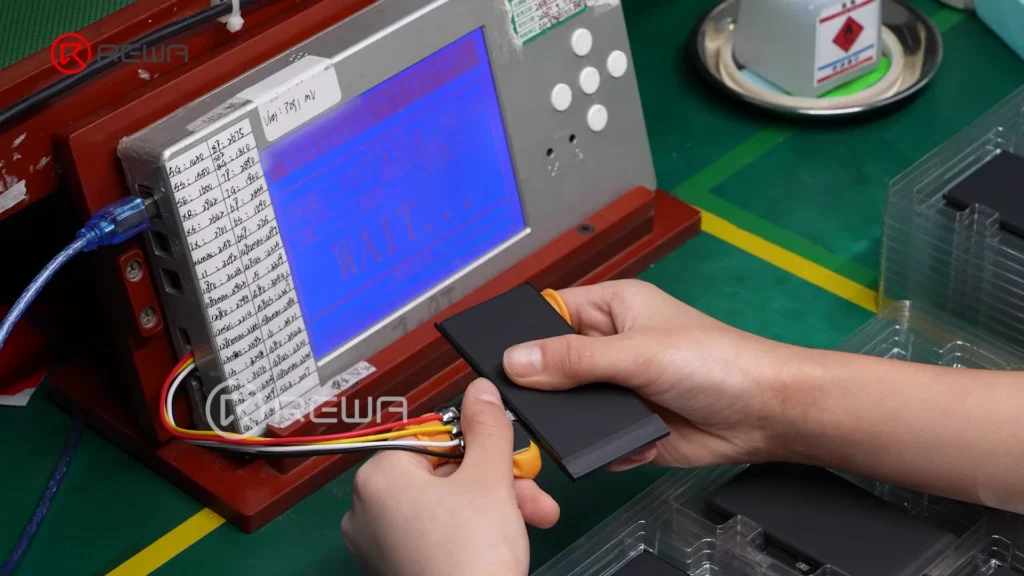
    After final inspection, the battery enters a resting period, during which parameters such as voltage and internal resistance are monitored.

    Technician connecting an assembled iPhone battery to a digital testing device to monitor voltage and internal resistance

    Monitoring voltage and internal resistance during the resting period provides additional data for quality control.

    Why the BMS Board Matters for Aftermarket iPhone Batteries

    The BMS board is often hidden inside the battery, so it is easy to overlook when comparing aftermarket batteries. However, its design and manufacturing quality can influence important aspects of battery operation.

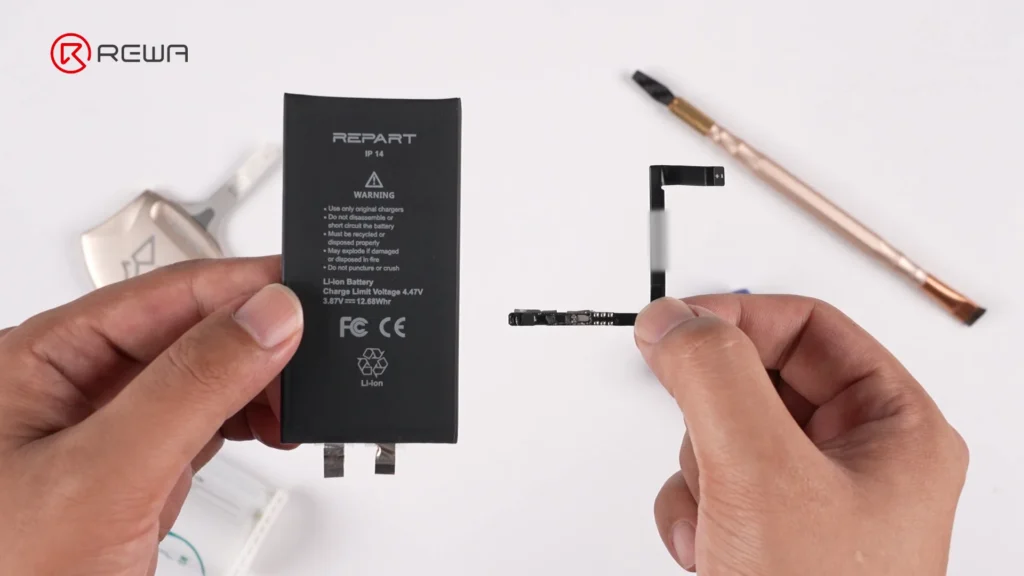
    A reliable third-party battery requires more than simply selecting a battery cell with the right capacity. The cell, BMS board, firmware, electrical connections, protection circuitry, manufacturing process and strict quality test before shipping all work together.

    Hands holding a black iPhone 14 battery cell on the left and a small BMS board with flex cable on the right

    For distributors, refurbishing facilities, and repair shops, this means that battery evaluation should go beyond looking at the printed capacity or external appearance.

    Frequently Asked Questions

    What is the difference between a battery cell and a BMS board?

    The battery cell is the component that stores electrical energy. The BMS board is the electronic management and protection system that monitors the cell and controls related battery functions.

    What is a TI chip in a battery BMS board?

    TI refers to Texas Instruments, a semiconductor manufacturer whose battery-management ICs are used in various battery applications. In the REWA Selected battery board shown in the video, a custom TI chip with an Impedance Track algorithm is used to support accurate battery monitoring and gauge estimation.

    Why are SPI and AOI inspections important?

    SPI checks the accuracy of solder paste printing before components are soldered, while AOI uses cameras to inspect the assembled PCB and solder joints afterward. These inspections help identify manufacturing issues at different stages of PCB production.

    Why does REWA test battery voltage and internal resistance after assembly?

    Voltage and internal resistance provide important information about the electrical condition of a battery pack. Monitoring these parameters after assembly and during the resting period adds another layer of quality control before the battery is shipped.

    Why measure internal resistance during final quality inspection?

    Internal resistance is one of the important electrical characteristics of a battery. Lower internal resistance generally means less electrical energy is lost inside the battery when current flows, although battery performance cannot be judged by this parameter alone.

    Conclusion

    An aftermarket iPhone battery is more than a battery cell. Behind the finished product is a BMS board that integrates electronic components, battery-management technology, protection functions, firmware, and flex-cable connections.

    From a bare PCB to a complete battery pack, every stage can contribute to the consistency and reliability of the finished battery.

    By combining rigorous quality control process with technical support, REWA Technology is committed to developing high-standard aftermarket battery solutions for professional repair businesses worldwide. If you have any question, please feel free to contact us.

  • iPhone Repair: Impact of iOS 18.1 on Aftermarket Parts

    iPhone Repair: Impact of iOS 18.1 on Aftermarket Parts

    Since Apple introduced Parts Pairing, third-party technicians have worked around these limitations with various solutions. Now, with the release of iOS 18.1, changes in repair history tracking aim to improve repair possibility. But what impact does this have on third-party iPhone repairs?

    A wide range of aftermarket parts, including iPhone screens, batteries, cameras, and face ID assemblies, were tested by REWA Tech lab to determine the real-world impact of iOs 18.1 on aftermarket parts.

    Replace Screen Replacement

    Before iOS 18

    Replacing iPhone screen will appear “Unknown Part” message and True Tone will disappear; issues resolved using IC transfer and repair programmers.

    Example: 100% Fix "Unknown Part" Message for iPhone 15 Pro After Screen Replacement

    After iOS 18.1

    No.Screen  TypeTransfer Original ICTransfer Original  Front SensorPass Repair AssistantParts &  Service HistoryTrue Tone
    1OEMNoYesNoUnable to ConfigureYes
    2OEMYesYes/NoYes
    3AftermarketNoYesNoUnable to  ConfigureYes
    4AftermarketYesYes/NoYes
    5OEM + Paired Front SensorNoNoYesUsedYes
    6Service Pack + Paired Front SensorNoNoYesGenuineYes

    Key findings

    • As long as the screen has a matching IC and sensor, there will be no repair history and no need for a repair assistant diagnosis.
    • All third-party screens support True Tone.

    Replace Battery Replacement

    Before iOS 18

    “Unknown Part” message, battery health not displayed; resolved by solutions like no welding battery, battery cell + tag-on flex, battery cell + repair board.

    Example: Aftermarket Solutions to Calibrate iPhone Battery Health on iOS 17.4

    After iOS 18.1

    No.Battery TypePass Repair AssistantParts & Service HistoryHealth Data
    1OEM NewYesGenuine100%
    2OEM UsedYesUsedOEM Used battery’s data
    3Aftermarket(TI ZY HF 
    Solutions)
    NoUnverified100%
    4Battery Cell + Native BMS Board//Native battery’s data

    Key findings

    • Third-party batteries still fail to pass Repair Assistant, and the parts history is recorded as unverified.
    • New third-party batteries replaced in iPhones all can show health data.

    We also tested third party batteries on iOS 18.0.

    Watch the video: 

    Replace Rear Camera Replacement

    Before iOS 18

    Replacing a lens alone will display an unknown part message. A repair programmer and repair flex cables are required.

    Example: How to Remove Rear Camera "Unknown Part" Message for iPhone 15 PM

    After iOS 18.1

    No.Camera ModelPass Repair AssistantCamera Calibration
    1iPhone 12YesNo
    2iPhone 13YesNo
    3iPhone 14YesNo
    4iPhone 15YesYes
    5iPhone 16YesYes

    Key findings

    The rear cameras of iPhone 12-16 can be diagnosed by the repair assistant, but the iPhone 15 and 16 series require camera calibration.

    Replace Front Camera + Face ID Assembly

    Before iOS 18

    Replacing this assembly will make Face ID function fail. A repair programmer and repair flex cables are required.

    Example: Fix Face ID (WITHOUT SOLDERING) Not Working with REFOX RP30

    After iOS 18.1

    No.Assembly ModelPass Repair AssistantFace ID
    1iPhone 12NoNo
    2iPhone 13NoNo
    3iPhone 14NoNo
    4iPhone 15NoNo
    5iPhone 16YesYes

    Key findings

    iPhone 12-15 front camera + Face ID assembly cannot be diagnosed by the repair assistant, only iPhone 16 can.

    Summary

    From iOS 18.0 to 18.1, iPhone repairs have gradually become relatively easy, but there are still some problems that need to be verified. Pay attention to the REWA channel to get more new technologies and information.

    Additionally, REWA provides a variety of repair tools and phone parts, welcome to consult or visit our online shop!

    Consult us: https://rewawp.iamtareq.com/wholesale/

    Visit the online store: https://shop.rewa.tech/

  • Can Aftermarket Battery Finish Parts Pairing on iOS 18?

    Can Aftermarket Battery Finish Parts Pairing on iOS 18?

    In this video REWA Lab will share you a full progress about battery test on iOS 18, we will install different batteries to see if they can successfully pair with the device, stay tuned for more REWA professional videos.
    For battery repair tools, you can visit website:
    https://rewawp.iamtareq.com/repair-tools/
    Contact us for more details: +852 5167 5273 / sales@rewa.tech

  • REWA Tech Showcases at IFA Berlin 2024, Innovation and Empowerment

    REWA Tech Showcases at IFA Berlin 2024, Innovation and Empowerment

    From September 6 to 10, REWA Tech is thrilled to announce its participation in IFA Berlin 2024. This year marks the 100th anniversary of the IFA exhibition. It not only highlights the latest advancements and trends in the industry but also provides a valuable opportunity for face-to-face interactions with customers around the globe.

    rewa tech showcases ifa berlin 2024 innovation empowerment 100th
    Figure 1. IFA 100th Anniversary Spectacular

    Stay On Top of The Latest Technologies

    In recent years, technology innovations have grown at a rapid pace. Chinese manufacturers are committed to being at the forefront of consumer tech developments.

    REWA Tech was found in 2008, who is committed to becoming the industry’s leading brand in empowering repair businesses. REWA Selected products range includes screens assemblies, batteries, small parts, refurbishing machines, and repair tools, all designed to drive innovation and development in the repair business.

    By participating in IFA Berlin 2024, REWA Tech aims to showcase its core strengths and foster deep collaborations with global partners and customers.

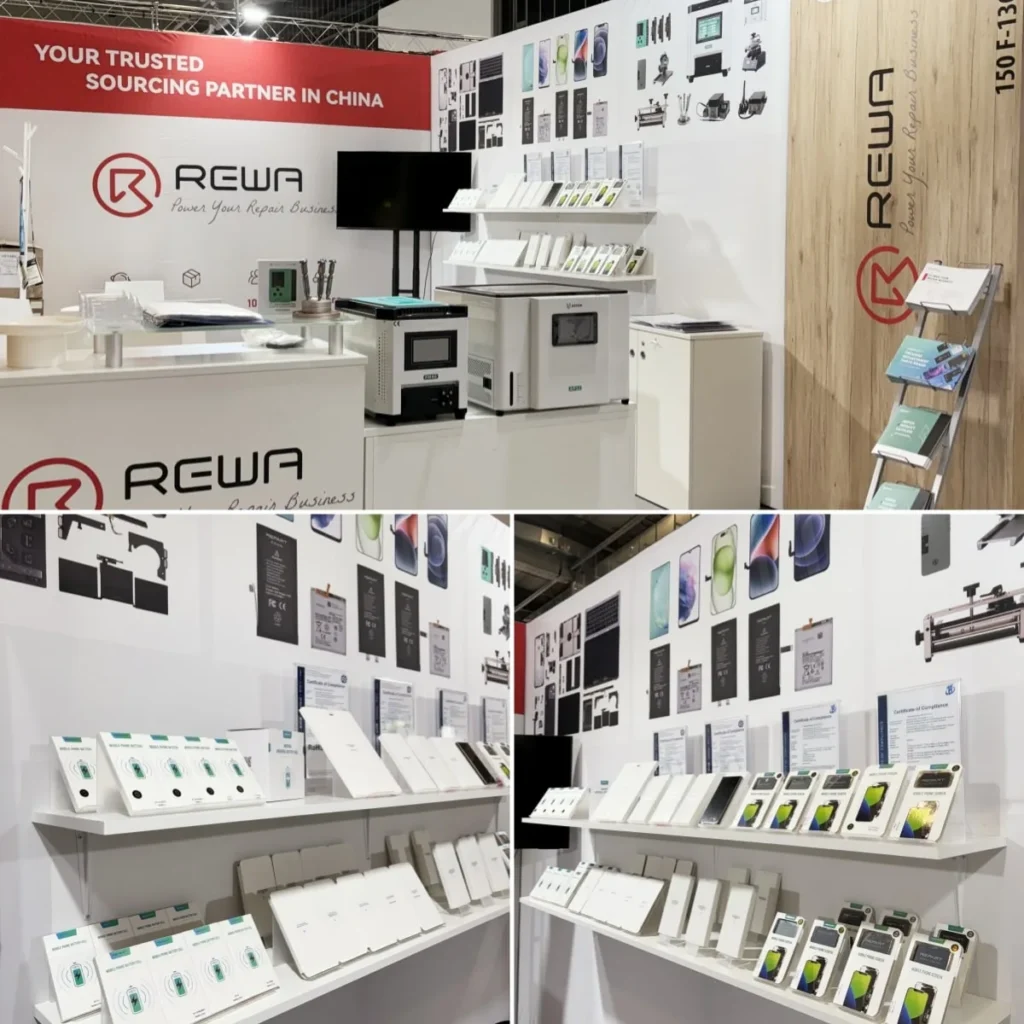
    rewa tech showcases ifa berlin 2024 innovation empowerment booth no
    Figure 2. REWA Tech Booth

    Actual Products Prove Strength

    At the exhibition, REWA Tech presented its latest product lines and technological solutions, including main phone parts, screen refurbishing machines, and efficient repair tools. Our technical experts and business representatives engaged warmly with attendees, discussing the latest developments and challenges in phone repair.
    Many exhibitors showed great interest in REWA Selected products, and some potential customers had in-depth exchanges with REWA representatives.

    rewa tech showcases ifa berlin 2024 innovation empowerment communicate
    Figure 3. Communicate with Exhibitors

    For example, the REFOX AP32, a desktop screen polishing machine with two slots. It’s designed to remove scratches effectively while being easy to use. As opposed to many larger models, the AP32 takes up little space in repair stores. The machine has generated considerable interest, with many customers asking for details and pricing. Several customers have ordered this tool right away to integrate it into their businesses.

    rewa tech showcases ifa berlin 2024 innovation empowerment customers
    Figure 4. Customers Asking for Details and Pricing of AP32

    Establish Relationships with Global Customers

    REWA Tech was able to relate closely to its customers as well as strengthen partnerships with industry exhibitors at this event. They look forward to continuing to deliver high-quality services and support to the global repair community, driving progress and growth in the industry.

    rewa tech showcases ifa berlin 2024 innovation empowerment cooperation
    Figure 5. Cooperation and Friendship

    Upcoming Events

    Furthermore, REWA Tech will participate in MWC 2024 in Las Vegas and GITEX 2024 in Dubai. See you then!
    For more information, please contact us: https://rewawp.iamtareq.com/wholesale/

  • REWA New Website Released: Power Your Repair Business

    REWA New Website Released: Power Your Repair Business

    We are pleased to announce that REWA Tech official website has been upgraded! This update is tailored for B2B phone repair enterprise users. Not only has it been upgraded in visual design, but it also offers more product and service information. This will help you stand out from the repair industry competition.

    rewa new website released power your repair business tech

    Rich product and service information

    As a phone parts wholesale supplier, we have updated the display page of products and services to provide a more detailed overview of solutions, allowing you to find the solution that best meets your business needs.
    Check details: https://rewawp.iamtareq.com/product/

    rewa new website released power your repair business product

    New UI design

    By adopting a modern design style, it offers a more professional and concise browsing experience. Enjoy smooth navigation and visual enjoyment whether you are searching for information or exploring solutions.

    Improve user experience

    By optimizing the content layout and website architecture, the browsing experience on mobile devices is also greatly enhanced. This helps you access the website more efficiently anytime, anywhere and make business decisions.

    Why choose REWA?

    As a leader in one-stop repair business solutions, REWA Tech has always been committed to providing customers with the most complete solutions through screen assemblies, batteries, small parts, repair and refurbishment products and technical support. This includes training services, pre-sales and after-sales services. Additionally, we have updated our website to reflect our brand upgrade and our latest understanding of customer needs.

    rewa new website released power your repair business why

    Explore Now

    Visit REWA Tech Official Website now to explore new repair business solutions!
    We sincerely invite you to visit the new official website to experience the new design and functions. If you have questions or feedback, please feel free to contact us. We look forward to working with you to jointly drive your business to success.

  • Unlock US iPhone 15 PM Potential: Converting eSIM to Physical Dual SIM

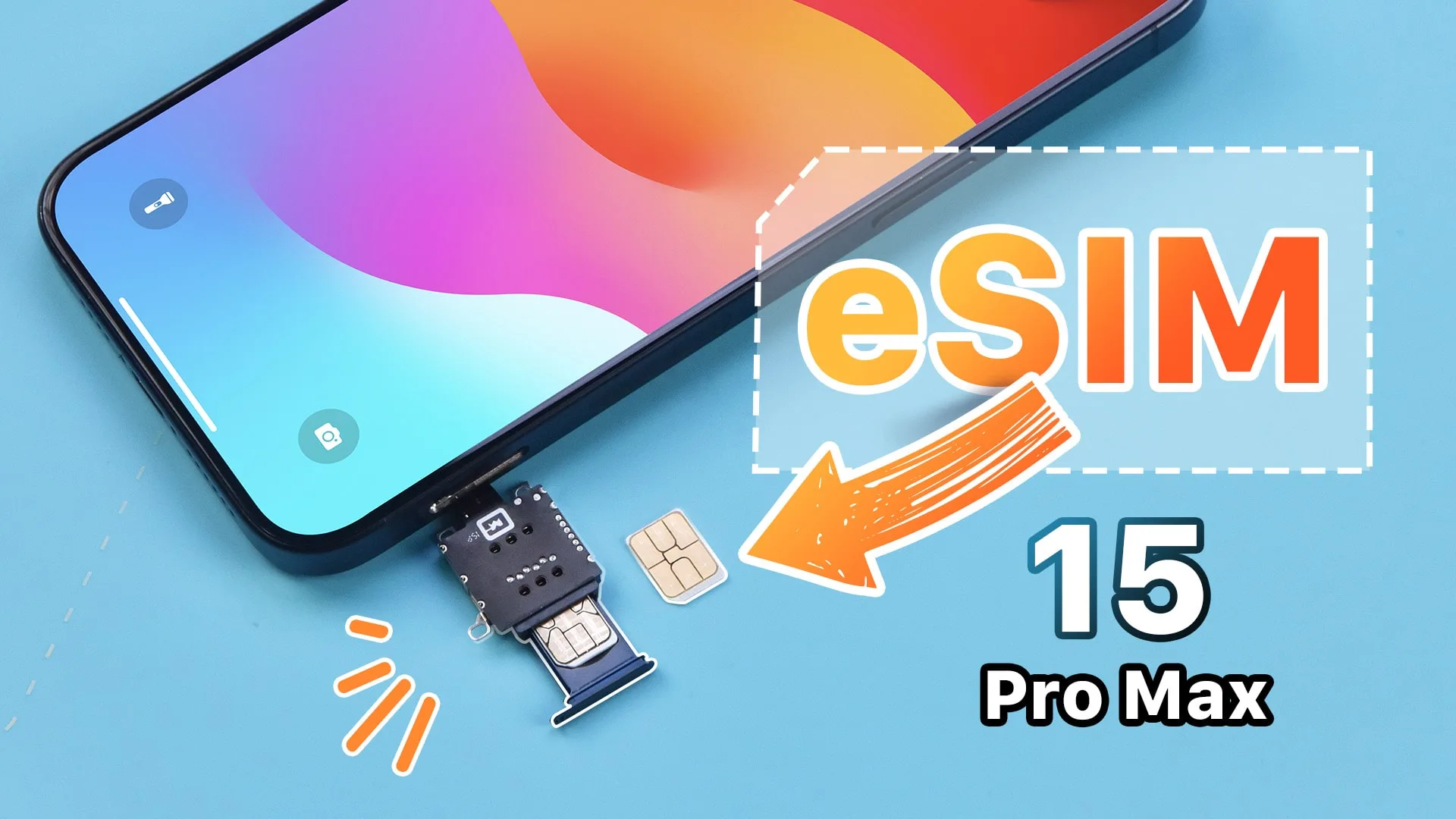
    Unlock US iPhone 15 PM Potential: Converting eSIM to Physical Dual SIM

    Due to the different motherboard structure between the US version of iPhone 14 Pro Max and iPhone 15 Pro Max, transforming the eSIM to dual SIM becomes more tricky.
    We will share with you a new hack about how to convert eSIM to physical dual SIM, but more importantly, we will discuss whether or not converting it is worthwhile.
    For related repair tools and camera replacements, you can visit website:

    https://rewawp.iamtareq.com/repair-tools/ ; https://rewawp.iamtareq.com/battery/

    Contact us for more details: +852 5167 5273 / sales@rewa.tech

  • iPhone Aftermarket Batteries: Massive Production and Pro Inspection

    iPhone Aftermarket Batteries: Massive Production and Pro Inspection

    In the previous blog: What Should A Qualified Battery Actually Be, REWA explained when should a battery be replaced and what standards we applied towards battery replacements.

    Now we will demonstrate the detailed production process and test procedures.

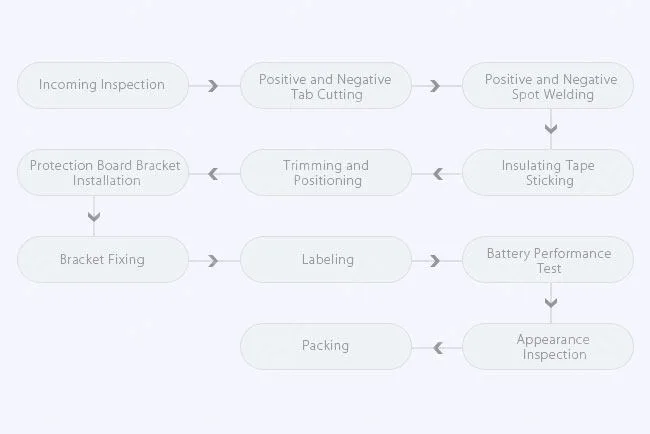
    Top quality batteries come from excellent materials, advanced automation equipment, and strict inspection&test standards. In the top-level factories, phone battery is usually carried out on highly automated equipment, with top quality materials applied.

    However there are still many smaller manufacturers who use manual assemble methods or poor materials, that is why the batteries in the market vary greatly.

    What should a complete battery production process be?

    Production Process

    Production Process

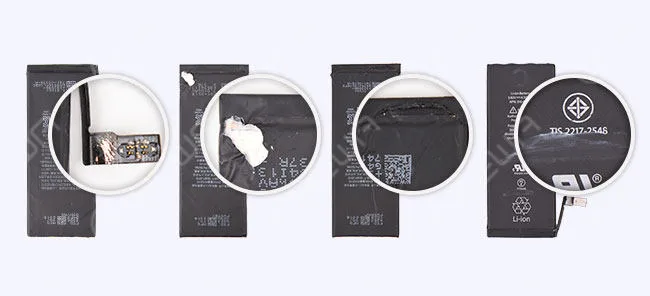
    Battery appearance inspection is a common but easy way to inspect your phone batteries, but it does not always work, lacking precise values and results.

    Some battery failures are not so easy to spot with naked eyes. However, the strict test is necessary for the lithium batteries to ensure safety and quality.

    Here we will demonstrate the professional and complete test procedures.

    The test can be divided into three parts: Appearance Inspection, Basic Performance Test and Physical Performance Test.

    Appearance Inspection

    Appearance Inspection: breakage, paint loss, crack, corrosion, labeled data

    Appearance Inspection: breakage, paint loss, crack, corrosion, labeled data

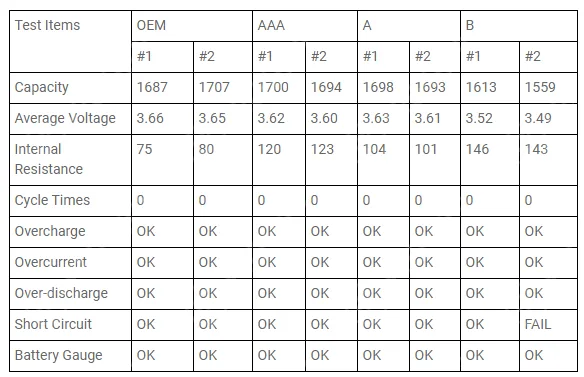
    Basic Test Methods and Procedures

    Basic Test Methods and Procedures

    Physical Performance Test Procedures 

    Further physical performance tests are conducted in the extreme situations, so as to verify if the battery will bend, deform, fire and explode in the different simulative environments.

    1. Low-Pressure High Altitude Simulation Test 

    This procedure is to test the air transportation safety performance of the battery at a pressure under 11.6kPa.

    Result: After 360 minutes, all the samples perform normally, no fire or explosion. /The samples do not explode or catch fire.

    2. Temp. & Humi. Test 

    This test is to verify the temperature adaptability of battery, processed at an extreme temperature of 72±2℃ and -40±2℃. 

    Batteries are stored for 6 hours at 72±2℃, then 6 hours at -40±2℃, for a total of 10 cycles.

    Result: After 10 cycles, all the samples perform normally. No bulge, fire or explosion./ The samples do not explode or catch fire

    3. Vibration Test 

    Vibration test is used to verify the battery anti-vibration performance during the transportation and usage. The test is a Sine Sweep: 7Hz – 200Hz, 15 min/sweep, 12 times, 3 hours in total

    Result: All the samples perform normally

    4. Capacity Test 

    This is to test the actual capacity of the battery

    Result: OEM is the top performer. AAA Grade and A Grade come second, and the values are very close. B grade batteries are much worse than the above 3 kinds.

    5. Impact Test 

    Impact test simulates the impacting and hitting of the battery.

    Apply 561.5cm/s2 acceleration impact to the battery to test if it will be crushed or distorted when overload.

    Result: B grade batteries have problems of bend and deformation. Other samples perform normally.

    6. External Short Circuit Test 

    This test simulates an external short circuit to the terminals of the cell or battery. When the temperature goes up to 55℃, turn on the switch to make it short circuit, then check the battery to see if it will explode.

    Result: After 2 hours standing, all the samples perform normally. No fire or explosion. /The samples do not explode or catch fire.

    7. Drop Test 

    The drop test is operated at a height of 1.2 meters to test the battery hardness and anti-deformation capability.

    Result: B grade batteries have problems of bend and deformation. Other samples perform normally.

    8. Crush Test 

    Each battery is applied with a crushing force of 1.3kN for 0.1s. After 30 minutes, check the battery to see if it will fire, explode or deform.

    Result: All the samples perform normally.

    9. Thermal Abuse Test 

    The purpose of abuse testing is to verify that the battery is not a danger to the user either by accidental or deliberate thermal abuse under any conceivable conditions of use.

    After the temperature rise for 26 minutes, hold at 130℃ for 10 minutes, check the battery to see if it will fire or explode

    Result: All the batteries have the problem of bulging, no fire or explosion

    10. Burning Test 

    The purpose of this procedure is to test the safety performance of the battery. Put the battery into the machine, ignite it to test if the battery will explode and if the ashes are in clumps.

    Result: After 30 minutes, batteries burned completely, no explosion, with clumpy ashes left

    Every battery from REWA has to pass through rigorous basic performance and physical performance test, and only qualified products can be delivered to the warehouse. This is to ensure every battery you get is superior, safe and reliable.

    Certifications

    Our business has been founded on the belief “Quality Above ALL” for years. The batteries from REWA passed a series of international authoritative certifications, such as UL, CE, FCC etc..

    From all the above test results and analysis, we can draw a conclusion that OEM, AAA and A grade batteries are much better and safer than the B grade.

    Now that there is a shortage of OEM batteries, the cost-effective AAA and A grade batteries undoubtedly become your first choice.Every battery from REWA has been rigorously tested.

    Our QC and technical team can offer the right solutions for your needs and advise the best but economical battery replacements.

    If you have any questions and demands, please feel free to contact us.

  • How to Fix iPhone X Battery Draining Fast – Fault Hides Under the Card Reader

    How to Fix iPhone X Battery Draining Fast – Fault Hides Under the Card Reader

    The iPhone X battery is draining fast with an overheating issue. After measurement, the motherboard is found to have a current leakage. Since the current is too small, rosin detecting is unable to find the fault. Therefore, we use a thermal imager to find the faulty part. After multiple checks, the faulty part is found to be under the card reader.

  • iPhone Aftermarket Screen & Battery Compatibility Test On iOS 13

    iPhone Aftermarket Screen & Battery Compatibility Test On iOS 13

    iOS 13 has been officially released for a month. In order to provide our clients with featuring stable quality, REWA LAB has conducted a series of compatibility tests for iPhone series from iPhone 6s to iPhone X with OEM NEW, A+Grade Aftermarket Screens and Aftermarket Batteries respectively. Now, Let’s take iPhone 6s, iPhone 8P, and iPhone X as examples and show you how the test goes.

    Tips: iOS 13 only supports the iPhone 6s and later models.

  • iPhone 13 vs. iPhone 12 Battery Life Comparison

    iPhone 13 vs. iPhone 12 Battery Life Comparison

    Apple dispatched four iPhone 13, iPhone 13 MINI, iPhone 13 Pro, and iPhone 13 Pro Max in 2021, notwithstanding battery development.

    It has likewise acquired a ton of enhancements alongside battery upgrades with a longer life battery. Let’s check out the difference compared with the iPhone 12.

    Apple iPhone 13 model is indistinguishable from iPhone 12 appearance, the thing that matters is that the iPhone 13 has a thickness of 0.25 mm contrasted with iPhone 12, which is basically impacted by a higher capacity battery and another camera module.

    iPhone 13 thickness: 7.65 mm 

    iPhone 12 thickness: 7.4 mm 

    iPhone 13 battery capacity is raised, 8% increment in iPhone 13, 9% of iPhone 13 and iPhone 13, where iPhone 13 Pro Max battery capacity is most reached by 18%, yet in addition the iPhone has above 4000mAh huge battery capacity for the first time.

    iPhone 13 mini battery capacity is 2406mAh 

    iPhone 13 battery capacity is 3095mAh 

    iPhone 13 Pro battery capacity is 3095mAh 

    iPhone 13 Pro Max battery capacity is 4352mAh 

    iPhone 13 Comparison of Battery life with iPhone 12

    As indicated by Apple’s fully-digital “California streaming” event on September 14, the iPhone 13 Series battery life on fortifying 1.5 hours to 2.5 hours expanded than the iPhone 12 Series, the information is as per the following:

    iPhone 13 mini battery life increased 1.5 hours than iPhone 12 mini 

    iPhone 13 battery life is raised by 2.5 hours than iPhone 12 

    iPhone 13 Pro battery life to boost 1.5 hours than iPhone 12 Pro 

    iPhone 13 Pro Max battery life is more than 2.5 hours than iPhone 12 Pro Max 

    The iPhone 13 series fully enhances battery capacity, and is equipped with 5 nano-enhanced version A15 bionic chips to reduce power consumption, which will make iPhone 13 battery life strengthening.

    thickness of 0.25 mm contrasted with iPhone 12, which is basically impacted by a higher capacity battery and another camera module.

    iPhone 13 thickness: 7.65 mm 

    iPhone 12 thickness: 7.4 mm 

    iPhone 13 battery capacity is raised, 8% increment in iPhone 13, 9% of iPhone 13 and iPhone 13, where iPhone 13 Pro Max battery capacity is most altogether reached by 18%, yet in addition the iPhone has above 4000mAh huge battery capacity for the first time.

    iPhone 13 mini battery capacity is 2406mAh 

    iPhone 13 battery capacity is 3095mAh 

    iPhone 13 pro battery capacity is 3095mAh 

    iPhone 13 Pro Max battery capacity is 4352mAh 

    iPhone 13 Comparison of Battery life with iPhone 12

    As indicated by Apple’s fully-digital “California streaming” event on September 14, the iPhone 13 Series battery life on fortifying 1.5 hours to 2.5 hours expanded than the iPhone 12 Series, the information is as per the following:

    iPhone 13 mini battery life to increase 1.5 hours than iPhone 12 mini 

    iPhone 13 battery life is raised by 2.5 hours than iPhone 12 

    iPhone 13 Pro battery life to boost 1.5 hours than iPhone 12 Pro 

    iPhone 13 Pro Max battery life is more than 2.5 hours than iPhone 12 Pro Max 

    The iPhone 13 series fully enhances battery capacity, and is equipped with 5 nano-enhanced version A15 bionic chips to reduce power consumption, which will make iPhone 13 battery life strengthening.

  • How to improve iPhone battery life!

    How to improve iPhone battery life!

    Watching videos on YouTube, reading news, playing games and replying email will all consume the battery life greatly.

    There are many ways that can be used to save power. Some are not very convenient or not effective, while some are useless on the latest operating system, but below are proven ways to extend battery life.

    Turn off auto- brightness

    The brighter the screen, the faster the power consumed by the iPhone battery.

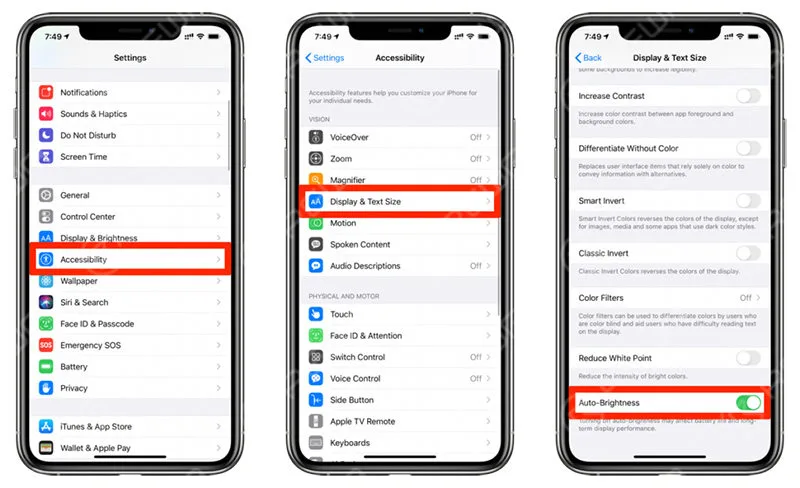
    Turn off auto- brightness

    Go to Settings > Accessibility > Display & Text Size > Auto-Brightness.

    The brightness of the screen depends on the surrounding environment. Turning off this feature can avoid unnecessary power consumption. In the future, if you want to change the brightness, open the control center and use the slider to control the screen brightness.

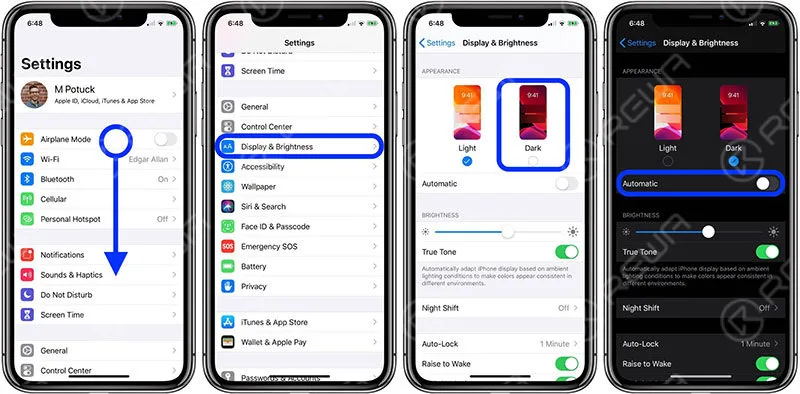
    Switch to dark mode

    Dark mode is a feature starting from iOS 13. It browses the part that is displayed in the white so far and switches to color matching in black.OLED’s iPhone will help increase the battery. OLED does not use the power to display in black, so dark mode is used to increase the battery time.

    The corresponding model is as follows

    iPhone X

    iPhone XS / XS Max

    iPhone 11 Pro / Pro Max

    iPhone 12/12 Mini / 12 Pro / 12 Pro Max

    Setting – display and brightness, light and dark, switch here

    Switch to dark mode

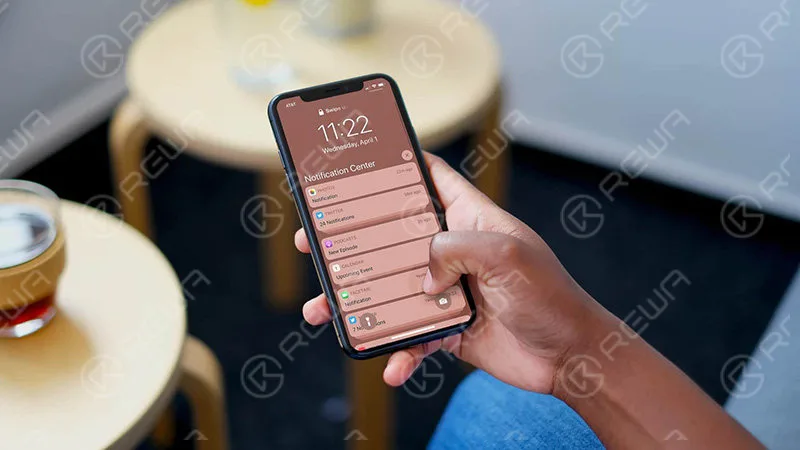
    Reduce unnecessary notifications

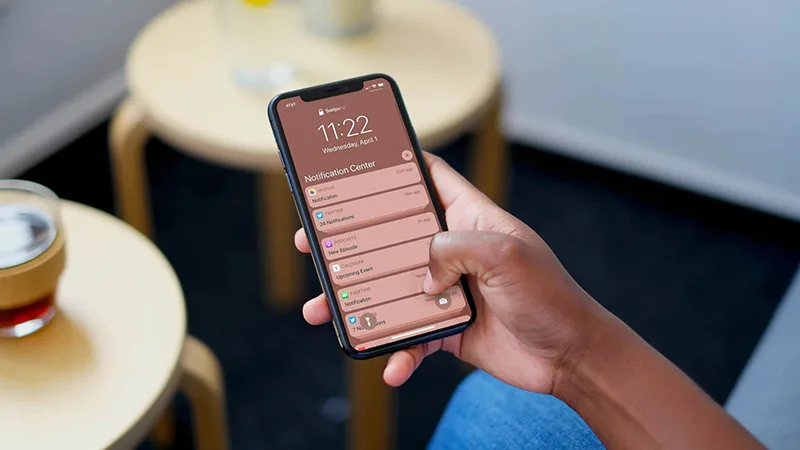
    When the iPhone receives the notification, the battery is powered by the battery, so you can manage the battery consumption by managing the required and unnecessary notifications.

    Which application notification is not important, turn off the notice.

    Reduce unnecessary notifications

    Open the “Settings” app and proceed to “Notification”. Then select the app from the list and switch off “Allow notification” and disable it.

    Conclusion

    This time, we introduced settings to suppress the battery consumption of the iPhone.

    By customizing the 3 choices introduced above, the battery consumption of the day is considerably reduced.