Tag: iPad air

  • iPad Air 2 Glass Replacement Guide | Save Money on Repairs

    iPad Air 2 Glass Replacement Guide | Save Money on Repairs

    iPad Air 2 was first debuted in Oct. 2014 and it has been more than 2 years so far. If you happen to get one Apple’s iPad Air 2 and it recently became the victim of an unfortunate accident, how will you deal with it?

    I’m afraid you’ll need to cough up some serious money to get it fixed or replace it.

    If you’re handy, however, and you can manage to source iPad spare parts at a decent price.

    As a repair shop, you can earn more profits by fixing iPad for your customers by following along our latest LCD refurbishing instructions.

    As a matter of fact, we have already published a few articles with regard to LCD refurbishing guidance for some flagship models of Apple and Samsung phone.

    But as for iPad or tablet PC, it’s the first time that we get involved in the iPad broken screen refurbishment.

    As such, iPad repair knowledge isn’t readily available to the public and falls into the category of “catch as catch can”.

    Now let’s get through and take first look at the latest broken LCD refurbishing techniques and equipment.

    This refurbishing process will include some of the recommended refurbishing machines of high performance and easy-to-use virtues as well as materials and tools .

    Broken Screen Testing

    Firstly, you need an iPad Air 2 screen with broken glass lens but properly working touch digitizer and LCD display.

    Install LCD to motherboard plate, then test if the display, touch functionality is OK.

    ipad air glass replacement guide save money repairs

    LCD Separating

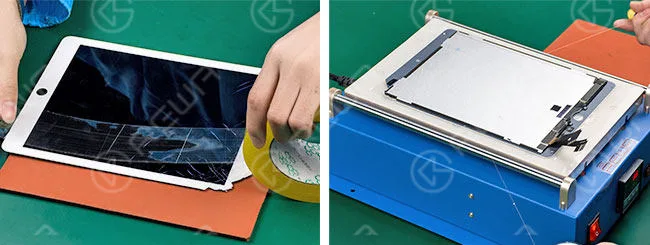
    In the first place, we need to stick a layer of adhesive tape on the full surface of the LCD screen.

    Get it heated on 13” LCD Separating Machine.

    Press the vacuum button, then embed the gold cutting wire into the bottom of LCD screen, pull it right and left till the glass separated.
    ipad air glass replacement guide save money repairs 2

    Glue Removing

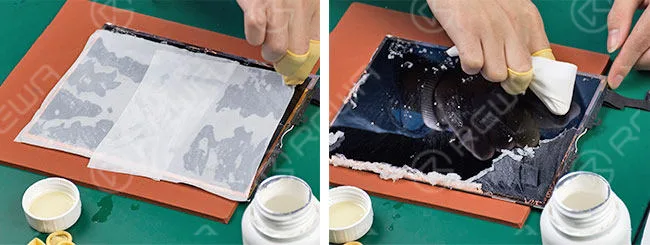
    Dip some 8333 OCA Cleaner with Anti-static Glass Wiper, spread it on LCD for 1 minute.

    And remove the residue adhesive.
    ipad air glass replacement guide save money repairs 3

    OCA Laminating and Bubble Removing

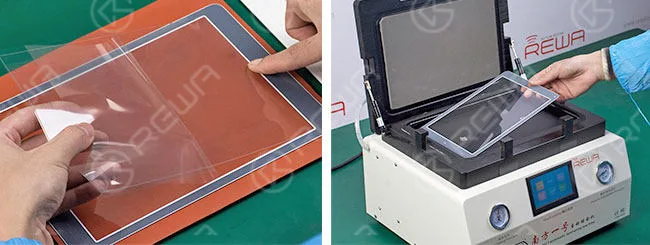
    Respectively tear off the protective films on new glass lens and OCA, align them then laminate.

    After that, place glass lens into Glass Laminating Machine for bubble removing for 3 minutes to make sure air bubbles between OCA and glass lens completely removed.
    ipad air glass replacement guide save money repairs 4

    Glass Laminating and Bubble Removing

    Put the LCD into Alignment LCD Mold and clean it.

    Tear off another protective film on OCA glue. Then align glass lens with LCD and put it into a mold for preliminary lamination.

    Take out the LCD and put it into Glass Laminating Machine with a laminate cushion placed under it. You should be more careful of the placement of LCD flex cables at this moment.

    Place another clean glass lens onto the LCD Assembly and align them to make complete lamination. Take it out after glass laminating is done.
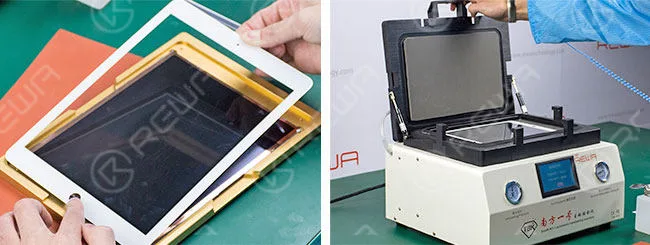
    ipad air glass replacement guide save money repairs 5

    Retesting

    Connect the LCD to the motherboard, and then test the display and touch functionality again, both are OK.
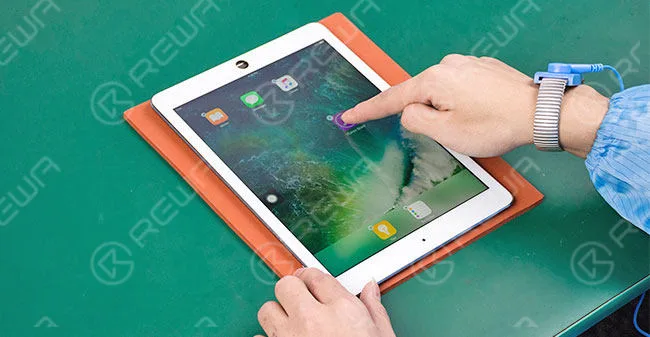
    ipad air glass replacement guide save money repairs 6

    Warm Prompt: This broken screen refurbishing service for iPad series currently cover iPad mini 4, iPad Air 2 and iPad Pro.

    Now is when we should call it a day.

    Because at this point a cracked iPad Air 2 screen is successfully refurbished.

    If you still have any other questions or are looking for LCD refurbish machines, materials, demo videos and technical support or on-site training, please feel free to contact us via service@rewa.tech or visit the website at shop.rewa.tech .

    Video Tutorial
  • How To Unlock iPad Air

    How To Unlock iPad Air

    The video is made for technical sharing, if you have a locked iCloud, please contact Apple official service. With a 64-bit system repair tool, you can remove activation lock of iPhone 5s/6/6 plus/iPad Air/Air 2/mini/mini 2/mini 3/mini 4 by changing the serial number.

    Many iPad users are easy to forget their iPad password/pin. We often heard many similar questions from different channels: what to do if I forgot iPad password? How to unlock my iPad? how to unlock iPad activation lock? Therefore, this video is made to help those in need to unlock iPad without the password or reset disabled iPad. The method can be used to get into locked iPad Pro, iPad 2/3/4, iPad Air 1/2, iPad Mini 1/2/3 without the password.

    There are some different ways to solve how to unlock an iPad, software and hardware; but our video is mainly talking about how to bypass iPad Air activation lock in hardware.

    The device can’t be activated without the right ID and password, so we can use hardware unlock iCloud of iPad Air. Here are the detail steps to teach you how to unlock an iPad Air – Hardware unlock iCloud of iPad Air with 64 bit system repair tool

    And if you don’t want to use the hardware unlock iCloud of iPad, you can try this software to solve your problem. You need to use a software which named iOS Lock Screen Removal, this is a professional software for unlocking a phone without the password. It supports both iOS and Android. As for iOS, this iPhone unlocker works greatly with the latest iOS 11 and iPhone X/iPhone 8. 

    One Click to Bypass the Lock Screen Password on iPad Pro

    Step 1. Connect your iPad Pro to PC

    First, please install the iOS Lock Screen Removal and run it on your computer. Then click the “Unlock” among all the choices.

    Next, you can concatenate your iPad Pro to the computer using a lightning cable and click “Start” on the program.

    Step 2. Boot iPad Pro in DFU mode

    In order to prior to bypass iPad Pro lock screen, we need to boot it in DFU mode. If you have no idea how to boot it, you can follow the orders on dr.fone to complete it.

    1. Power off your iPad Pro.

    2. Press and hold the Volume Down button and the Power button together for 10 seconds.

    3. Free the Power button and keep holding the Volume Down button until your iPad Pro is in DFU mode.

    Step 3. Identify iOS device information

    After the device is in DFU mode, dr.fone will scan your phone and display the device information, such as iPad generation, iOS version, etc. If the information is wrong, you can also select the correct information from the dropdown lists. Then click “Download” the download the firmware for your iPad Pro.

    Step 4. Unlock iPad Pro screen lock

    After managing to download the firmware, click “Unlock Now” to initiate unlocking your iPad Pro. Can you believe that just in a few seconds, your iPad Pro will be unlocked successfully? Believe it or not, the dr.fone is so efficient.

    Attentionally, it’s unavoidable that the unlocking course will also wipe the data on your iPad Pro. To be honest, there is no solution to bypass iPhone/iPad lock screen without data loss at present in the market.

    Notice:

    The software solution is from some iPad user recommended, we didn’t verify it, if you have a lock iCloud iPad need to repair, we recommend the hardware solution.




