Apple has recently rolled out the first beta test version of iOS 15.2, marked with the version number 19c5026i. This update brings several noteworthy features and improvements, with a primary focus on enhancing user privacy and safety. In this article, we will delve into the key highlights of the iOS 15.2 beta update.
key highlights of the iOS 15.2 beta update.
App Privacy Report
Privacy has been a core concern for smartphone users, and Apple continues to address this with the iOS 15.2 beta update. One of the standout features is the App Privacy Report, which empowers users to gain insights into their applications’ activities, including data network usage, location information, access to address books, and more.
To access this feature after updating your device to iOS 15.2:
1. Go to “Settings.”
2. Select “Privacy.”
3. Tap on “App Privacy Report.”
4. Enable “Open Application Privacy Report.”
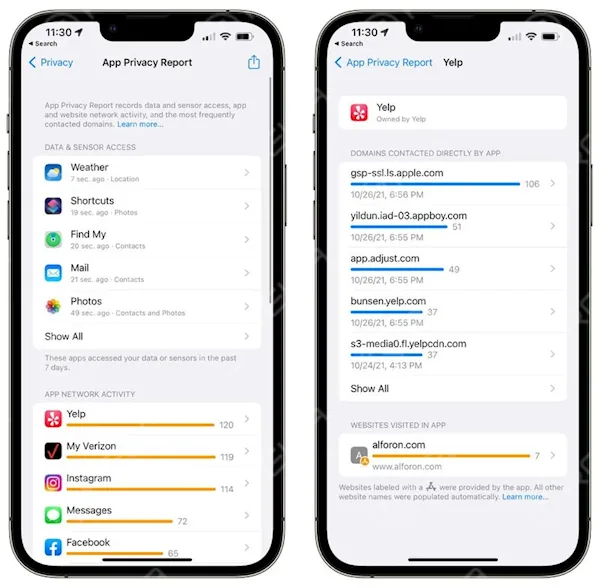
Once activated, this feature will begin displaying the data whenever you use an application. This transparency gives users a better understanding of how apps interact with their data.
Emergency SOS
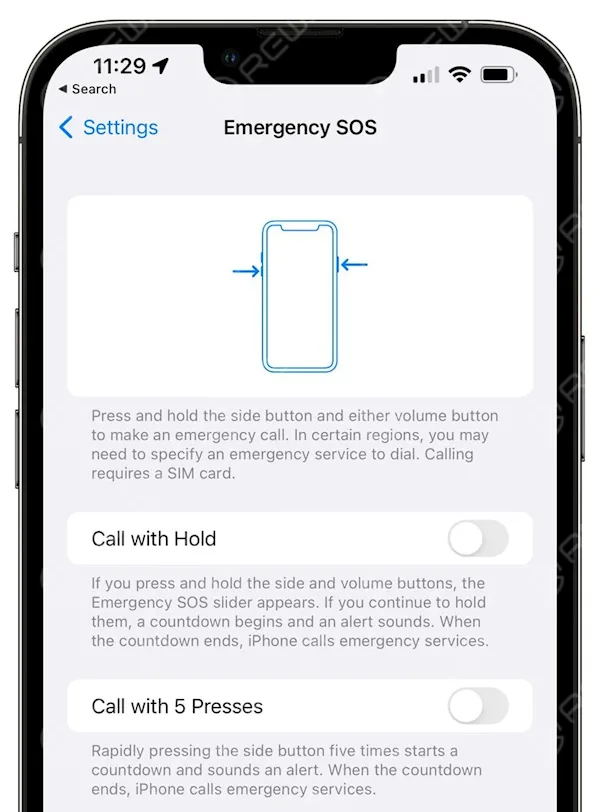
The Emergency SOS feature on iPhones plays a critical role in ensuring user safety. When activated, it automatically dials the local emergency number and shares your current location with your emergency contacts via SMS.
In the iOS 15.2 beta, the SOS Emergency Call function receives some notable updates for even quicker access and enhanced safety:
Activation: Now, you can activate Emergency SOS by using a combination of the power button and volume keys. Alternatively, a quick press of the power button five times will activate it.
Countdown Timer: The automatic dialing countdown has been extended from 3 seconds to 8 seconds. This gives users more time to cancel the call if it was accidentally triggered.
Notification Summary
Managing notifications is made more efficient and organized with the iOS 15.2 beta. The Notification Summary feature receives an update with improved card appearances. This means that your notifications are presented in a cleaner and more visually appealing manner.
Information Security
For parents concerned about their child’s online safety, the iOS 15.2 beta offers a valuable feature. When parental controls are enabled on a device used by a child, the system will notify parents if it detects the transmission or receipt of inappropriate content, such as indecent images.
This proactive approach empowers parents to stay informed and take necessary actions to protect their children online.
Conclusion
The iOS 15.2 beta update from Apple introduces significant enhancements in user privacy, safety, and notification management. With the new App Privacy Report, users can gain insights into app activities, while the updates to Emergency SOS and Notification Summary streamline important functions. Additionally, the focus on information security ensures a safer digital environment for young users.
As you explore these features in the iOS 15.2 beta, remember to provide feedback to Apple to help shape the final release, and stay tuned for further improvements as the beta testing progresses. Your data privacy and safety are at the forefront of Apple’s efforts, and these updates reflect their commitment to delivering a secure and user-friendly experience.
Disclaimer: This article discusses features in the iOS 15.2 beta, and some details may be subject to change in the final release. Please keep your device updated and refer to official Apple resources for the latest information.
 English
 Español
 Français
 Deutsch
 Italiano