Étiquette : Écran de l'iPhone

  • Samsung Galaxy S9/S9+ Cracked Screen Glass Only Repair – Refurbishing Solution V5.0

    Samsung Galaxy S9/S9+ Cracked Screen Glass Only Repair – Refurbishing Solution V5.0

    With the emergence of more and more curved-screen mobile phones on the market, curved-screen technology becomes more and more complicated, adding the difficulty of curved-screen refurbishing. The release of the Samsung S9 series also brings a new challenge since traditional curved-screen refurbishing solutions with freeze assistance cannot meet its need. That’s why we bring you this latest curved-screen refurbishing solution with heat assistance, which can meet the refurbishing needs of most curved-screen and flexible-screen mobile phones.

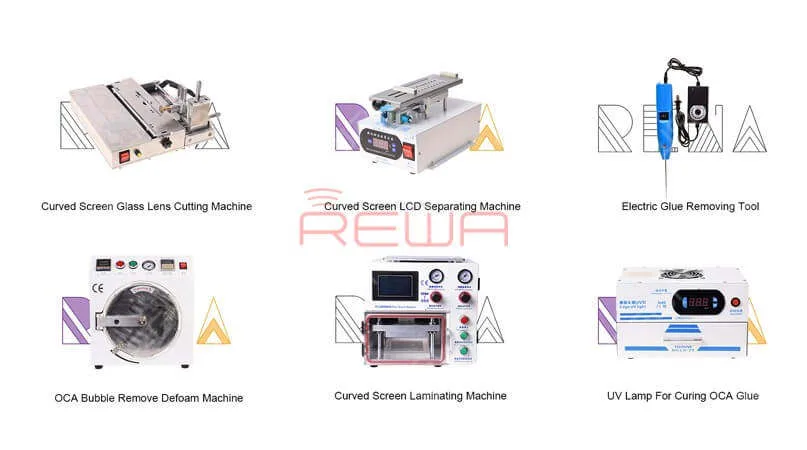
    This Refurbishing Solution V5.0 mainly uses the following equipment:
    Samsung Galaxy S9/S9+ Cracked Screen Glass Only Repair - Refurbishing Solution V5.0

    Samsung Galaxy S9/S9+ Cracked Screen Glass Only Repair - Refurbishing Solution V5.0

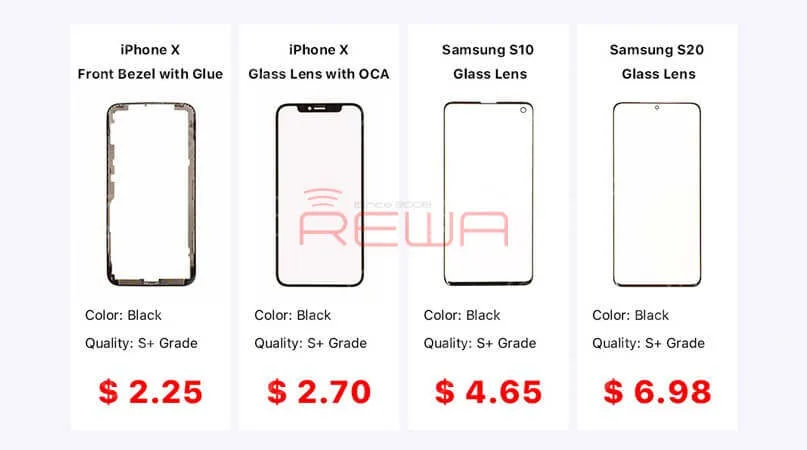
    Lentille en verre pour Samsung & iPhone

    Machine de découpe de verres d'écran incurvés

    Séparateur LCD à écran incurvé rotatif

    Outil électrique pour enlever la colle

    Machine à stratifier pour écran incurvé

    Lampe UV haute puissance

    Machine à enlever les bulles

    For more detailed info on each product, contact us at sales@rewatechnology.com, or go to the shop.rewa.tech to learn more!


    Samsung Galaxy S9/S9+ Cracked Screen Glass Only Repair - Refurbishing Solution V5.0

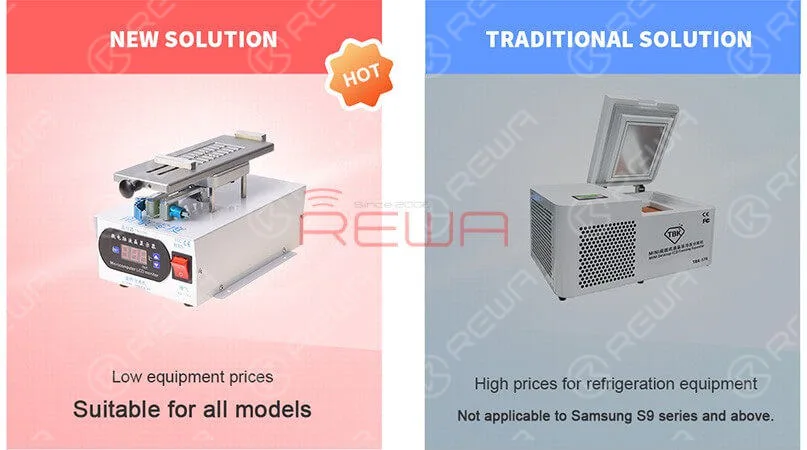
    Compared to a traditional solution, the Refurbishing Solution V5.0 is suitable for all models. Especially suitable for the Samsung S9 series and above. The new solution can solve the problem of LCD layering, avoiding cold damage to the LCD. Also, the overall equipment price is lower than traditional solutions. Better than any other solution on the market, we provide the best technical support which includes online customer service and a full range of instructional video services.


    Samsung Galaxy S9/S9+ Cracked Screen Glass Only Repair - Refurbishing Solution V5.0

    Better than any other solution on the market, we provide the best technical support which includes online customer service and a full range of instructional video services.

    For more details on the operation, watch the video below:

  • Reconditionnement d'écran iPhone 11 Pro Max

    Reconditionnement d'écran iPhone 11 Pro Max

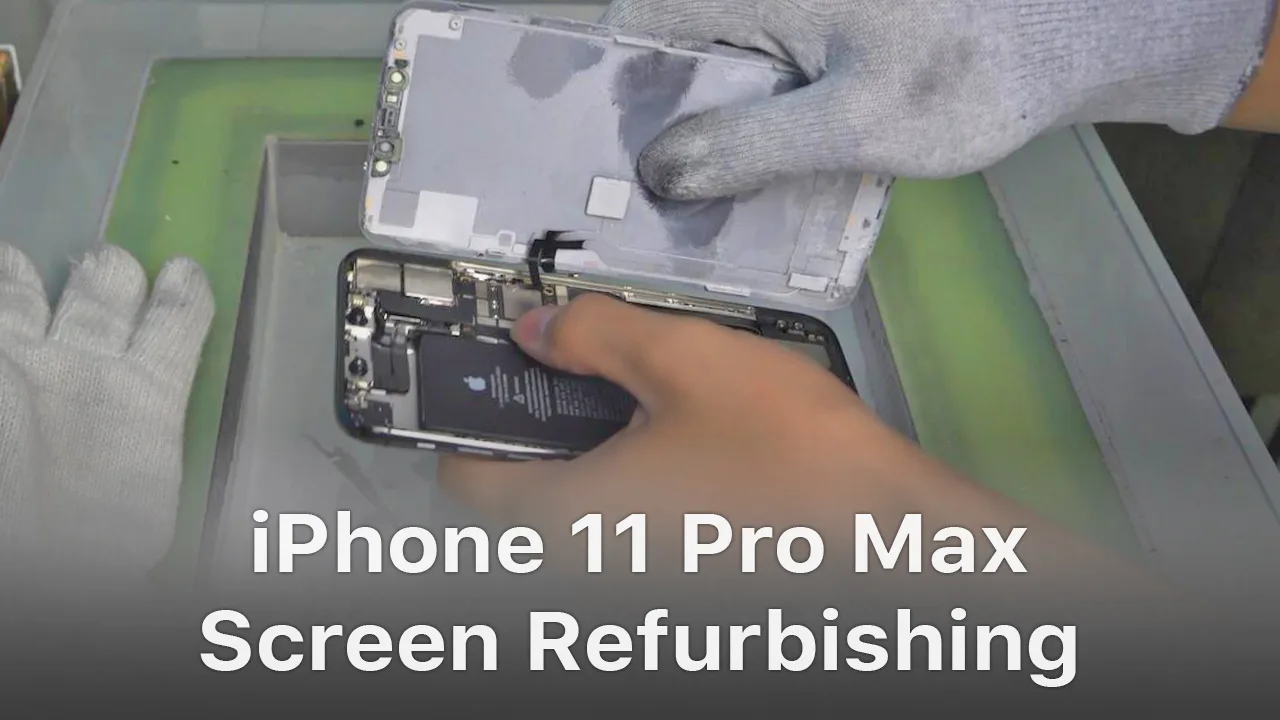
    For iPhone X and later iPhone models, the bracket covering the bottom flex cable bonding area is adhered to by cold adhesive. The traditional method with heating assistance when removing bezel might damage the screen. After several attempts, REWA LAB found that the new method with cold assistance can improve the success rate and efficiency of screen refurbishing. For details, please check our video today – iPhone 11 Pro Max screen refurbishing.

    Tools & Parts used to refurbish iPhone 11 Pro Max:

  • Conseils et astuces pour le remplacement de l'écran et de la batterie de l'iPhone

    Conseils et astuces pour le remplacement de l'écran et de la batterie de l'iPhone

    No matter you are a repair shop owner or a customer of a mobile phone, there’s more than one reason you might need to replace the iPhone screen or the battery.

    Screen/battery replacement is an essential business for repair shops. Professional replacing techniques can not only reduce the failure rate of screen/battery replacement and save time, but also highlight the professional image of the repair shop and gain favorable feedback from customers.

    In this article, we take iPhone X as an example to show you tips and tricks for screen/battery replacement of iPhone X/XS/XS Max.

    Follow our steps and power your repair shop now.

    Finding the Right Tools, Screen, Battery, and Instructions

    Once you’re ready to replace the screen or the battery, research the recommended tools and battery options for each phone individually, as they’re all slightly unique.

    REWA is dedicated to providing products and services for business clients(repair shops, refurbishing factories, etc.) and data recovery services for individual clients.

    As for other repair demands of individual clients, repair shops nearby would be a good choice for you.

    What Will You Need to Replace The Screen/Battery of Your iPhone X

    New iPhone X Screen

    New iPhone X Battery

    New iPhone X Battery Adhesive Strips

    Pistolet à air chaud

    Plastic Pry Piece

    Pince à épiler droite

    Plastic Suction Cup

    Barre à mine en plastique

    Bracelet antistatique – protect components from accidental ESD damage

    Tri-point Screwdriver

    Tournevis Phillips

    Pentagon Screwdriver

    iPhone Screen Replacement Steps Overview

    1.Pentalobe Screws Removing and Hot Air Gun Heating

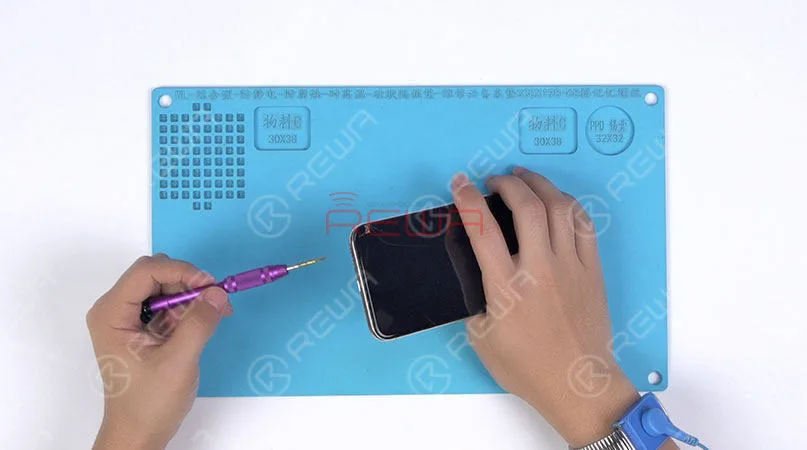
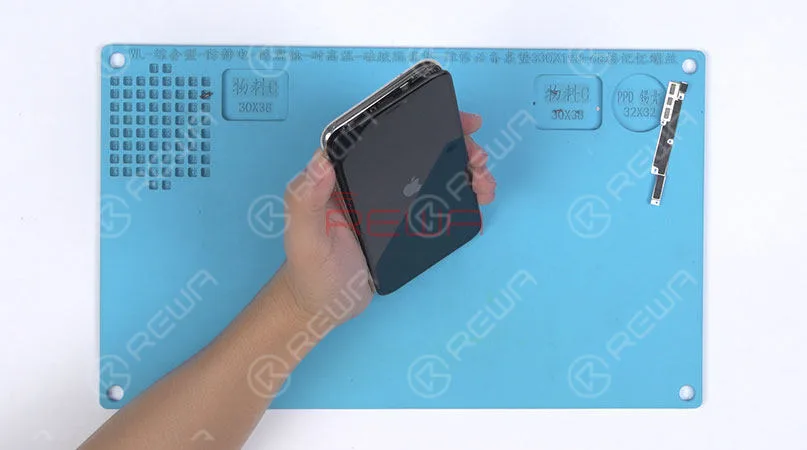
    Remove the two pentalobe screws with the pentagon screwdriver at the bottom edge of the phone.

    Since there are waterproof seals between the screen and the back glass assembly, you need to heat and soften up the waterproof seals with the hot air gun at 120℃-150℃ for 1 minute.

    Remove the two pentalobe screws with the pentagon screwdriver at the bottom edge of the phone. Since there are waterproof seals between the screen and the back glass assembly, you need to heat and soften up the waterproof seals with the hot air gun at 120℃-150℃ for 1 minute.

    2. Open The Screen

    Press the suction cup firmly onto the screen, and insert the pry piece to slice through the adhesive holding the screen.

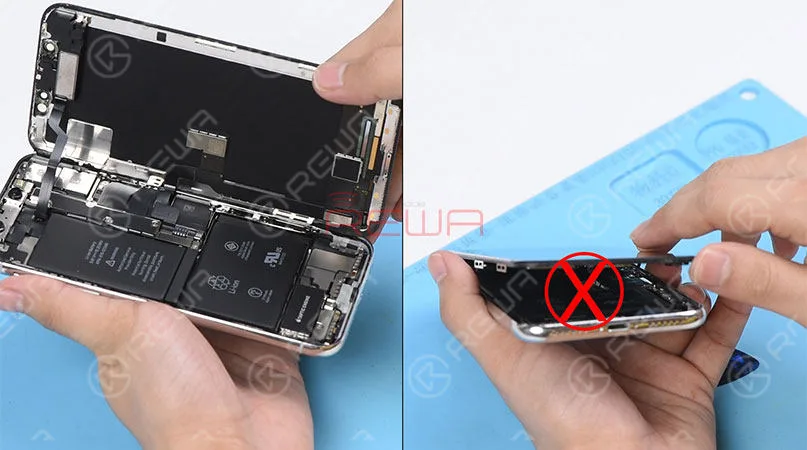
    Note: Do not swing the screen up from the bottom side.

    As the flex cables of iPhone x are mainly arranged on the right side, to avoid tearing off these cables, we need to open the phone by swinging the screen up from the left side.

    Press the suction cup firmly onto the screen, and insert the pry piece to slice through the adhesive holding the screen. Note: Do not swing the screen up from the bottom side. As the flex cables of iPhone x are mainly arranged on the right side, to avoid tearing off these cables, we need to open the phone by swinging the screen up from the left side.

    ♥Tips: Please be careful with the force applied when replacing the screen.

    Otherwise, the phone might be stuck in touch/display issues. Because the bottom area of the screen(with ICs bonded here) and the Face ID area are fragile.

    3. Connector Bracket And Screen Removing

    (Watch the video to get details – at the ending of the article)

    Remove screws securing the connector bracket with the tri-point screwdriver

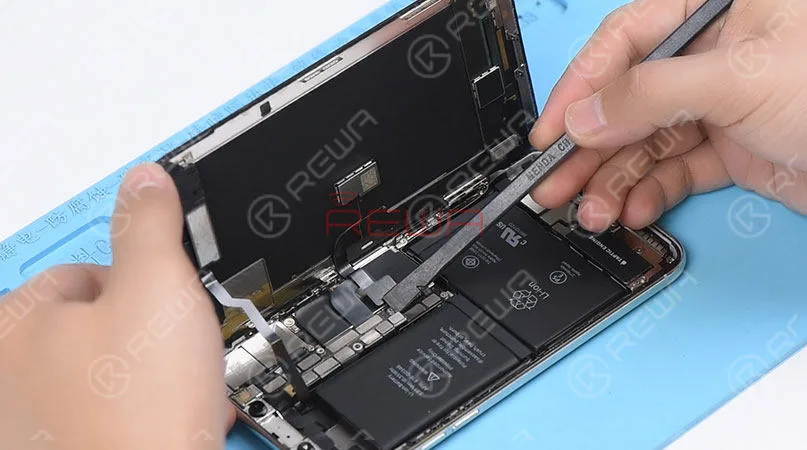
    Pry the battery connector up from its socket

    Disconnect the OLED panel cable connector

    Pry the digitizer cable connector up from its socket And then disconnect the front panel sensor assembly flex cable
    Pry the digitizer cable connector up from its socket And then disconnect the front panel sensor assembly flex cable

    ♥Tips: The front panel sensor assembly flex cable is secured by the double-sided tape. Please lift the cable carefully when removing the screen.

    4. Earpiece Speaker And Sensor Assembly Removing & Installation

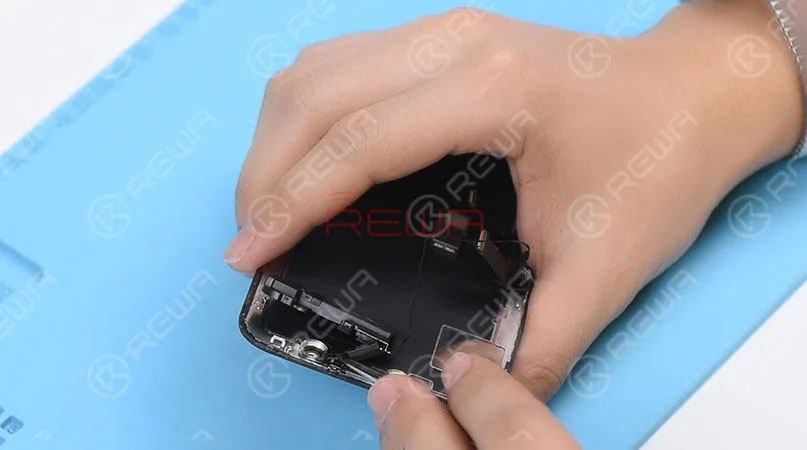
    Remove screws securing the front panel sensor assembly flex cable with the tri-point screwdriver. Heat with the Hot Air Gun at 120℃-150℃ first to soften the adhesive, then remove the front panel sensor assembly flex cable with tweezers.
    Remove screws securing the front panel sensor assembly flex cable with the tri-point screwdriver. Heat with the Hot Air Gun at 120℃-150℃ first to soften the adhesive, then remove the front panel sensor assembly flex cable with tweezers.

    ♥Tips: there is double-sided tape securing the Flood Illuminator Module area.

    Get the earpiece speaker and sensor assembly installed onto the new screen

    Get the front panel sensor assembly flex cable, the digitizer cable connector the OLED panel cable connector and the battery connector connected

    5.Phone Assembling

    Please test the screen before the reassembly process.

    Please test the screen before the reassembly process.

    ♥Tips: the waterproof seals might get damaged when replacing the screen. If so, clean the residual waterproof seals at first, then stick new waterproof seals.

    The true tone-capable display of iPhone 7 – XS Max is missing after screen replacement. So we highly suggest that repair shops restore the true tone with the True Tone Programmer after screen replacement.

    iPhone X/XS/XS Max Screen Replacement Tips & Tricks

    1. Wear Anti-static Wrist Strap

    2. Power off the phone before the disassembly

    3. Pre-heat with hot air gun

    4. Open the phone by swinging the screen up from the left side

    5. Pay attention to the bottom area of the screen (ICs Bonding Area)

    6. Pay attention to the top area of the screen(Face ID area)

    7. Disconnect the battery flex cable first

    8. Pre-heat before removing earpiece speaker and sensor assembly

    9. Test the screen before the reassembly process

    iPhone Battery Replacement Steps Overview

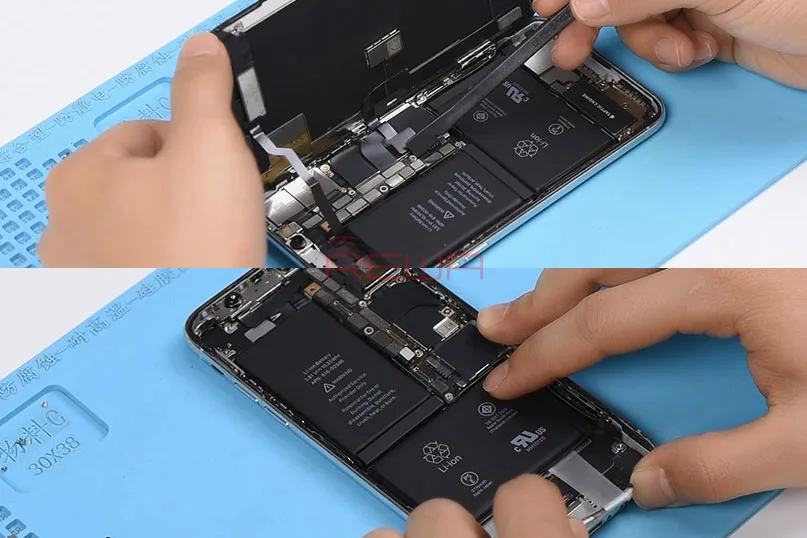
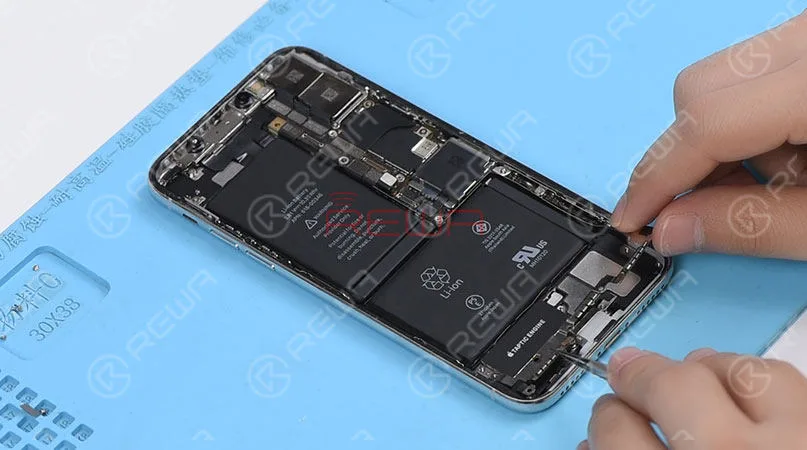
    ♥Tips: To remove the battery adhesive strips easily, please remove the Taptic Engine and speaker at first.

    1.Taptic Engine And Speaker Removing

    Please be noted that there are many screws detached in this step, we highly suggest that you place these screws in order.
    1.Taptic Engine And Speaker Removing   Please be noted that there are many screws detached in this step, we highly suggest that you place these screws in order.

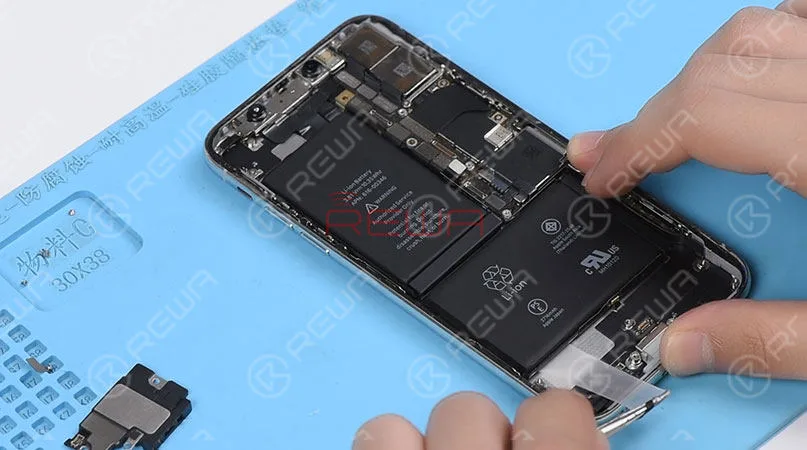
    2.Battery Adhesive Strips Removing

    Wrap the battery adhesive strips with tweezers and pull the strips out slowly and parallelly.
    2.Battery Adhesive Strips Removing Wrap the battery adhesive strips with tweezers and pull the strips out slowly and parallelly.

    3.Battery Adhesive Strips & Battery Adhering

    Adhere new battery adhesive strips to the battery.

    4.Taptic Engine And Speaker Installation

    iPhone X/XS/XS Max Battery Replacement Tips & Tricks

    1. Taptic Engine and speaker removing first

    2. Place screws in order

    3. Pull the strips out slowly and parallelly.

    Conclusion :

    In addition to professional techniques, high-quality and reliable third-party suppliers are also extremely important for repair shops. Choose REWA, choose the quality you want.

    For individual clients and repair enthusiasts, REWA online shop with iPhone screens of different quality grade and replacement batteries are here for your choice.

    Why hesitating? Place your order now! For certified iPhone Screens, replacement batteries and repair tools, please place an order on BOUTIQUE EN LIGNE REWA.

  • REWA High-end iPhone Aftermarket In-cell Screen – OEM Quality With Better Price

    REWA High-end iPhone Aftermarket In-cell Screen – OEM Quality With Better Price

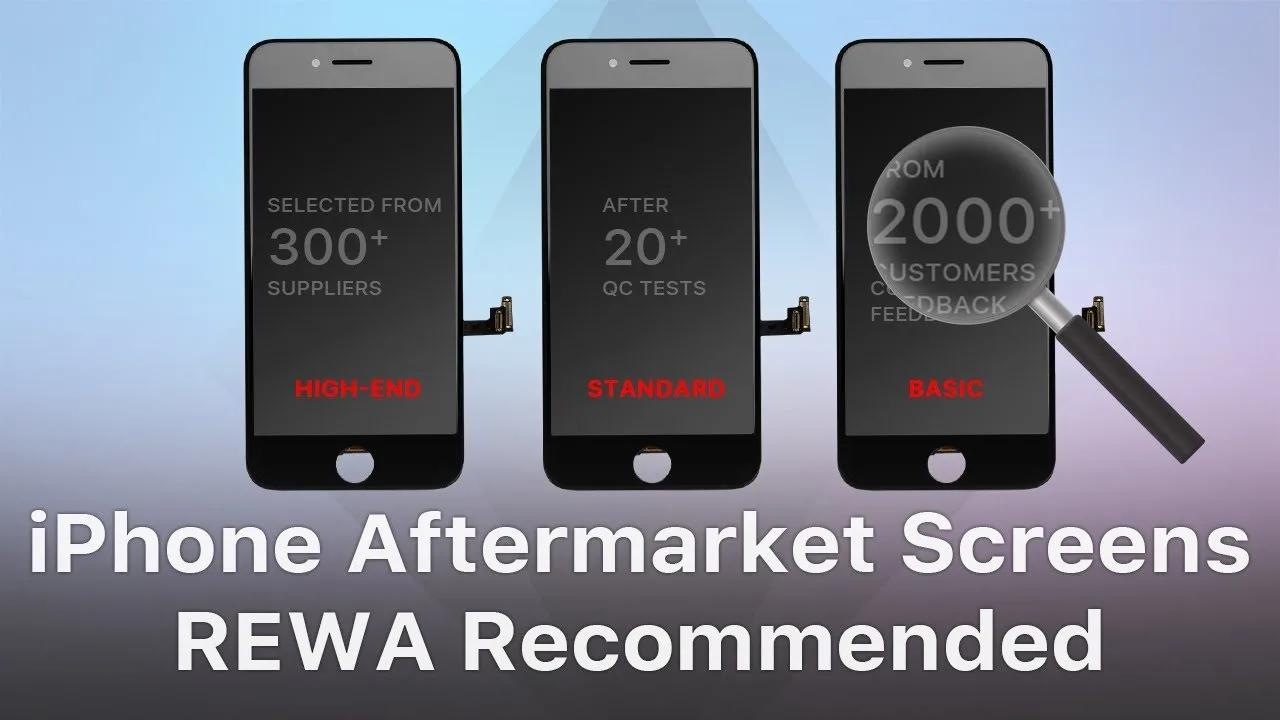
    For most customers, the iPhone aftermarket screen is definitely a cost-effective choice. However, the quality of Écrans de rechange pour iPhone on the market also varies from one to another. As a professional solution provider, REWA has devoted to providing cost-effective and competitive products for our clients. After a series of tests conducted by REWA LAB, we are happy to recommend our high-end iPhone in-cell screens covering from iPhone 6 to iPhone 8 Plus.

    REWA In-cell Screen Test Report

    Inspection cosmétique

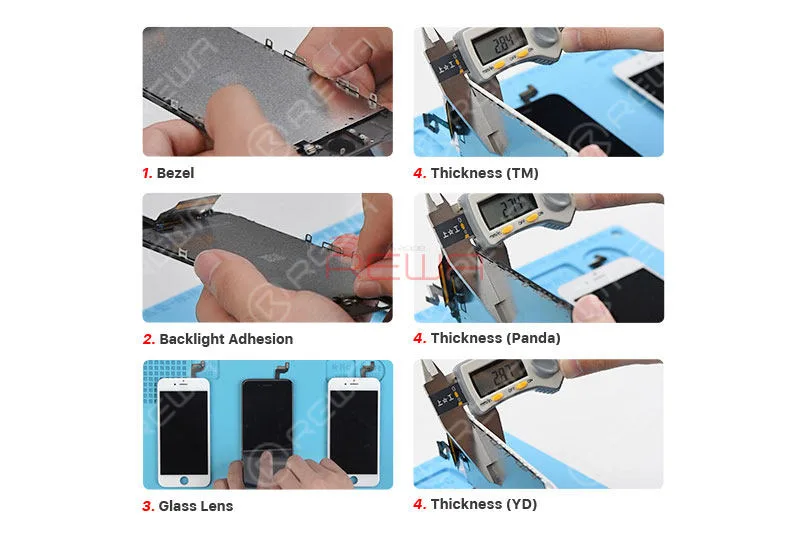
    ① The surface of glass lens is not damaged, off paint, or with bubbles inside. The glass lens has been manufactured under high-temperature tempering to be sturdy and durable.

    ② Without adhesive failure, the front bezel is not damaged or screw hole blocked.

    ③ Flex cables are not broken or damaged. The display flex cable and the touch flex cable are bonded together just like the OEM New.

    ④ The backlight has adhered tightly that cannot be separated easily.

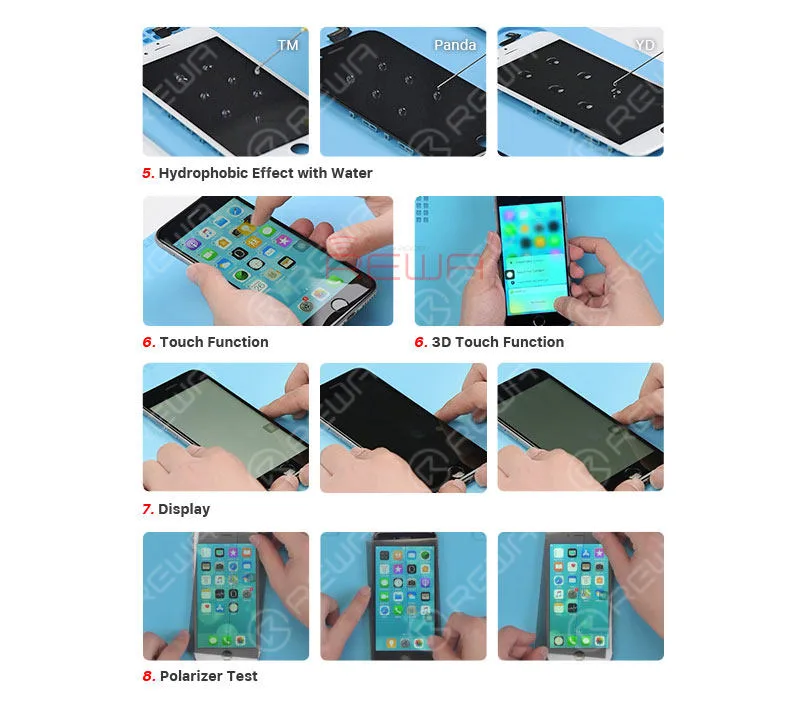
    ⑤ Coated with fingerprint oil, the screen performs perfectly in the hydrophobic effect test.

    Screen Fitness

    The screen fitness is decided by the thickness of the screen, IC size and bezel adhesion.

    ① Screen Thickness Manufactured with the original material&structure&technology, the thickness of REWA high-end iPhone in-cell screen is close to the OEM New.

    ② IC Size ICs on the screen feature normal size that won’t affect screen installation.

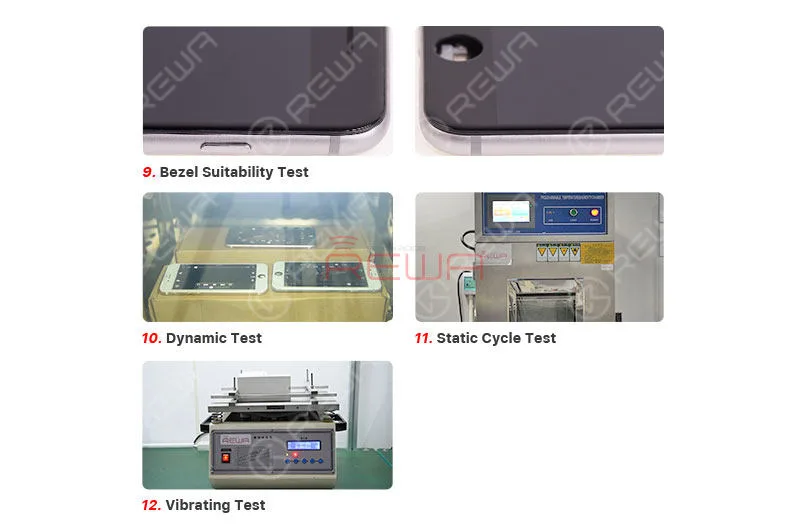
    ③ Installation The phone features smooth edges without protuberance/gap. There is no light-leaking or backlight oppression.

    Display Comparison

    ① Display Effect With wide color gamut and ESR backlight support, the screen is close to the OEM New in display effect and backlight brightness.

    ② Polarizer Test The screen performs well at all angles under the sunglasses just like the OEM New.

    Test de fonctionnement

    ① Touch & 3D Touch & Keyboard Manufactured with the original material &s tructure & technology, REWA high-end iPhone in-cell screen features smooth and stable touch just like the OEM New.

    ② The screen runs smoothly when playing videos/games just like the OEM New.

    ③ Measure temperature after the phone has run for half an hour. The measured value is close to the OEM New.

    Aging & Vibrating Test

    After the Static Cycle Test (Condition: -20℃/2Hrs, +55℃55%RH/2Hrs, +55℃/4Hrs), the Dynamic Test (Condition: +45℃; playing video for 2Hrs) and the Vibrating Test (Amplitude: 2mm, Frequency: 50HZ, Time:1H), REWA high-end iPhone in-cell screen performs well in the display/function test and features normal backlight adhesion.

    Conclusion :

    Manufactured with the original material&structure&technology, REWA high-end iPhone in-cell screen performs perfect in touch, 3D touch, screen fitness, display, function test, etc.. Featuring performance close to OEM New, the screen also supports true tone restore. With a relatively low price, REWA high-end iPhone in-cell screen is definitely a qualified alternative to the OEM screen.

    REWA High-end iPhone Aftermarket In-cell Screen - OEM Quality With Better Price

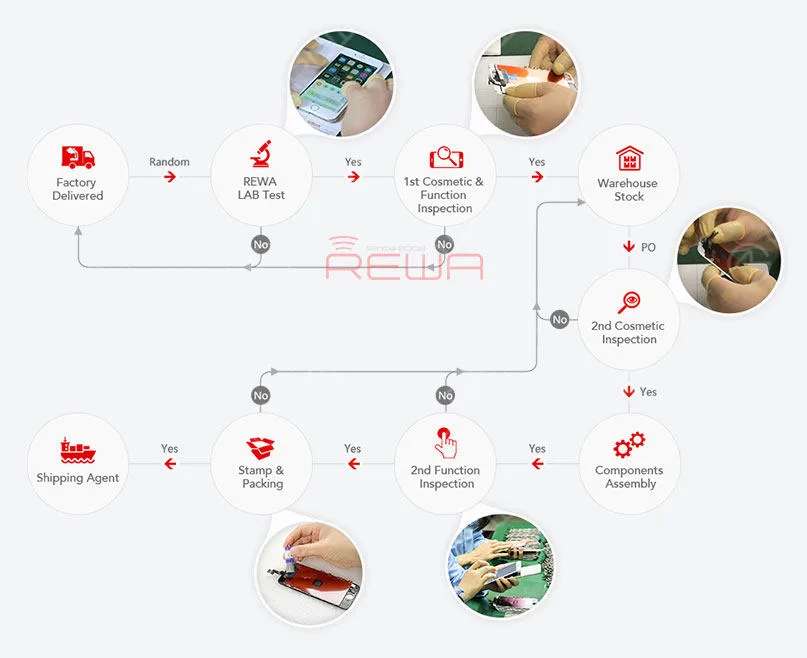
    We provide a one-year warranty for our products and four rounds of quality control process before shipment. REWA certified products, trustworthy and reliable.

    For quick order, please visit Boutique en ligne REWA! For bulk order, please feel free to contact your REWA account manager to get a discount!

  • Do I have to choose an original iPhone screen?

    Do I have to choose an original iPhone screen?

    There are varies of aftermarket iPhone screens in the market. They are made of different raw materials with different techniques. And also different prices. Some technicians may be confused and even fraud by such a mess quality grades definition. So as to choose the original screen only. But are the original screens really your best choice? Check this video for the answer.


  • Which iPhone X Screen REWA Recommended So Far?

    Which iPhone X Screen REWA Recommended So Far?

    Have you ever been confused by different iPhone X screens in the market? OEM New, AA Grade, Aftermarket Flexible OLED, Aftermarket Rigid OLED, etc. Actually, it is not such a bad thing for customers to have different choices as long as they can distinguish one from another. Well, hope the comprehensive and in-depth comparison test on different iPhone X screens presented by REWA LAB will help you find the right iPhone X screen you need.

  • OLED vs. LED : Impact sur la santé oculaire

    OLED vs. LED : Impact sur la santé oculaire

    Les statistiques de Statista indiquent le nombre total d'utilisateurs de téléphones mobiles dans le monde entre 2015 et 2020. En 2019, le nombre d'utilisateurs de téléphones portables devrait atteindre 4,68 milliards.

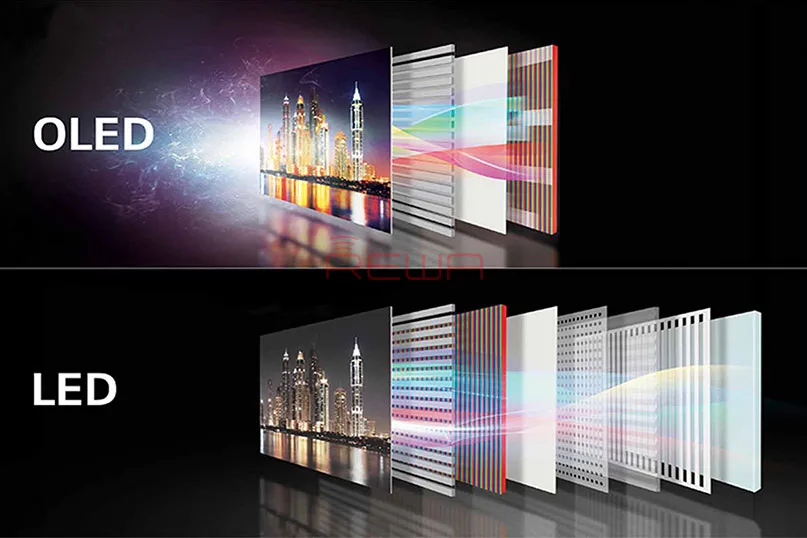
    Ces dernières années, la technologie OLED s'est imposée comme la principale technologie d'affichage des smartphones, et les vendeurs de téléphones les plus populaires au monde proposent tous des smartphones AMOLED.

    On pense que les écrans AMOLED causent des "maux d'yeux" en raison de l'assombrissement à basse fréquence effectué par les fabricants d'AMOLED. OLED ou LED ?

    Les deux facteurs à l'origine du mal des yeux sont la lumière bleue et le scintillement.

    La lumière bleue est une lumière visible à haute énergie, largement reconnue pour ses effets nocifs tels que la gêne oculaire et les lésions de la rétine, ainsi que comme facteur contribuant à des maladies telles que le cancer, le diabète, les maladies cardiaques, l'obésité et l'insomnie.

    Les enfants semblent avoir des rétines délicates qui sont très sensibles aux dangers de la lumière bleue.
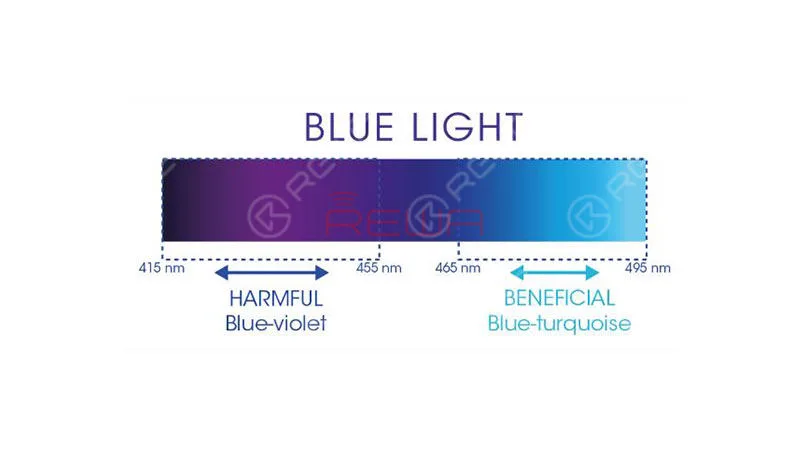
    très sensibles aux dangers de la lumière bleue.

    Intertek, une société britannique indépendante spécialisée dans l'assurance qualité, a également conclu que les lampes OLED n'émettent que 10% de la lumière bleue émise par les lampes LED ayant la même luminance et la même température de couleur.
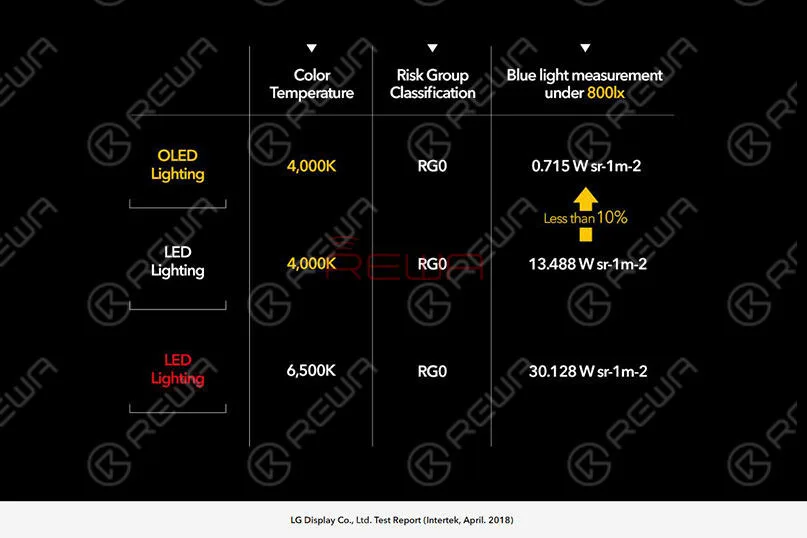
    Lampes LED ayant la même luminance et la même température de couleur.

    Comment gérer la lumière bleue et éviter les dommages causés par le HEV ?

    1. Utilisez Flux ou une application similaire sur votre ordinateur ou votre portable pour réduire la quantité de lumière bleue émise par l'écran.

    2. Utilisez une application sur votre appareil mobile pour réduire la quantité de lumière bleue émise par l'écran.

    3. Utiliser des lunettes ou des lentilles de contact filtrant le VHE

    4. Utiliser des couvercles de filtre bleus

    Le scintillement est l'autre facteur à l'origine du "mal des yeux".

    Le scintillement est un changement visible de luminosité entre les cycles affichés sur les écrans vidéo.

    Il s'applique en particulier à l'intervalle de rafraîchissement des téléviseurs et des écrans d'ordinateur à tube cathodique (CRT), ainsi que des écrans d'ordinateur et des téléviseurs à plasma.

    La commutation de la source lumineuse provoque un scintillement.

    Plus la vitesse de commutation est élevée, plus le scintillement de l'écran est rapide. La plupart des téléphones mobiles adoptent la gradation DC et la gradation PWM.

    La gradation en courant continu est une technologie qui permet de régler la luminosité en contrôlant directement les courants de part et d'autre du dispositif d'émission de lumière.

    Plus le courant est faible, plus la luminosité est faible.

    La norme IEEE PAR1789 recommande des pratiques de modulation du courant dans les LED à haute luminosité afin d'atténuer les risques pour la santé des spectateurs.

    Écrans LCD utilisent principalement la gradation en courant continu.

    La gradation en courant continu est une méthode très simple.

    Mais elle présente des inconvénients évidents.

    Comme les longueurs d'onde des trois couleurs primaires sont différentes, la gradation CC peut entraîner des effets de couleur inévitables à une luminosité extrêmement faible.

    Les écrans AMOLED utilisent la technologie de gradation PWM à basse fréquence.

    Plus la luminosité de l'écran est faible, plus le taux de stroboscopie est faible et plus les yeux humains peuvent percevoir la lumière, ce qui facilite la tâche des personnes sensibles.

    La gradation PWM est une technique qui permet d'ajuster la luminosité par un clignotement rapide. Même si les yeux humains ne peuvent pas percevoir les changements de l'écran lors du processus de commutation, notre cerveau réagit à ce phénomène.

    Les scintillements fréquents provoquent de la fatigue, ce qui stimule le système de réfraction et accélère le vieillissement de la vision.

    L'image suivante représente la forme d'onde PWM du rapport cyclique.
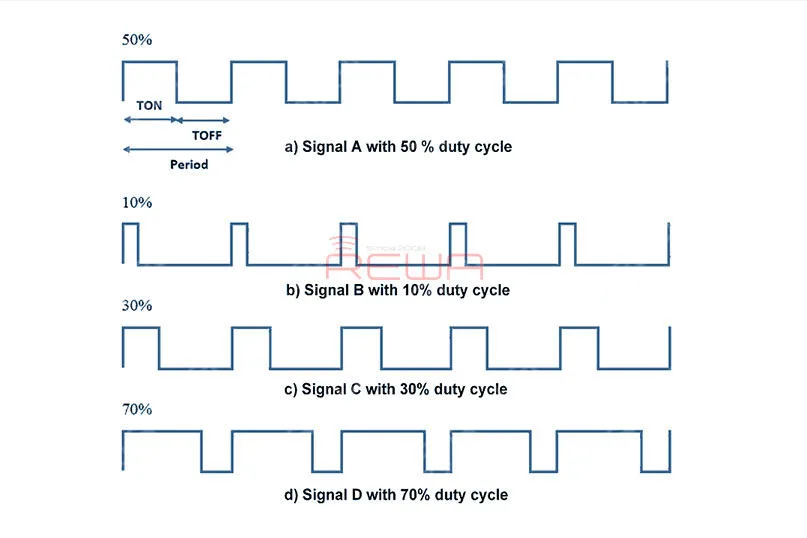
    L'image suivante représente la forme d'onde PWM du rapport cyclique.

    Pourquoi la gradation DC n'est-elle pas adoptée par les écrans AMOLED ?

    Les écrans AMOLED sont des technologies d'auto-éclairage qui reposent sur des matériaux organiques.

    La qualité de l'affichage de l'écran AMOLED est directement liée à la qualité de l'image. matériaux de tamisage.

    La différence de couleur entre les pixels sera clairement démontrée.

    Avec la gradation DC, les premiers modèles tels que les Galaxy S, S2 et Note souffraient d'une couleur blanche inégale et d'une forte dominante de couleur.

    Le plus triste, c'est que ce problème n'a pas été bien résolu, même jusqu'à présent.

    Cependant, la référence de gradation PWM résout le problème de la dominante de couleur à faible luminosité de l'écran AMOLED et améliore en fait la stabilité des couleurs.
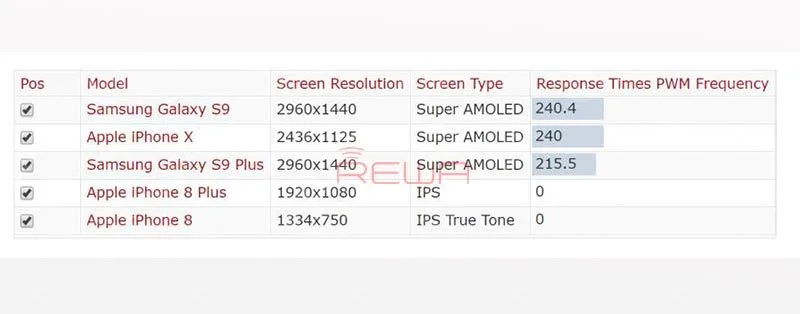
    améliore encore la stabilité de la couleur

    Comment éviter les dommages causés par le scintillement ?

    1. Pour minimiser les effets de scintillement, ne regardez pas l'écran dans l'obscurité.

    2. Ne vous asseyez pas trop près de l'écran.

    3. Pour minimiser le scintillement du PWM, faites fonctionner l'écran à sa luminosité maximale, car c'est là que le rapport cyclique est le plus élevé.

    4. Pour les téléviseurs, les moniteurs et les ordinateurs portables, recherchez des taux de rafraîchissement d'écran publiés de 120 Hz ou plus. Pour les PC, réglez la fréquence de rafraîchissement la plus élevée possible.

    5. Les personnes très sensibles au scintillement devront peut-être opter pour des écrans LCD, dont les temps de réponse relativement lents atténuent le scintillement.

    Les écrans LCD doivent avoir des couleurs 24 bits sans le contrôle du taux de rafraîchissement (FRC) que l'on trouve dans les écrans 18 bits (ou moins).

    Des conseils sont également donnés sur la manière de protéger ses yeux lors de l'utilisation d'un téléphone portable.

    1. Procurez-vous une protection d'écran antireflet

    2. Clignez fréquemment des yeux ou aspergez-les avec de l'eau.

    3. Suivre la règle du 20/20/20

    En ce qui concerne le téléphone portable, il existe la règle dite des 20/20/20.

    En gros, cela signifie que toutes les vingt minutes, vous devez regarder quelque chose à une distance d'au moins vingt pieds pendant au moins vingt secondes.

    4. Réglez la luminosité, le contraste et la taille du texte.

    5. Gardez votre écran propre

    6. Garder la bonne distance

    Quelle est votre opinion sur le sujet ? Partagez vos réflexions dans les commentaires ci-dessous !

    Besoin de remplacer l'écran LCD ?

    REWA propose des réparations de téléphones portables, des remplacements d'écrans et des outils depuis 10 ans.

    Notre nouvelle boutique en ligne - shop.rewa.tech fournit les meilleures pièces de rechange pour la réparation des téléphones portables à des prix abordables.

    De plus, il s'agit d'une vente flash intempestive. Ne manquez pas cette occasion !

    Cours de réparation de téléphones portables :
  • Écrans de rechange pour l'iPhone X Tests complets et comparaisons

    Écrans de rechange pour l'iPhone X Tests complets et comparaisons

    Nowadays, more and more iPhone X aftermarket screens emerge in the market. Different structures as they share, they are also different in qualities. As to brightness issues and display issues most concerned by our clients, REWA LAB has conducted strict tests and comparison on iPhone X screens and we are happy to share with you the results as follows.

  • First-hand Test on New iPhone Aftermarket Screen – Panda Screen

    First-hand Test on New iPhone Aftermarket Screen – Panda Screen

    Recently, a newly developed iPhone Aftermarket screen – Panda screen has appeared in the market with iPhone 6/6s/7/8 models. REWA LAB has carried out a series of tests on our exclusive Panda screen samples. Let’s take a look at the test result with iPhone 6s as an example.

    COSMETIC INSPECTION

    Test on New iPhone Aftermarket Screen

    The bezel, glass lens and backlight adhesion are qualified.

    The thickness of Panda screen is 2.74mm, which is thinner than the other two screens.

    TEST DE FONCTION

    Test on New iPhone Aftermarket Screen

    Panda screen has higher hydrophobicity than the other two screens.

    It has a stable reaction sensitivity of touch and 3D touch function.

    The pure color performance is qualified but some of the Panda screen samples have polarizer problem under POL Film. It is uncertain if it will be improved when it comes to full production or not.

    INSTALLATION TEST

    Test on New iPhone Aftermarket Screen

    The bezel fits good with no seam.

    After 2-hour Dynamic test, 8-hour Static Cycle test, and 1-hour Vibrating test, all the functions performs normally.

    The Panda screen samples performed well during the test. Still, as a new product, there lies the uncertainty about its quality. The recommendation, therefore, is for you to get some samples or try with a small quantity if have any interests. Bulk stock is not suggested.

    More Panda Screen details or sample needs please contact our account manager.

  • REWA iPhone Screen & Flex Compatibility Test On iOS 12

    REWA iPhone Screen & Flex Compatibility Test On iOS 12

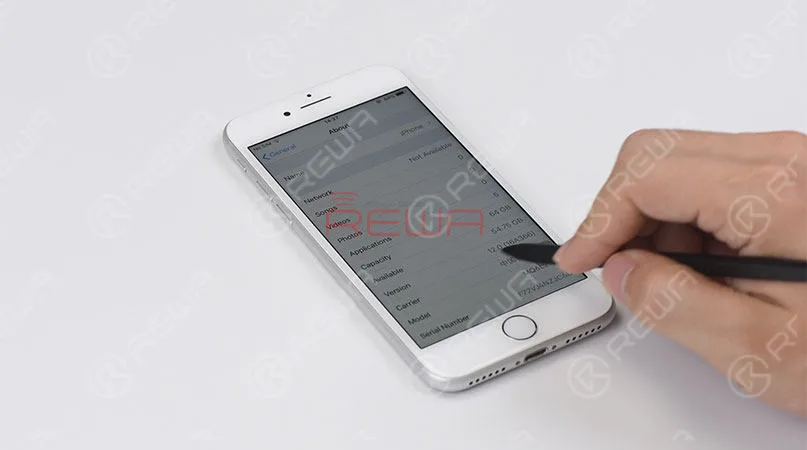
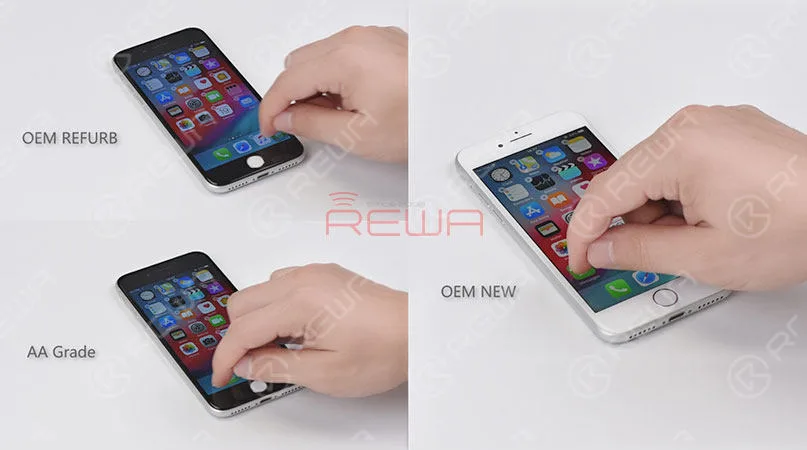
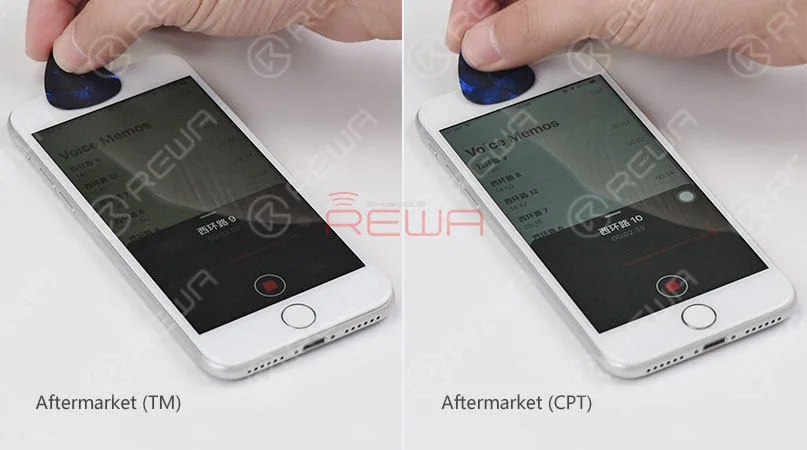
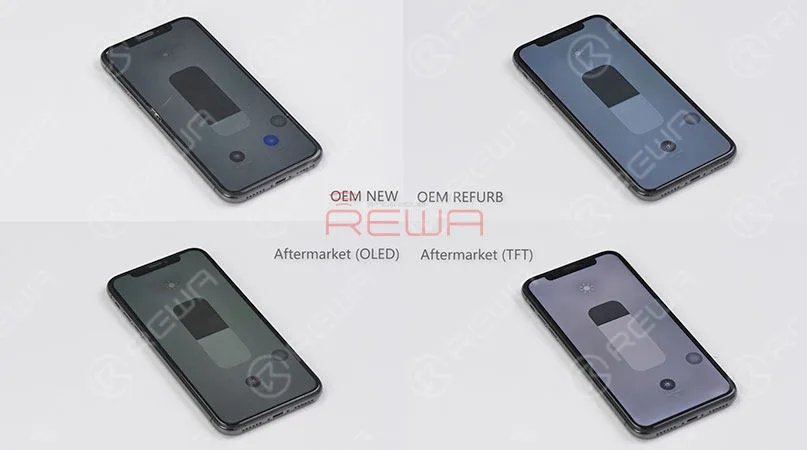
    Since iOS 12 has been released recently, REWA LAB has conducted a series of compatibility tests for iPhone series from iPhone 6s to iPhone X with OEM NEW, OEM REFURB and aftermarket screens respectively. According to the test results, common functionality like touch functionality, 3D Touch, proximity sensor functionality and light sensor functionality function normally on iOS 12. Now, let’s take iPhone 8 and iPhone X as examples and show you how the test goes. 

  • REWA iPhone Screen & Flex Compatibility Test On iOS 12

    Test de compatibilité des écrans et des nappes REWA iPhone sous iOS 12

    Apple iOS 12 soft update is already available today with a lot of adding new features for supported iPhone, iPad and iPod devices. Compared with former iOS versions, iOS 12 catches full attention of most iPhone users since iOS 11 actually has some problems. REWA also focuses heavily on a bunch of new features of iOS 12, like the new UI design, new features, and the operating speed on the older devices, but what we concern most like those in aftermarket industry is that whether it can compatible with our screens properly. Therefore, REWA LAB has immediately carried out a series of tests with iPhone 6s – X screens on newly launched iOS 12.

    iPhone Screen & Flex Compatibility Test

    Update to iOS 12

    iPhone Screen & Flex Compatibility Test

    Touch and 3D touch function test

    iPhone Screen & Flex Compatibility Test

    Proximity sensor test

    iPhone Screen & Flex Compatibility Test

    Ambient light sensor test on iOS 12

    The tests have involved OEM New, OEM Refurb, AA Grade, aftermarket screens and front camera flex replacement from iPhone 6s to iPhone X, with iOS 12, updated, covering test items like proximity sensor, ALS, touch function, 3D touch, battery information face ID etc..

    Let’s take the iPhone 8 and iPhone X as examples.

    iPhone Screen & Flex Compatibility Test

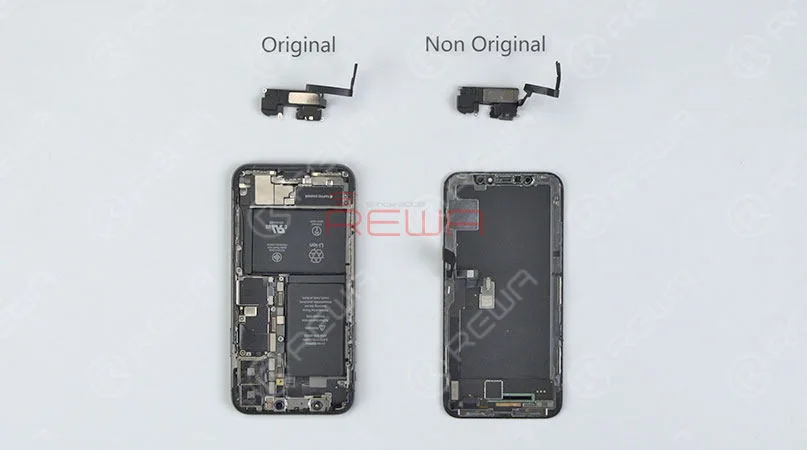
    Front camera flex replacement

    iPhone Screen & Flex Compatibility Test

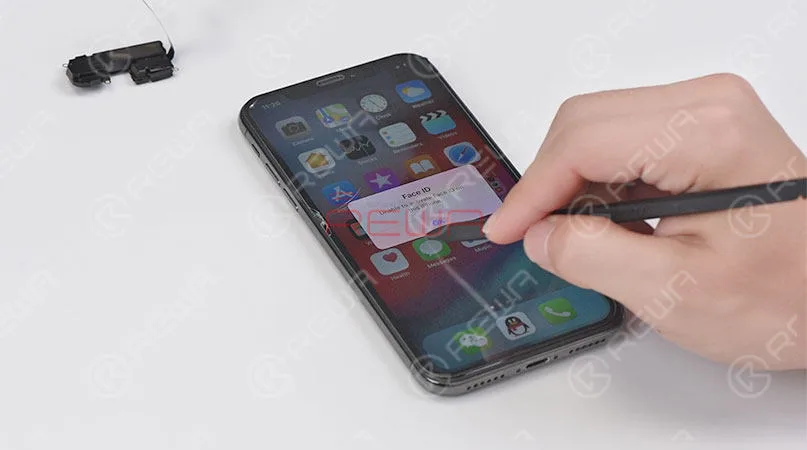
    iPhone X face ID failed after front camera flex replacement

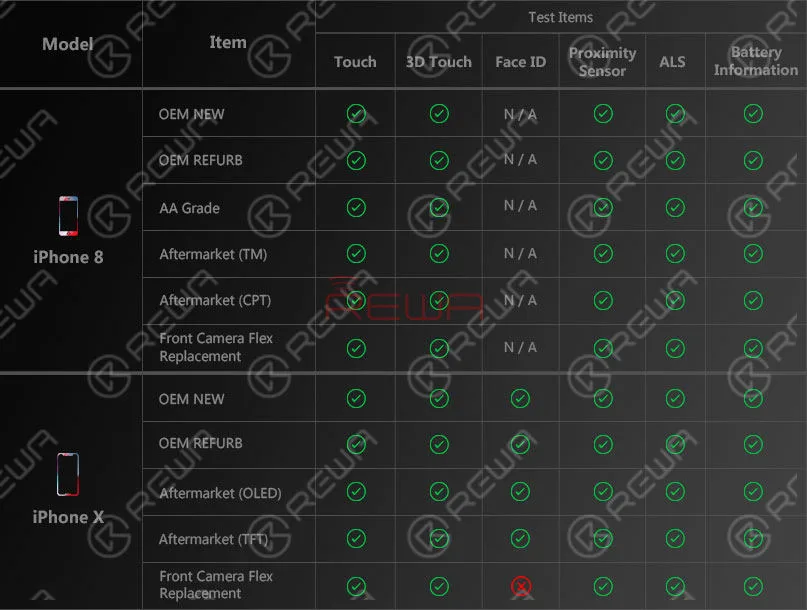
    Following is the test report for your reference.

    iPhone Screen & Flex Compatibility Test

    Test Report

    For detailed testing procedures, please check the video below.

    From the tests, we can see that all the screens of various quality levels from REWA can compatible with the newly released iOS 12. Proximity sensor, ALS, touch function, 3D touch and battery information work normally so far after updated. Whereas we have also noted that iPhone X face ID failed after front camera flex replacement. What’s more, on iOS 12, WiFi icon is disappeared, and true tone function is not available after screen replacement. Has your iPhone device been updated to the iOS 12 already? Any problems popped up? Leave us a comment about your experience.

  • Ne vous laissez pas abuser par le manque de clarté de la qualité des écrans d'iPhone

    Ne vous laissez pas abuser par le manque de clarté de la qualité des écrans d'iPhone

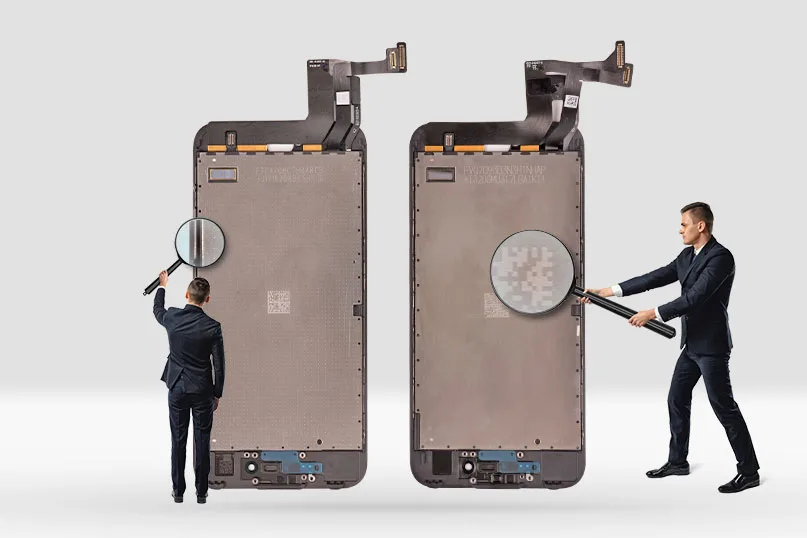
    Avez-vous déjà été dérouté par l'impossibilité de distinguer l'écran OEM de l'iPhone remis à neuf (remplacement du verre uniquement) de l'écran AA (LCD d'origine + câble flexible d'origine/compatible assemblé par une tierce partie) ? Bien qu'il soit difficile de distinguer ces deux types d'écrans, il existe encore quelques détails qui permettent de les distinguer. REWA va partager avec vous ces conseils et vous aider à obtenir la qualité exacte d'écrans que vous souhaitez.

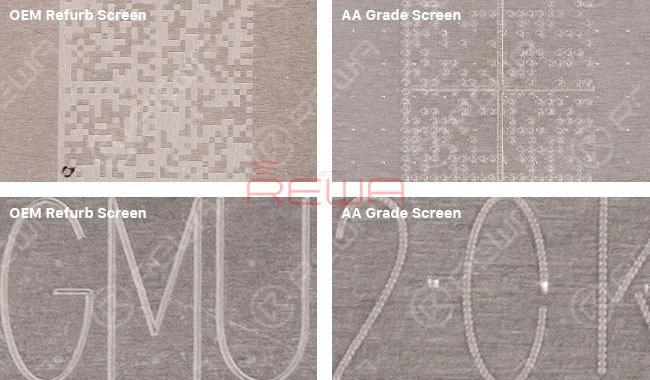
    Vérification du code QR

    Le rétroéclairage de l'écran OEM Refurb est doté d'un code QR unique aux lignes exquises et claires.

    Le rétroéclairage de l'écran de qualité AA présente le même code QR, mais avec des lignes floues et non exquises.

    Ne vous laissez pas abuser par le manque de clarté de la qualité des écrans d'iPhone

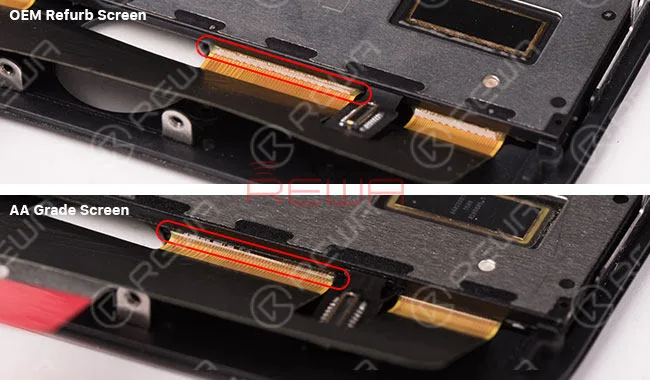
    Vérification de la liaison ACF

    Les écrans OEM Refurb ont peu de colles UV qui débordent et la forme de la liaison ACF est régulière et dentelée. En général, les écrans de qualité AA présentent des débordements de colle UV et la forme de la liaison ACF est irrégulière ou la texture est plus brillante que celle de l'écran OEM Refurb.

    Ne vous laissez pas abuser par le manque de clarté de la qualité des écrans d'iPhone

    Vérification des résidus de l'OCA :
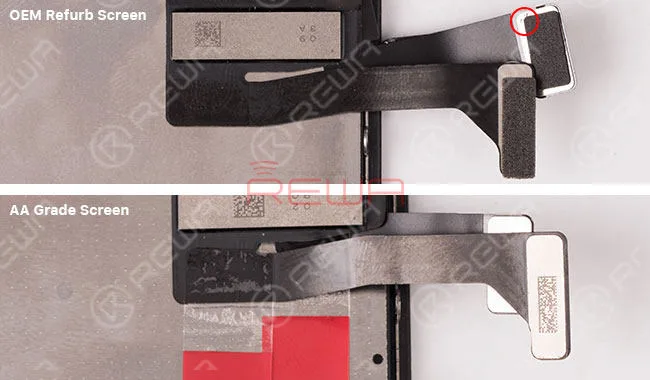
    L'écran OEM Refurb n'a remplacé que la lentille, il reste donc plus ou moins de résidus OCA. L'écran AA Grade a non seulement remplacé la lentille, mais aussi le rétroéclairage, de sorte qu'il ne reste plus aucun résidu d'OCA.

    Ne vous laissez pas abuser par le manque de clarté de la qualité des écrans d'iPhone

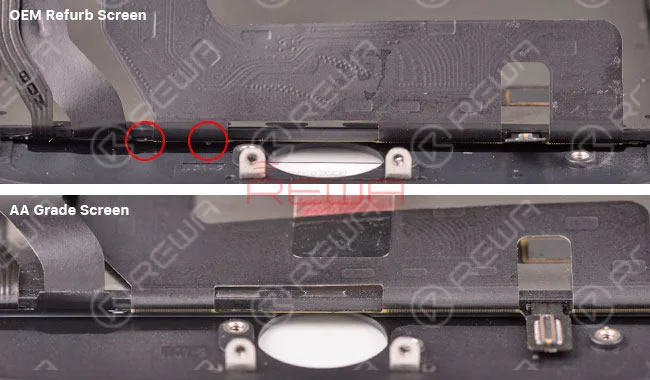
    Vérification de l'éponge en mousse :

    Normalement, l'éponge de l'écran OEM remis à neuf est conservée. L'éponge de l'écran de qualité AA est déchirée.

    Ne vous laissez pas abuser par le manque de clarté de la qualité des écrans d'iPhone

    Nous vous suggérons de combiner ces points de contrôle pour distinguer l'iPhone. Écrans OEM remis à neuf et Écrans de qualité AA.