Etiqueta: Pantalla del iPhone

  • Samsung Galaxy S9/S9+ Cracked Screen Glass Only Repair – Refurbishing Solution V5.0

    Samsung Galaxy S9/S9+ Cracked Screen Glass Only Repair – Refurbishing Solution V5.0

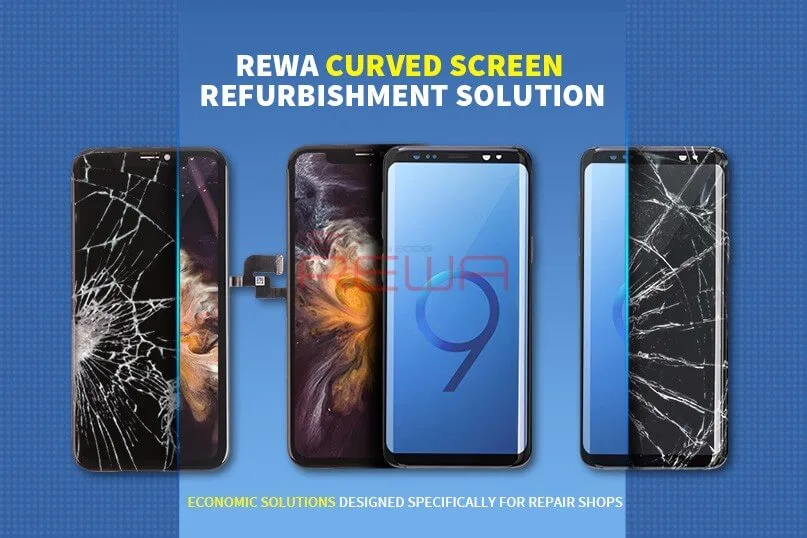
    With the emergence of more and more curved-screen mobile phones on the market, curved-screen technology becomes more and more complicated, adding the difficulty of curved-screen refurbishing. The release of the Samsung S9 series also brings a new challenge since traditional curved-screen refurbishing solutions with freeze assistance cannot meet its need. That’s why we bring you this latest curved-screen refurbishing solution with heat assistance, which can meet the refurbishing needs of most curved-screen and flexible-screen mobile phones.

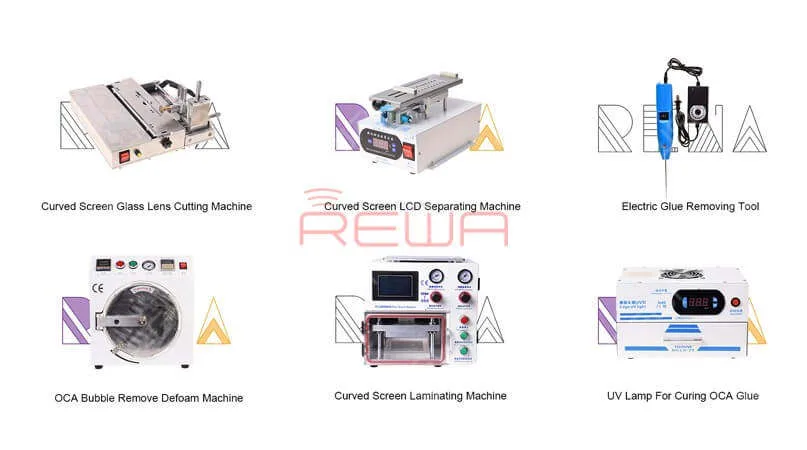
    This Refurbishing Solution V5.0 mainly uses the following equipment:
    Samsung Galaxy S9/S9+ Cracked Screen Glass Only Repair - Refurbishing Solution V5.0

    Samsung Galaxy S9/S9+ Cracked Screen Glass Only Repair - Refurbishing Solution V5.0

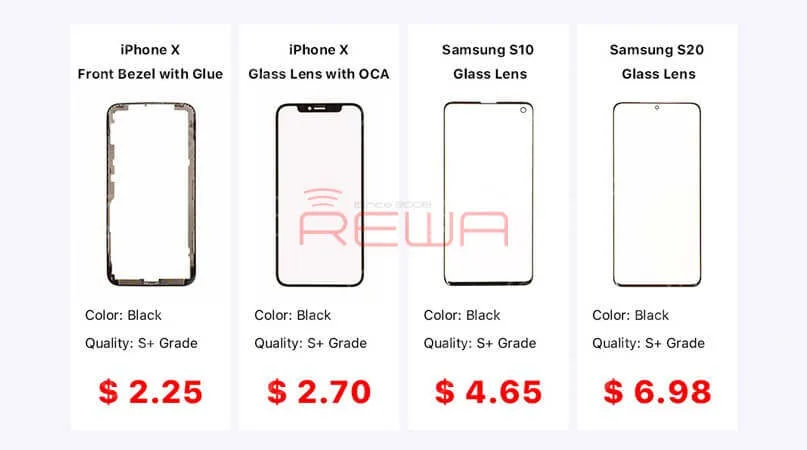
    Glass Lens For Samsung & iPhone

    Curved Screen Glass Lens Cutting Machine

    Rotatable Curved Screen LCD Separating Machine

    Despegador eléctrico

    Máquina laminadora de pantallas curvas

    High Power UV Lamp

    Máquina de eliminación de burbujas

    For more detailed info on each product, contact us at sales@rewatechnology.com, or go to the tienda.rewa.tech to learn more!


    Samsung Galaxy S9/S9+ Cracked Screen Glass Only Repair - Refurbishing Solution V5.0

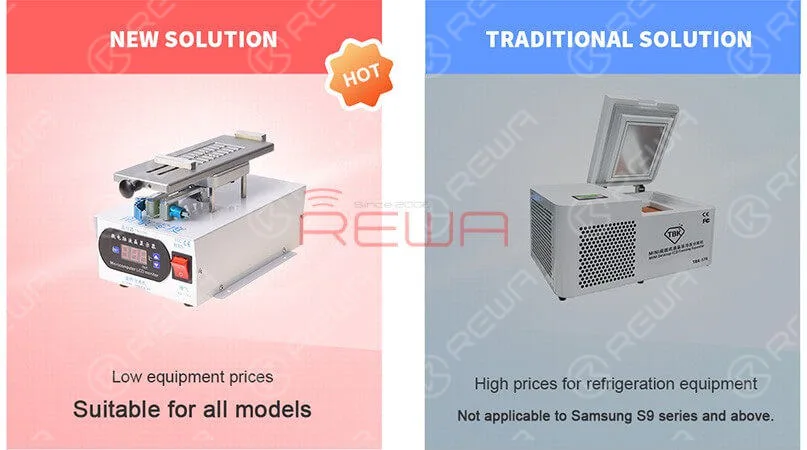
    Compared to a traditional solution, the Refurbishing Solution V5.0 is suitable for all models. Especially suitable for the Samsung S9 series and above. The new solution can solve the problem of LCD layering, avoiding cold damage to the LCD. Also, the overall equipment price is lower than traditional solutions. Better than any other solution on the market, we provide the best technical support which includes online customer service and a full range of instructional video services.


    Samsung Galaxy S9/S9+ Cracked Screen Glass Only Repair - Refurbishing Solution V5.0

    Better than any other solution on the market, we provide the best technical support which includes online customer service and a full range of instructional video services.

    For more details on the operation, watch the video below:

  • Reacondicionamiento de la pantalla del iPhone 11 Pro Max

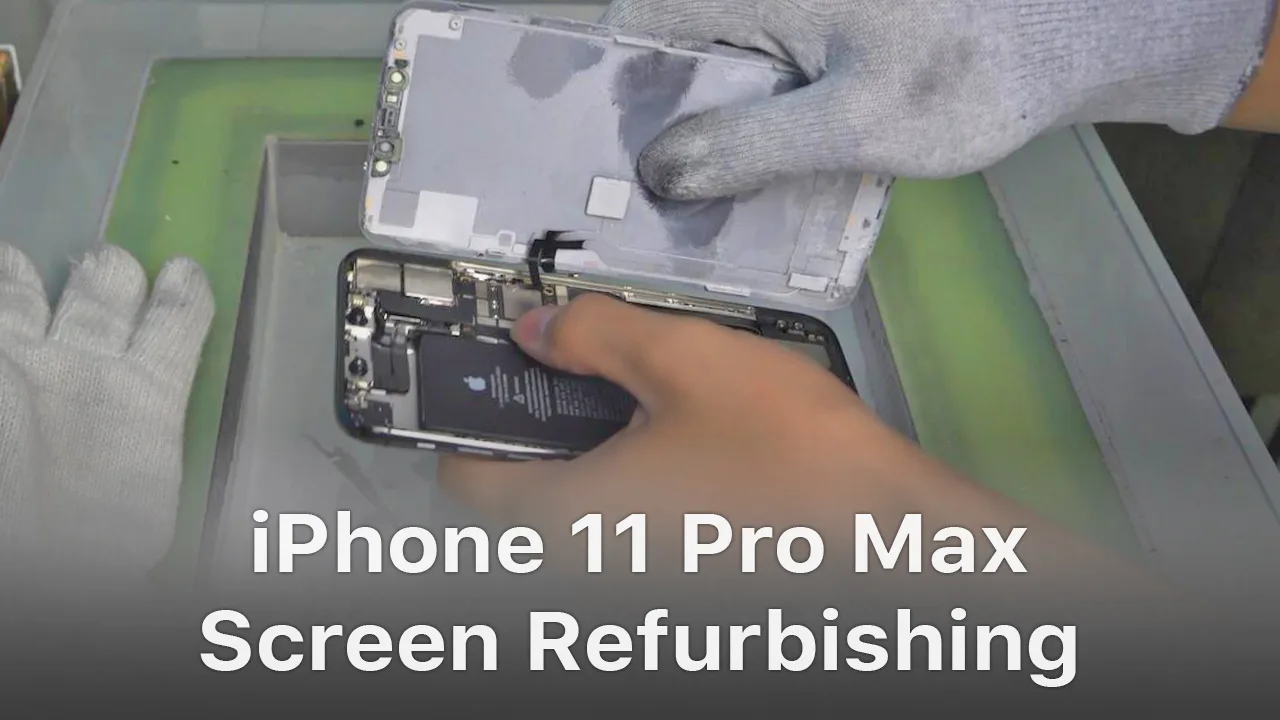
    Reacondicionamiento de la pantalla del iPhone 11 Pro Max

    Para el iPhone X y los modelos posteriores de iPhone, el soporte que cubre el área de unión del cable flexible inferior se adhiere mediante adhesivo en frío. El método tradicional con asistencia de calor al retirar el bisel puede dañar la pantalla. Tras varios intentos, REWA LAB descubrió que el nuevo método con asistencia en frío puede mejorar la tasa de éxito y la eficiencia del remozamiento de pantallas. Para obtener más detalles, consulte nuestro video de hoy: remozamiento de pantallas del iPhone 11 Pro Max.

    Herramientas y piezas utilizadas para restaurar el iPhone 11 Pro Max:

  • Consejos y trucos para el reemplazo de pantalla/batería del iPhone

    Consejos y trucos para el reemplazo de pantalla/batería del iPhone

    No matter you are a repair shop owner or a customer of a mobile phone, there’s more than one reason you might need to replace the iPhone screen or the battery.

    Screen/battery replacement is an essential business for repair shops. Professional replacing techniques can not only reduce the failure rate of screen/battery replacement and save time, but also highlight the professional image of the repair shop and gain favorable feedback from customers.

    In this article, we take iPhone X as an example to show you tips and tricks for screen/battery replacement of iPhone X/XS/XS Max.

    Follow our steps and power your repair shop now.

    Finding the Right Tools, Screen, Battery, and Instructions

    Once you’re ready to replace the screen or the battery, research the recommended tools and battery options for each phone individually, as they’re all slightly unique.

    REWA is dedicated to providing products and services for business clients(repair shops, refurbishing factories, etc.) and data recovery services for individual clients.

    As for other repair demands of individual clients, repair shops nearby would be a good choice for you.

    What Will You Need to Replace The Screen/Battery of Your iPhone X

    New iPhone X Screen

    New iPhone X Battery

    New iPhone X Battery Adhesive Strips

    Pistola de aire caliente

    Plastic Pry Piece

    Pinzas rectas

    Ventosa de plástico

    Palanca de plástico

    Muñequera antiestática – protect components from accidental ESD damage

    Tri-point Screwdriver

    Destornillador Phillips

    Pentagon Screwdriver

    iPhone Screen Replacement Steps Overview

    1.Pentalobe Screws Removing and Hot Air Gun Heating

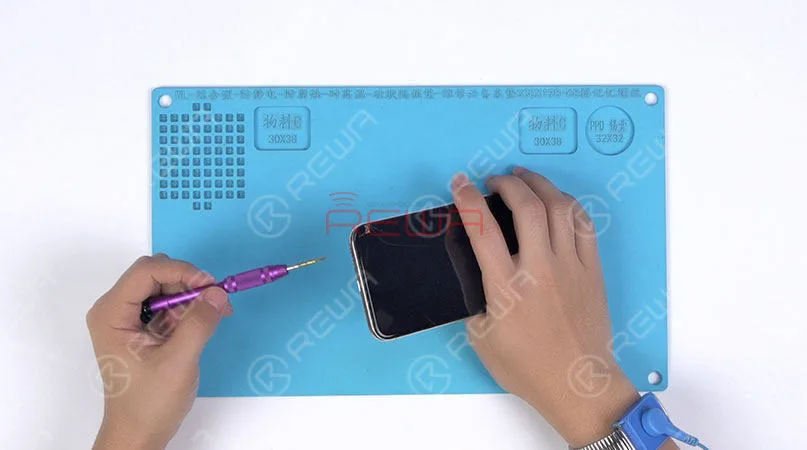
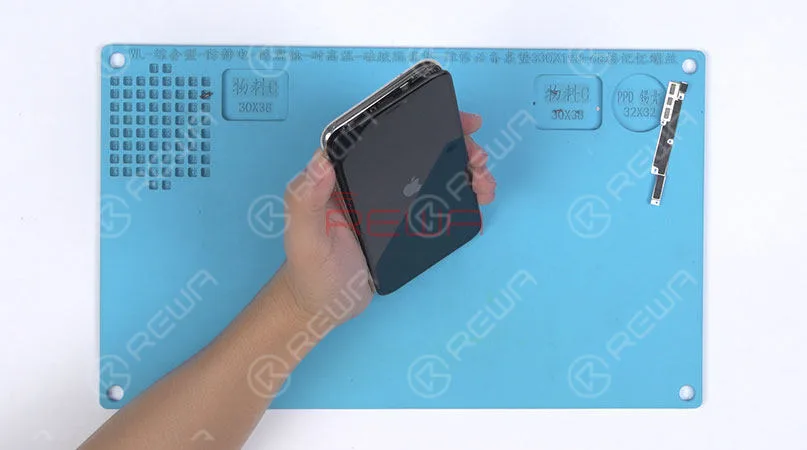
    Remove the two pentalobe screws with the pentagon screwdriver at the bottom edge of the phone.

    Since there are waterproof seals between the screen and the back glass assembly, you need to heat and soften up the waterproof seals with the hot air gun at 120℃-150℃ for 1 minute.

    Remove the two pentalobe screws with the pentagon screwdriver at the bottom edge of the phone. Since there are waterproof seals between the screen and the back glass assembly, you need to heat and soften up the waterproof seals with the hot air gun at 120℃-150℃ for 1 minute.

    2. Open The Screen

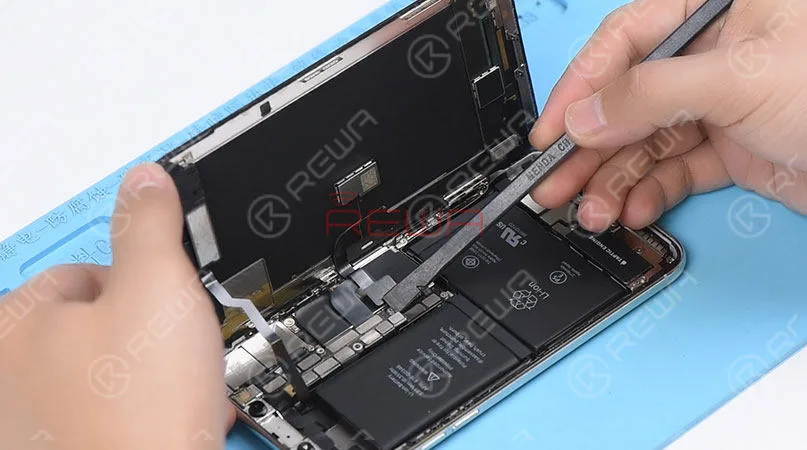
    Press the suction cup firmly onto the screen, and insert the pry piece to slice through the adhesive holding the screen.

    Note: Do not swing the screen up from the bottom side.

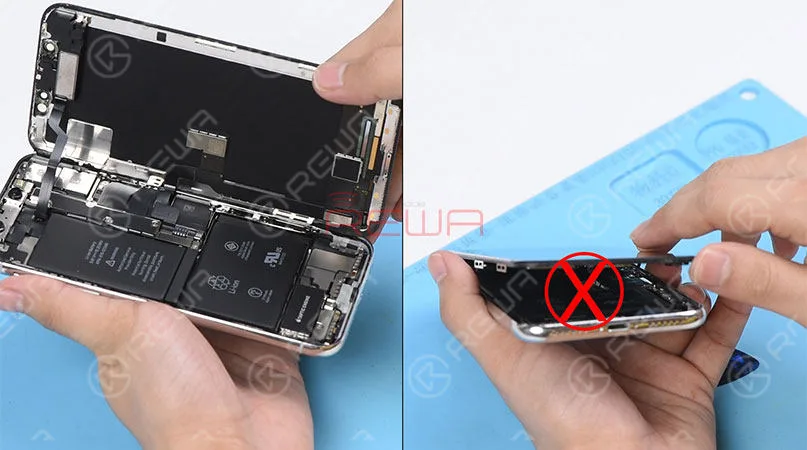
    As the flex cables of iPhone x are mainly arranged on the right side, to avoid tearing off these cables, we need to open the phone by swinging the screen up from the left side.

    Press the suction cup firmly onto the screen, and insert the pry piece to slice through the adhesive holding the screen. Note: Do not swing the screen up from the bottom side. As the flex cables of iPhone x are mainly arranged on the right side, to avoid tearing off these cables, we need to open the phone by swinging the screen up from the left side.

    ♥Tips: Please be careful with the force applied when replacing the screen.

    Otherwise, the phone might be stuck in touch/display issues. Because the bottom area of the screen(with ICs bonded here) and the Face ID area are fragile.

    3. Connector Bracket And Screen Removing

    (Watch the video to get details – at the ending of the article)

    Remove screws securing the connector bracket with the tri-point screwdriver

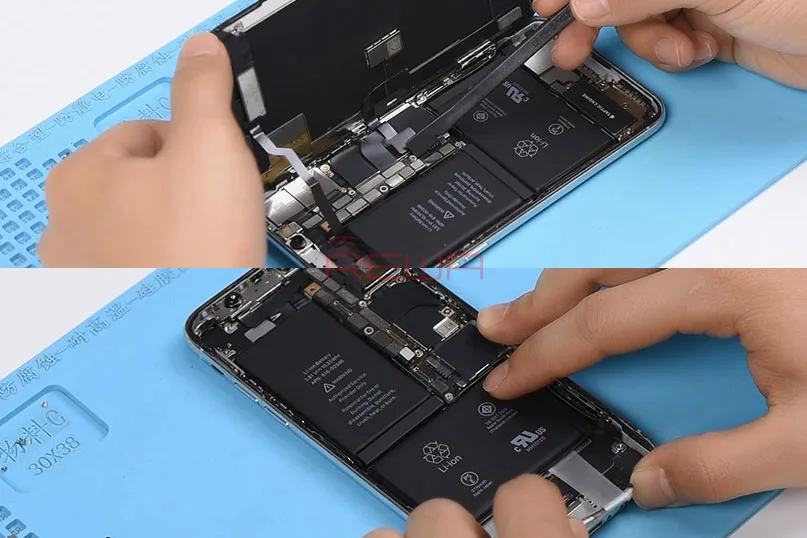
    Pry the battery connector up from its socket

    Disconnect the OLED panel cable connector

    Pry the digitizer cable connector up from its socket And then disconnect the front panel sensor assembly flex cable
    Pry the digitizer cable connector up from its socket And then disconnect the front panel sensor assembly flex cable

    ♥Tips: The front panel sensor assembly flex cable is secured by the double-sided tape. Please lift the cable carefully when removing the screen.

    4. Earpiece Speaker And Sensor Assembly Removing & Installation

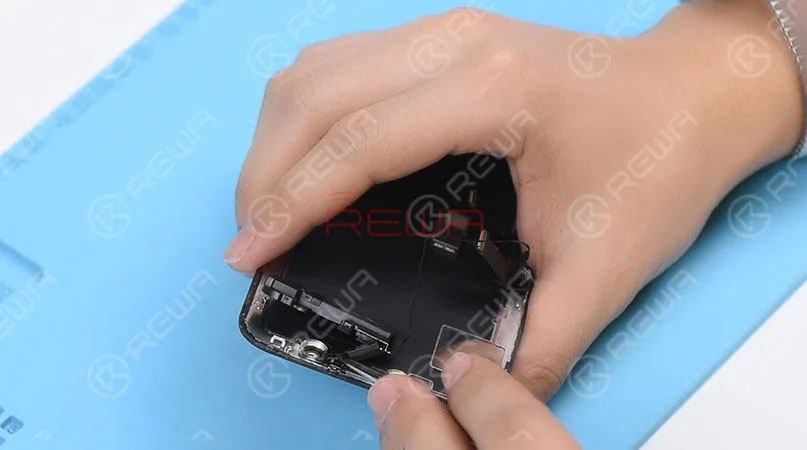
    Remove screws securing the front panel sensor assembly flex cable with the tri-point screwdriver. Heat with the Hot Air Gun at 120℃-150℃ first to soften the adhesive, then remove the front panel sensor assembly flex cable with tweezers.
    Remove screws securing the front panel sensor assembly flex cable with the tri-point screwdriver. Heat with the Hot Air Gun at 120℃-150℃ first to soften the adhesive, then remove the front panel sensor assembly flex cable with tweezers.

    ♥Tips: there is double-sided tape securing the Flood Illuminator Module area.

    Get the earpiece speaker and sensor assembly installed onto the new screen

    Get the front panel sensor assembly flex cable, the digitizer cable connector the OLED panel cable connector and the battery connector connected

    5.Phone Assembling

    Please test the screen before the reassembly process.

    Please test the screen before the reassembly process.

    ♥Tips: the waterproof seals might get damaged when replacing the screen. If so, clean the residual waterproof seals at first, then stick new waterproof seals.

    The true tone-capable display of iPhone 7 – XS Max is missing after screen replacement. So we highly suggest that repair shops restore the true tone with the True Tone Programmer after screen replacement.

    iPhone X/XS/XS Max Screen Replacement Tips & Tricks

    1. Wear Anti-static Wrist Strap

    2. Power off the phone before the disassembly

    3. Pre-heat with hot air gun

    4. Open the phone by swinging the screen up from the left side

    5. Pay attention to the bottom area of the screen (ICs Bonding Area)

    6. Pay attention to the top area of the screen(Face ID area)

    7. Disconnect the battery flex cable first

    8. Pre-heat before removing earpiece speaker and sensor assembly

    9. Test the screen before the reassembly process

    iPhone Battery Replacement Steps Overview

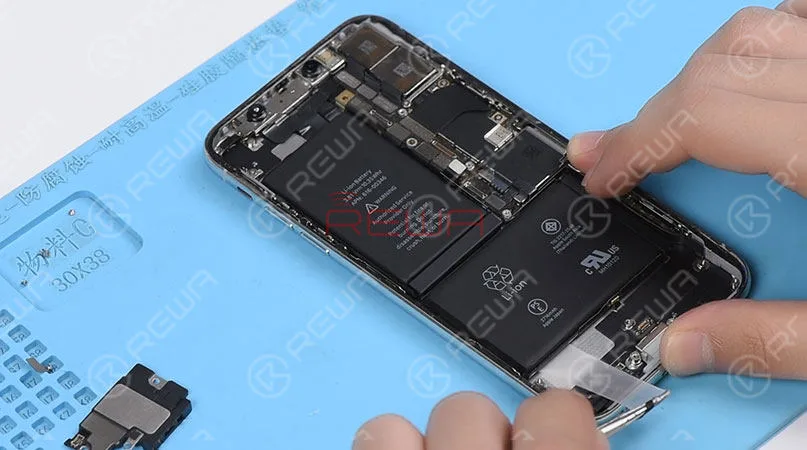
    ♥Tips: To remove the battery adhesive strips easily, please remove the Taptic Engine and speaker at first.

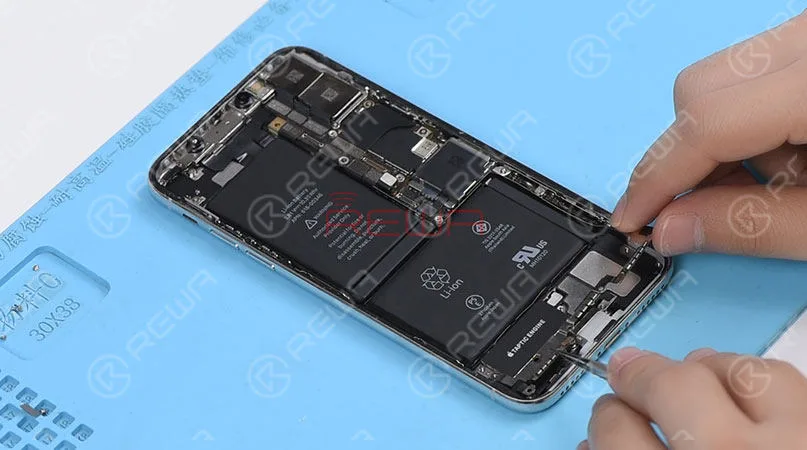
    1.Taptic Engine And Speaker Removing

    Please be noted that there are many screws detached in this step, we highly suggest that you place these screws in order.
    1.Taptic Engine And Speaker Removing   Please be noted that there are many screws detached in this step, we highly suggest that you place these screws in order.

    2.Battery Adhesive Strips Removing

    Wrap the battery adhesive strips with tweezers and pull the strips out slowly and parallelly.
    2.Battery Adhesive Strips Removing Wrap the battery adhesive strips with tweezers and pull the strips out slowly and parallelly.

    3.Battery Adhesive Strips & Battery Adhering

    Adhere new battery adhesive strips to the battery.

    4.Taptic Engine And Speaker Installation

    iPhone X/XS/XS Max Battery Replacement Tips & Tricks

    1. Taptic Engine and speaker removing first

    2. Place screws in order

    3. Pull the strips out slowly and parallelly.

    Conclusión:

    In addition to professional techniques, high-quality and reliable third-party suppliers are also extremely important for repair shops. Choose REWA, choose the quality you want.

    For individual clients and repair enthusiasts, REWA online shop with iPhone screens of different quality grade and replacement batteries are here for your choice.

    Why hesitating? Place your order now! For certified iPhone Screens, replacement batteries and repair tools, please place an order on REWA TIENDA ONLINE.

  • REWA High-end iPhone Aftermarket In-cell Screen – OEM Quality With Better Price

    REWA High-end iPhone Aftermarket In-cell Screen – OEM Quality With Better Price

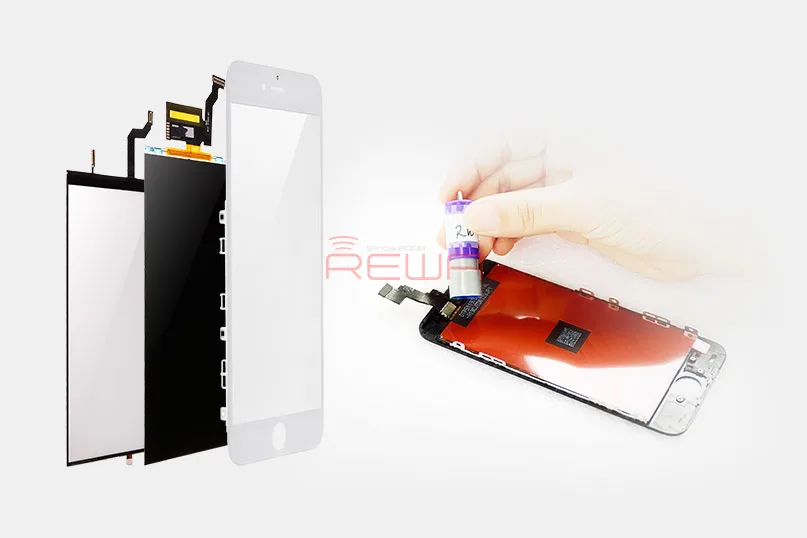
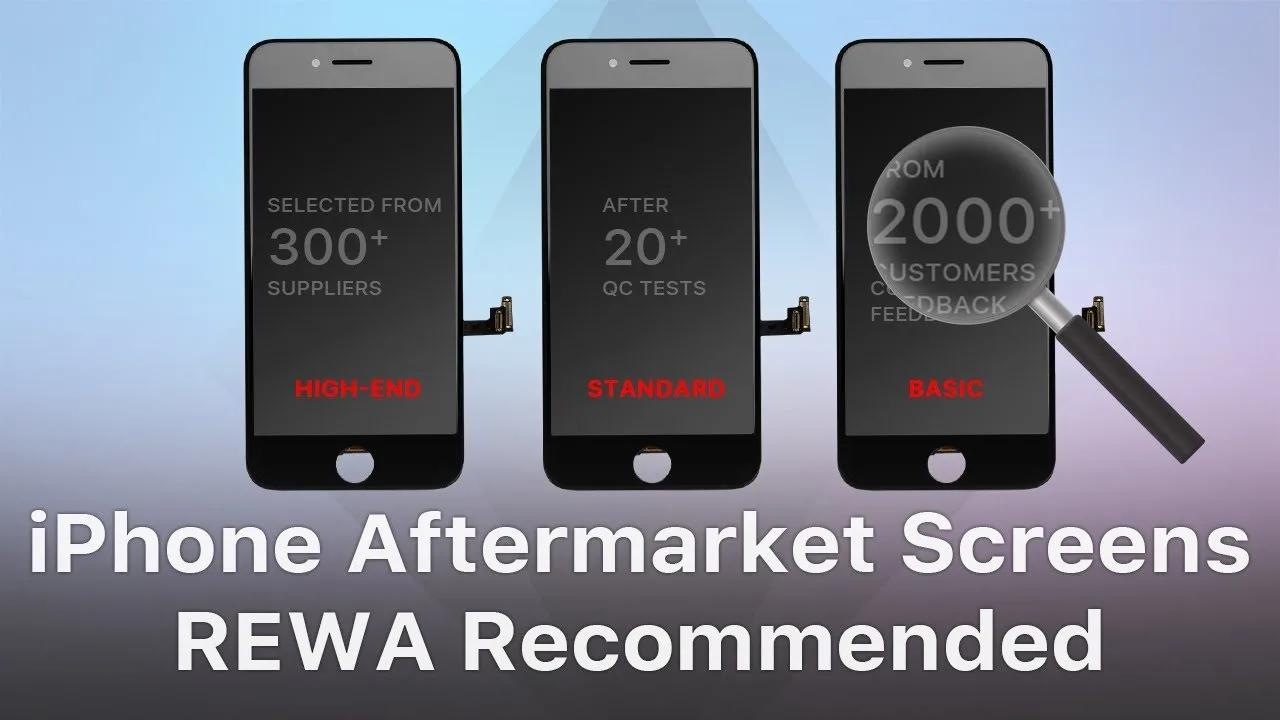
    For most customers, the iPhone aftermarket screen is definitely a cost-effective choice. However, the quality of Pantallas de recambio para iPhone on the market also varies from one to another. As a professional solution provider, REWA has devoted to providing cost-effective and competitive products for our clients. After a series of tests conducted by REWA LAB, we are happy to recommend our high-end iPhone in-cell screens covering from iPhone 6 to iPhone 8 Plus.

    REWA In-cell Screen Test Report

    Inspección cosmética

    ① The surface of glass lens is not damaged, off paint, or with bubbles inside. The glass lens has been manufactured under high-temperature tempering to be sturdy and durable.

    ② Without adhesive failure, the front bezel is not damaged or screw hole blocked.

    ③ Flex cables are not broken or damaged. The display flex cable and the touch flex cable are bonded together just like the OEM New.

    ④ The backlight has adhered tightly that cannot be separated easily.

    ⑤ Coated with fingerprint oil, the screen performs perfectly in the hydrophobic effect test.

    Screen Fitness

    The screen fitness is decided by the thickness of the screen, IC size and bezel adhesion.

    ① Screen Thickness Manufactured with the original material&structure&technology, the thickness of REWA high-end iPhone in-cell screen is close to the OEM New.

    ② IC Size ICs on the screen feature normal size that won’t affect screen installation.

    ③ Installation The phone features smooth edges without protuberance/gap. There is no light-leaking or backlight oppression.

    Display Comparison

    ① Display Effect With wide color gamut and ESR backlight support, the screen is close to the OEM New in display effect and backlight brightness.

    ② Polarizer Test The screen performs well at all angles under the sunglasses just like the OEM New.

    Prueba de funcionamiento

    ① Touch & 3D Touch & Keyboard Manufactured with the original material &s tructure & technology, REWA high-end iPhone in-cell screen features smooth and stable touch just like the OEM New.

    ② The screen runs smoothly when playing videos/games just like the OEM New.

    ③ Measure temperature after the phone has run for half an hour. The measured value is close to the OEM New.

    Aging & Vibrating Test

    After the Static Cycle Test (Condition: -20℃/2Hrs, +55℃55%RH/2Hrs, +55℃/4Hrs), the Dynamic Test (Condition: +45℃; playing video for 2Hrs) and the Vibrating Test (Amplitude: 2mm, Frequency: 50HZ, Time:1H), REWA high-end iPhone in-cell screen performs well in the display/function test and features normal backlight adhesion.

    Conclusión:

    Manufactured with the original material&structure&technology, REWA high-end iPhone in-cell screen performs perfect in touch, 3D touch, screen fitness, display, function test, etc.. Featuring performance close to OEM New, the screen also supports true tone restore. With a relatively low price, REWA high-end iPhone in-cell screen is definitely a qualified alternative to the OEM screen.

    REWA High-end iPhone Aftermarket In-cell Screen - OEM Quality With Better Price

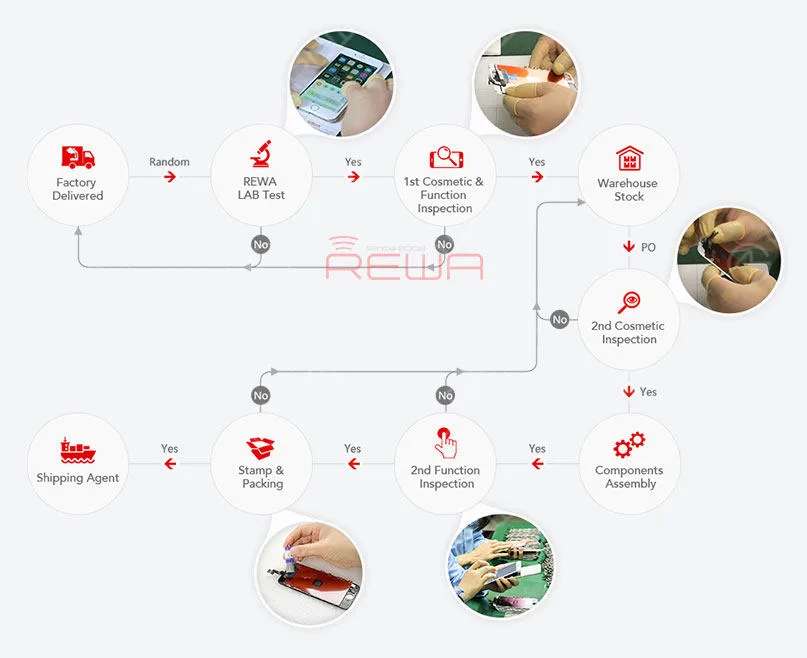
    We provide a one-year warranty for our products and four rounds of quality control process before shipment. REWA certified products, trustworthy and reliable.

    For quick order, please visit Tienda en línea REWA! For bulk order, please feel free to contact your REWA account manager to get a discount!

  • Do I have to choose an original iPhone screen?

    Do I have to choose an original iPhone screen?

    There are varies of aftermarket iPhone screens in the market. They are made of different raw materials with different techniques. And also different prices. Some technicians may be confused and even fraud by such a mess quality grades definition. So as to choose the original screen only. But are the original screens really your best choice? Check this video for the answer.


  • Which iPhone X Screen REWA Recommended So Far?

    Which iPhone X Screen REWA Recommended So Far?

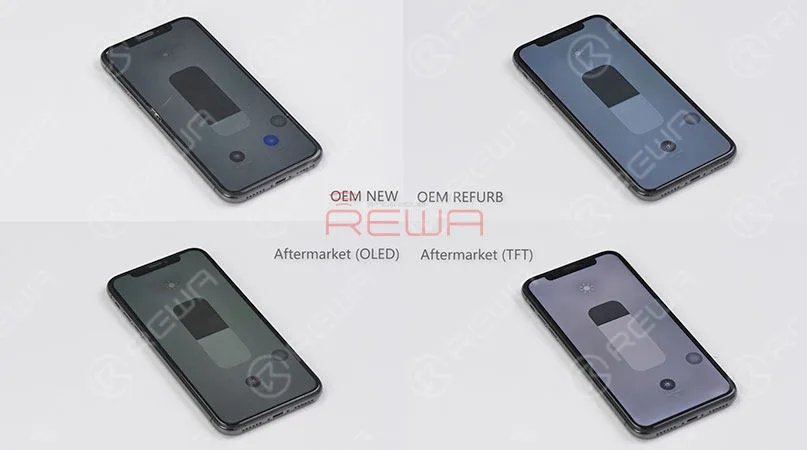
    Have you ever been confused by different iPhone X screens in the market? OEM New, AA Grade, Aftermarket Flexible OLED, Aftermarket Rigid OLED, etc. Actually, it is not such a bad thing for customers to have different choices as long as they can distinguish one from another. Well, hope the comprehensive and in-depth comparison test on different iPhone X screens presented by REWA LAB will help you find the right iPhone X screen you need.

  • OLED frente a LED: Impacto en la salud ocular

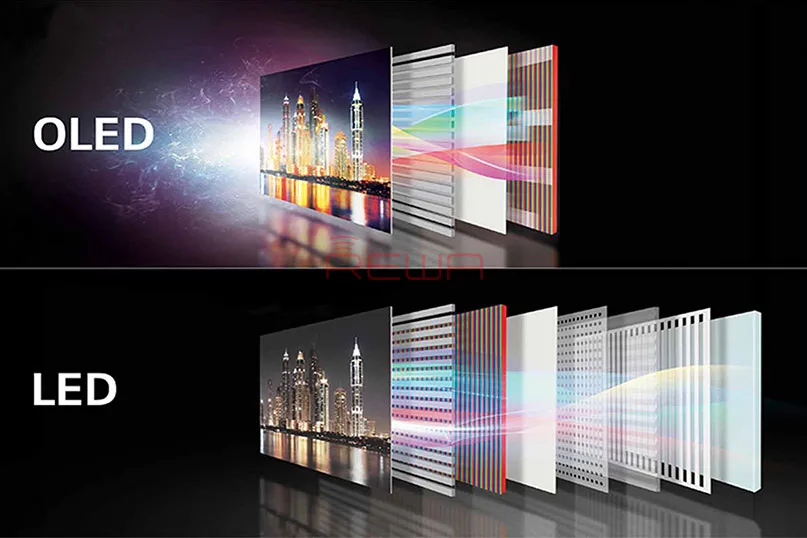
    OLED frente a LED: Impacto en la salud ocular

    La estadística de Statista muestra el número total de usuarios de teléfonos móviles en todo el mundo de 2015 a 2020. En 2019 se prevé que el número de usuarios de teléfonos móviles alcance los 4.680 millones.

    En los últimos años, la tecnología OLED se ha convertido en la principal tecnología de pantalla para smartphones, y los fabricantes de teléfonos más populares del mundo comercializan smartphones AMOLED.

    Se cree que las pantallas AMOLED causan "daño a los ojos" debido a la atenuación de baja frecuencia de los fabricantes de AMOLED. así que aquí viene la pregunta, ¿cuál es más perjudicial para los ojos? ¿OLED o LED?

    Los dos factores que provocan "dolor de ojos" son la luz azul y el parpadeo.

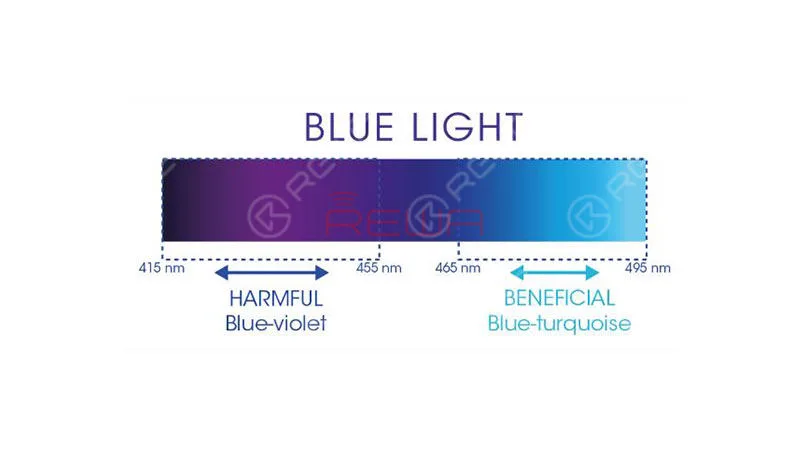
    La luz azul es una luz visible de alta energía, ampliamente reconocida por tener efectos nocivos como molestias oculares y daños en la retina, además de ser un factor que contribuye a enfermedades como el cáncer, la diabetes, las cardiopatías, la obesidad y el insomnio.

    Los niños parecen tener retinas delicadas que son muy susceptibles a los peligros de la luz azul.
    altamente susceptibles a los peligros de la luz azul.

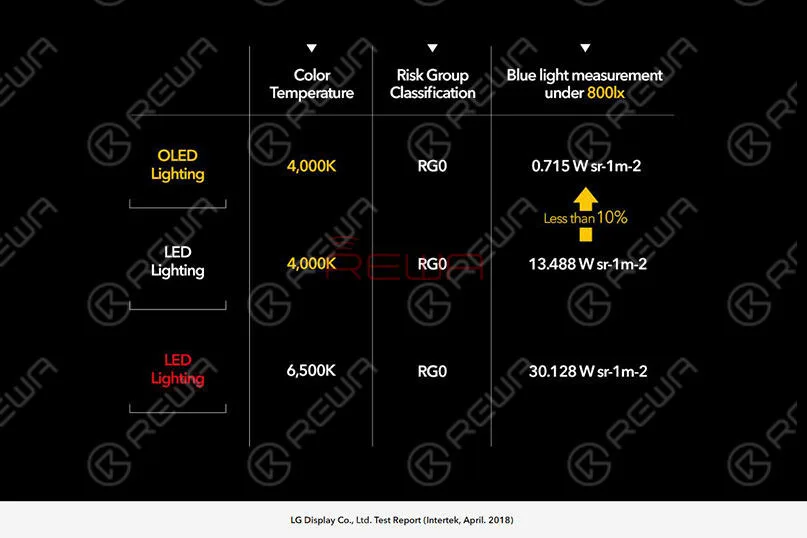
    Intertek, una empresa británica independiente especializada en control de calidad, también concluyó que las luces OLED emiten sólo 10% de la luz azul que emiten las luces LED con la misma luminancia y temperatura de color.
    Luces LED con la misma luminancia y temperatura de color.

    ¿Cómo hacer frente a la luz azul y evitar los daños causados por la HEV?

    1. Utiliza Flux o una aplicación similar en tu ordenador o portátil para reducir la cantidad de luz azul que emite la pantalla.

    2. Utiliza una aplicación en tu dispositivo móvil para reducir la cantidad de luz azul emitida por la pantalla.

    3. Utilizar gafas o lentillas con filtro HEV

    4. Utilizar tapas de filtro azules

    El otro factor que provoca "dolor de ojos" es el parpadeo.

    El parpadeo es un cambio visible en el brillo entre los ciclos mostrados en las pantallas de vídeo.

    Se aplica especialmente al intervalo de refresco de los televisores y monitores de ordenador de tubo de rayos catódicos (CRT), así como a las pantallas de ordenador y televisores de plasma.

    La fuente de luz conmutable provoca parpadeos.

    Cuanto mayor sea la velocidad de conmutación, mayor será el parpadeo de la pantalla. La mayoría de los teléfonos móviles adoptan la atenuación DC y la atenuación PWM.

    La regulación DC es una tecnología que ajusta el brillo controlando directamente las corrientes a ambos lados del dispositivo emisor de luz.

    Cuanto menor sea la corriente, menor será la luminosidad.

    IEEE PAR1789 recomienda prácticas para modular la corriente en los LED de alto brillo para mitigar los riesgos para la salud de los espectadores.

    Pantallas LCD utilizan sobre todo la regulación DC.

    La regulación de CC es un método muy sencillo.

    Pero tiene inconvenientes evidentes.

    Como las longitudes de onda de los tres colores primarios son diferentes, la atenuación por corriente continua puede provocar inevitables dominantes de color con una luminosidad extremadamente baja.

    Las pantallas AMOLED utilizan la tecnología de atenuación PWM de baja frecuencia.

    Cuanto menor sea el brillo de la pantalla, menor será la frecuencia de la luz estroboscópica y mayor la posibilidad de que los ojos humanos puedan percibirla, lo que facilita el trabajo a las personas sensibles.

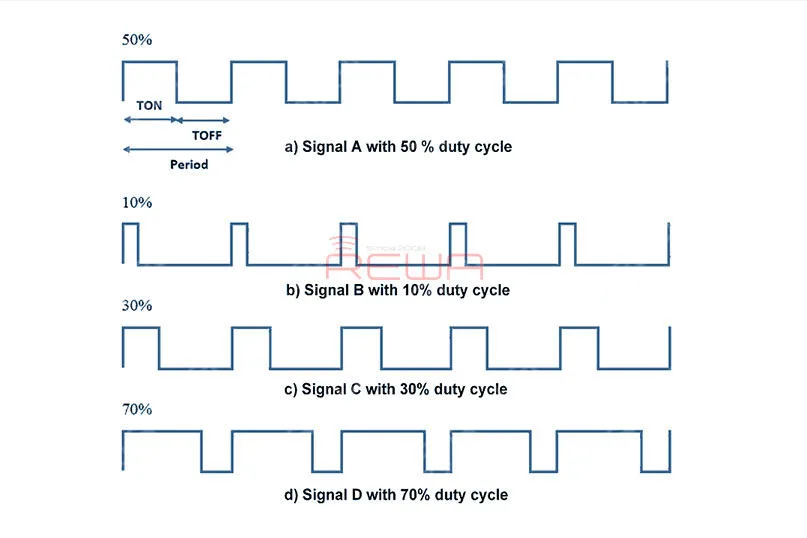
    La atenuación PWM es una técnica que ajusta el brillo mediante un parpadeo rápido, aunque los ojos humanos no puedan percibir los cambios de pantalla en el proceso de conmutación, nuestro cerebro responde a este fenómeno.

    Los parpadeos frecuentes provocan fatiga, lo que estimula al sistema de refracción a trabajar conjuntamente para acelerar el envejecimiento de la visión.

    La imagen siguiente es la forma de onda PWM de ciclo de trabajo.
    La imagen siguiente es la forma de onda PWM de ciclo de trabajo.

    ¿Por qué las pantallas AMOLED no adoptan la atenuación DC?

    Las pantallas AMOLED son tecnologías de autoiluminación basadas en materiales orgánicos.

    La calidad de visualización de la pantalla AMOLED está directamente relacionada con la calidad del materiales de pantalla.

    La diferencia de color entre píxeles quedará claramente demostrada.

    Los primeros modelos, como los Galaxy S, S2 y Note, sufrían de colores blancos desiguales y graves dominantes de color.

    Y lo que es más triste, este problema no se ha resuelto bien ni siquiera hasta ahora.

    Sin embargo, la referencia de atenuación PWM resuelve el problema de las primeras dominantes de color de bajo brillo en la pantalla AMOLED y, de hecho, mejora aún más la estabilidad del color.
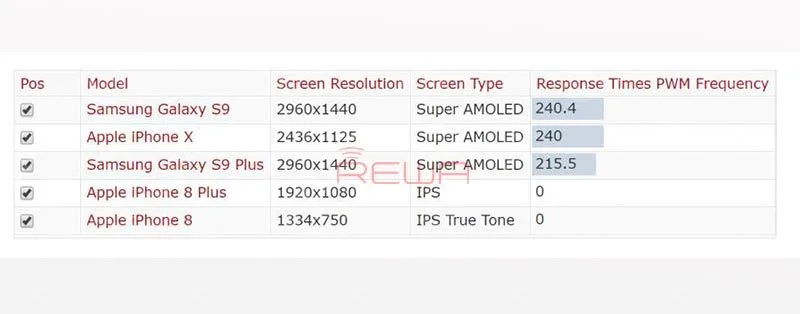
    mejora aún más la estabilidad del color

    ¿Cómo evitar los daños por parpadeo?

    1. Para minimizar los efectos del parpadeo, no mire la pantalla en la oscuridad.

    2. No te sientes demasiado cerca de la pantalla.

    3. Para minimizar el parpadeo del PWM, utilice la pantalla con el brillo máximo, ya que proporciona el ciclo de trabajo más alto.

    4. Para televisores, monitores y portátiles, busque frecuencias de refresco de pantalla publicadas de 120 Hz o superiores. En los PC, ajusta la frecuencia de refresco más alta disponible.

    5. Las personas muy sensibles al parpadeo pueden tener que cambiar a las pantallas LCD, que tienen tiempos de respuesta relativamente lentos que amortiguan cualquier parpadeo.

    Las pantallas LCD deben tener un color completo de 24 bits sin el control de velocidad de fotogramas (FRC) que se encuentra en las pantallas de 18 bits (o menos).

    También hay consejos sobre cómo proteger los ojos cuando se utiliza el teléfono móvil.

    1. Consigue un protector de pantalla antirreflejos

    2. Parpadea con frecuencia/salpica tus ojos con agua

    3. Sigue la regla 20/20/20

    Con el teléfono móvil, existe la llamada regla 20/20/20.

    Básicamente significa que cada veinte minutos tienes que mirar algo que esté al menos a seis metros de distancia durante al menos veinte segundos.

    4. Ajuste el brillo, el contraste y el tamaño del texto.

    5. Mantén tu pantalla limpia

    6. Mantener la distancia adecuada

    ¿Cuál es su opinión sobre el tema? Comparta su opinión en los comentarios.

    ¿Necesita cambiar el conjunto de la pantalla LCD?

    REWA ofrece tipos de reparación de teléfonos móviles de reemplazo de pantalla y herramientas para 10 años.

    Nuestra recién inaugurada tienda en línea - tienda.rewa.tech ofrece las mejores piezas de recambio para la reparación de teléfonos móviles a precios asequibles.

    Es más, ha venta flash inoportuna. ¡No te lo pierdas!

    Cursos de reparación de teléfonos móviles:
  • iPhone X Aftermarket Screens Full Tests and Comparisons

    iPhone X Aftermarket Screens Full Tests and Comparisons

    Nowadays, more and more iPhone X aftermarket screens emerge in the market. Different structures as they share, they are also different in qualities. As to brightness issues and display issues most concerned by our clients, REWA LAB has conducted strict tests and comparison on iPhone X screens and we are happy to share with you the results as follows.

  • Prueba de primera mano de la nueva pantalla posventa para iPhone - Panda Screen

    Prueba de primera mano de la nueva pantalla posventa para iPhone - Panda Screen

    Recientemente, ha aparecido en el mercado una nueva pantalla de iPhone Aftermarket - Panda screen con los modelos iPhone 6/6s/7/8. REWA LAB ha realizado una serie de pruebas con nuestras exclusivas muestras de pantallas Panda. Veamos el resultado de la prueba con el iPhone 6s como ejemplo.

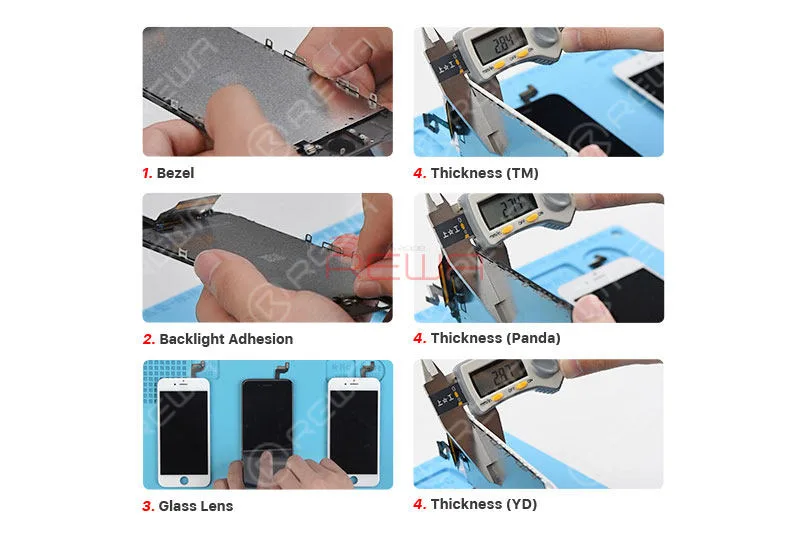
    INSPECCIÓN COSMÉTICA

    Prueba en la nueva pantalla de iPhone Aftermarket

    El bisel, la lente de cristal y la adherencia de la retroiluminación están cualificados.

    El grosor de la pantalla Panda es de 2,74 mm, más fina que las otras dos pantallas.

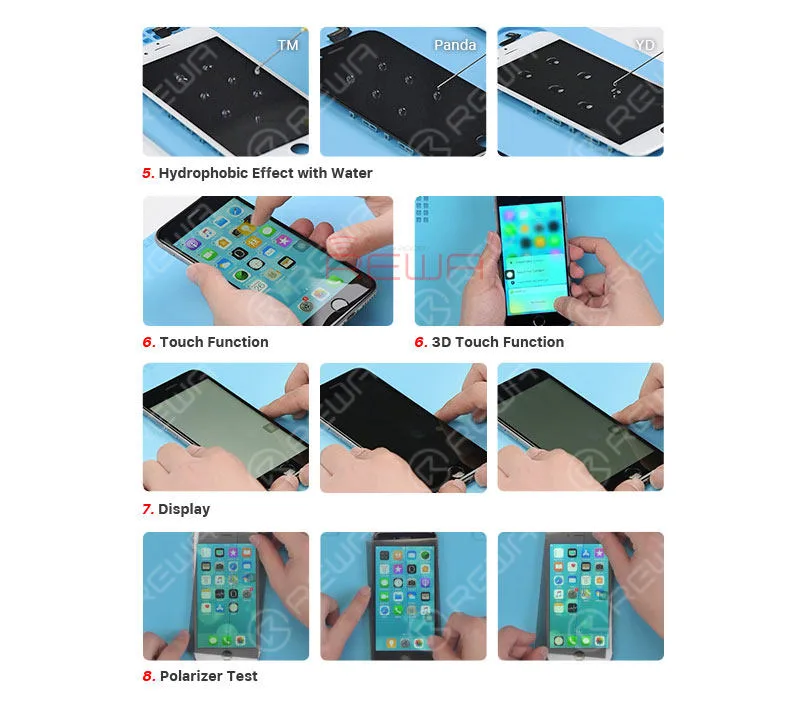
    PRUEBA DE FUNCIONAMIENTO

    Prueba en la nueva pantalla de iPhone Aftermarket

    El tamiz Panda tiene mayor hidrofobicidad que los otros dos tamices.

    Tiene una sensibilidad táctil de reacción estable y función táctil 3D.

    El rendimiento de color puro es cualificado pero algunas de las muestras de pantalla Panda tienen problemas de polarizador bajo Película POL. No se sabe si se mejorará o no cuando llegue a la plena producción.

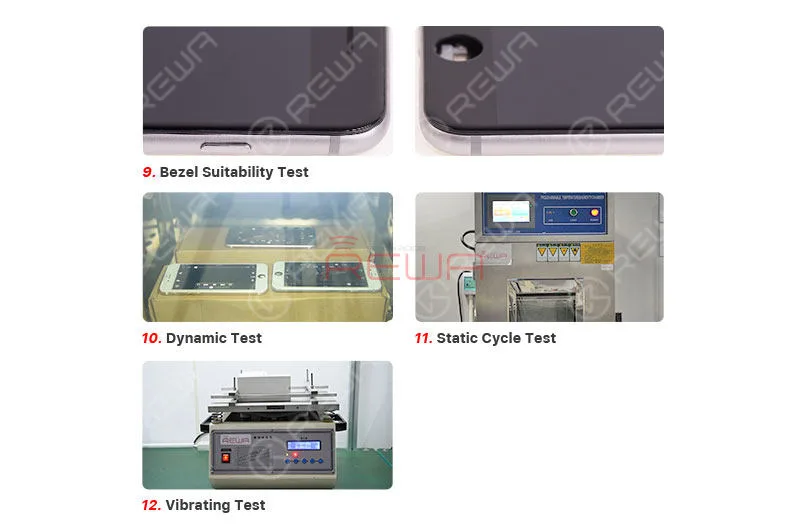
    PRUEBA DE INSTALACIÓN

    Prueba en la nueva pantalla de iPhone Aftermarket

    El bisel encaja bien sin costuras.

    Tras 2 horas de prueba dinámica, 8 horas de prueba de ciclo estático y 1 hora de prueba vibratoria, todas las funciones funcionan con normalidad.

    Las muestras de pantalla del Panda tuvieron un buen rendimiento durante la prueba. Aún así, al tratarse de un producto nuevo, existe incertidumbre sobre su calidad. La recomendación, por tanto, es que consiga algunas muestras o pruebe con una pequeña cantidad si tiene algún interés. No se sugiere hacer acopio a granel.

    Si desea más información o muestras de Panda Screen, póngase en contacto con nuestro gestor de cuentas.

  • Prueba de compatibilidad de la pantalla y el flex del iPhone REWA en iOS 12

    REWA iPhone Screen & Flex Compatibility Test On iOS 12

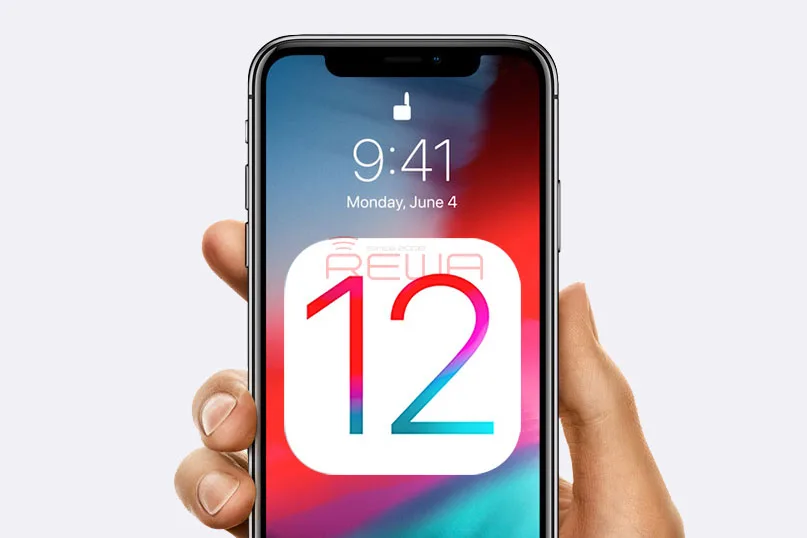
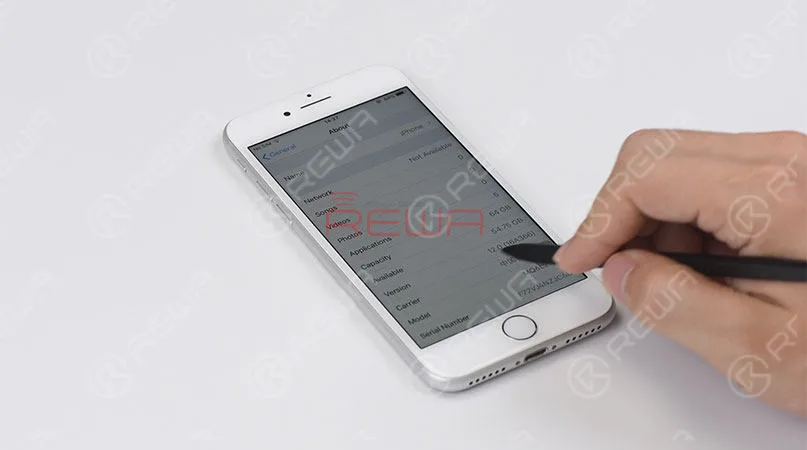
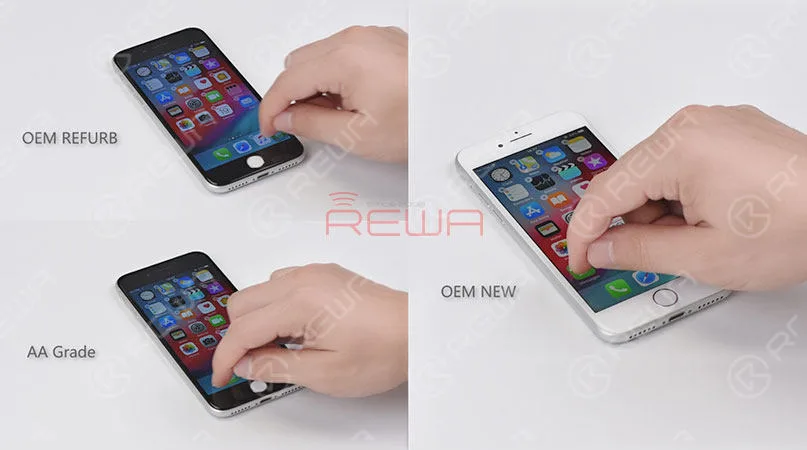
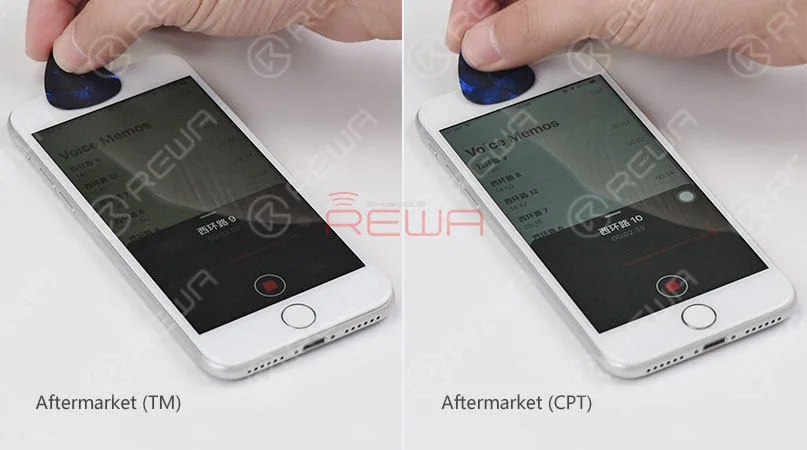
    Since iOS 12 has been released recently, REWA LAB has conducted a series of compatibility tests for iPhone series from iPhone 6s to iPhone X with OEM NEW, OEM REFURB and aftermarket screens respectively. According to the test results, common functionality like touch functionality, 3D Touch, proximity sensor functionality and light sensor functionality function normally on iOS 12. Now, let’s take iPhone 8 and iPhone X as examples and show you how the test goes. 

  • Prueba de compatibilidad de la pantalla y el flex del iPhone REWA en iOS 12

    Prueba de compatibilidad de la pantalla y el flex del iPhone REWA en iOS 12

    Apple iOS 12 soft update is already available today with a lot of adding new features for supported iPhone, iPad and iPod devices. Compared with former iOS versions, iOS 12 catches full attention of most iPhone users since iOS 11 actually has some problems. REWA also focuses heavily on a bunch of new features of iOS 12, like the new UI design, new features, and the operating speed on the older devices, but what we concern most like those in aftermarket industry is that whether it can compatible with our screens properly. Therefore, REWA LAB has immediately carried out a series of tests with iPhone 6s – X screens on newly launched iOS 12.

    iPhone Screen & Flex Compatibility Test

    Update to iOS 12

    iPhone Screen & Flex Compatibility Test

    Touch and 3D touch function test

    iPhone Screen & Flex Compatibility Test

    Proximity sensor test

    iPhone Screen & Flex Compatibility Test

    Ambient light sensor test on iOS 12

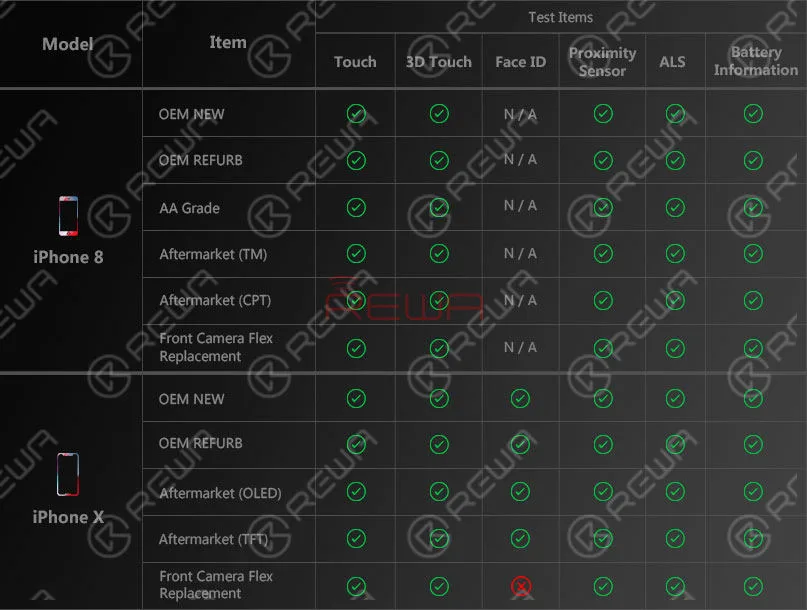
    The tests have involved OEM New, OEM Refurb, AA Grade, aftermarket screens and front camera flex replacement from iPhone 6s to iPhone X, with iOS 12, updated, covering test items like proximity sensor, ALS, touch function, 3D touch, battery information face ID etc..

    Let’s take the iPhone 8 and iPhone X as examples.

    iPhone Screen & Flex Compatibility Test

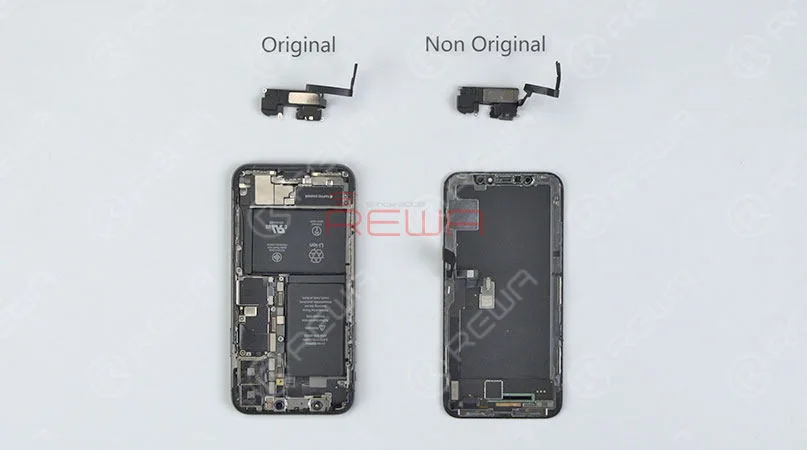
    Front camera flex replacement

    iPhone Screen & Flex Compatibility Test

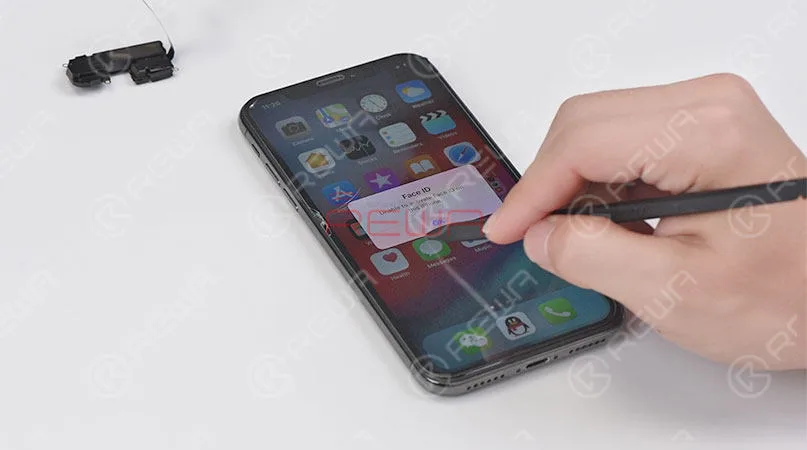
    iPhone X face ID failed after front camera flex replacement

    Following is the test report for your reference.

    iPhone Screen & Flex Compatibility Test

    Informe de la prueba

    For detailed testing procedures, please check the video below.

    From the tests, we can see that all the screens of various quality levels from REWA can compatible with the newly released iOS 12. Proximity sensor, ALS, touch function, 3D touch and battery information work normally so far after updated. Whereas we have also noted that iPhone X face ID failed after front camera flex replacement. What’s more, on iOS 12, WiFi icon is disappeared, and true tone function is not available after screen replacement. Has your iPhone device been updated to the iOS 12 already? Any problems popped up? Leave us a comment about your experience.

  • No se deje engañar por las calidades poco claras de las pantallas de iPhone

    No se deje engañar por las calidades poco claras de las pantallas de iPhone

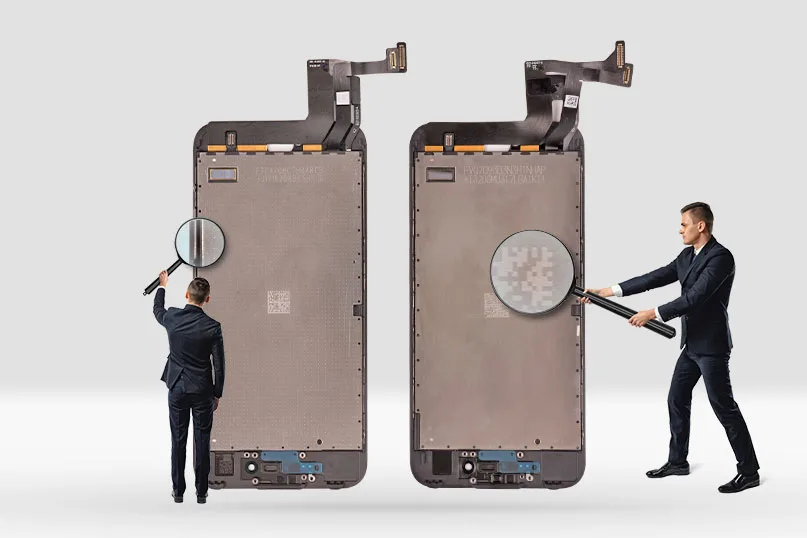
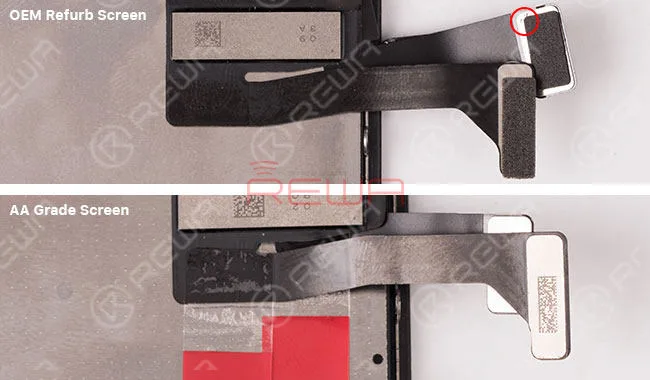
    ¿Alguna vez ha estado confundido por no poder distinguir la pantalla OEM Refurb del iPhone (sólo se sustituye el cristal) y la pantalla de grado AA (LCD original + cable flexible original / compatible montado por terceros)? Aunque los dos tipos de pantallas son difíciles de distinguir, todavía hay algunos detalles para distinguirlos. Ahora REWA compartirá con usted estos consejos y le ayudará a obtener la calidad exacta de los montajes de pantalla que desea.

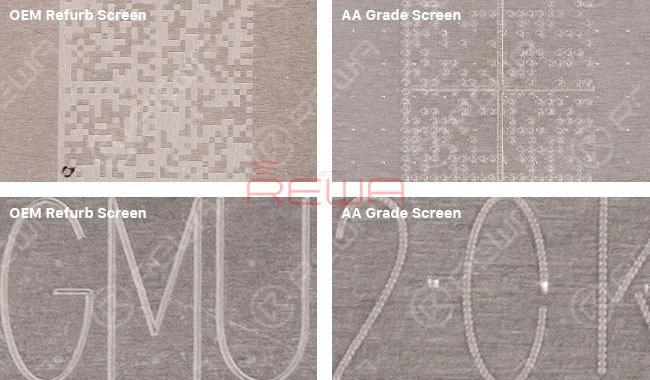
    Comprobación del código QR

    La retroiluminación de la pantalla OEM Refurb tiene un código QR único con líneas exquisitas y claras.

    La retroiluminación de la pantalla de grado AA tiene el mismo código QR pero con líneas borrosas y no exquisitas.

    No se deje engañar por las calidades poco claras de las pantallas de iPhone

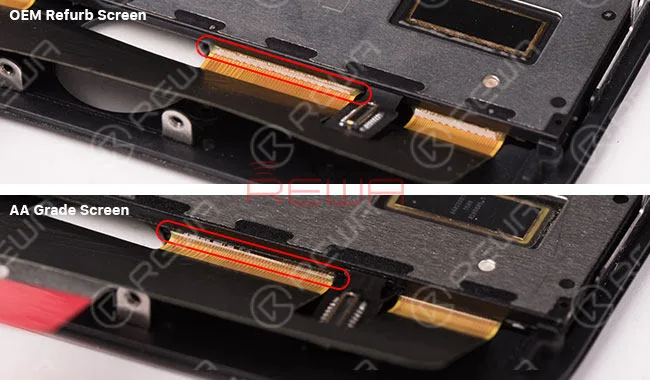
    Comprobación de la unión ACF

    La malla OEM Refurb tiene pocas colas UV desbordadas y la forma de la unión ACF es regular y dentada. Por lo general, la pantalla de grado AA tiene algo de pegamento UV desbordado y la forma de la unión ACF es irregular o la textura es más brillante que OEM Refurb.

    No se deje engañar por las calidades poco claras de las pantallas de iPhone

    Comprobación de residuos de OCA:

    OEM Refurb Screen sólo sustituyó la lente, por lo que aún quedan más o menos residuos de OCA. La pantalla de calidad AA no solo ha sustituido la lente, sino también la retroiluminación, por lo que no quedan residuos de OCA.

    No se deje engañar por las calidades poco claras de las pantallas de iPhone

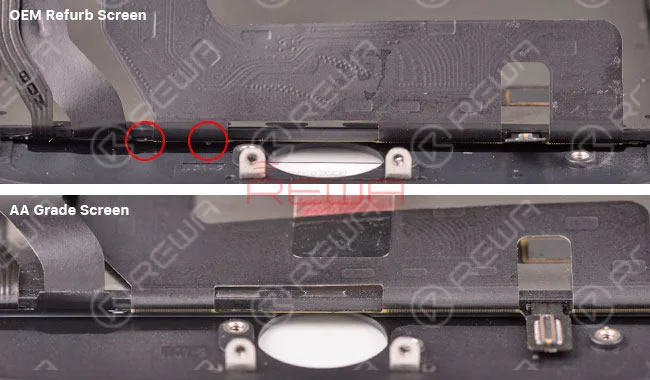
    Comprobación de la esponja de espuma:

    Normalmente, la esponja de espuma de la rejilla OEM Refurb se conserva. La esponja de espuma de la pantalla de grado AA se arrancará.

    No se deje engañar por las calidades poco claras de las pantallas de iPhone

    Le sugerimos que combine estos puntos de comprobación para distinguir el iPhone. Pantallas reacondicionadas OEM y Cribas de grado AA.