Schlagwort: wesentliche Instrumente

  • Unverzichtbare Werkzeuge für die Reparatur von doppelt gestapelten Motherboards

    Unverzichtbare Werkzeuge für die Reparatur von doppelt gestapelten Motherboards

    iPhone-Serie von  iPhone X zum neuesten iPhone 11 Pro Max kommt mit der doppelt gestapelten Hauptplatine.

    Daher ist es wichtig, dass die Werkstätten die Reparaturtechniken für doppelstöckige Hauptplatinen verbessern. REWA empfiehlt die folgenden 3 unverzichtbaren Werkzeuge für die Reparatur von doppelt gestapelten iPhone-Hauptplatinen.

    Prüfen Sie es jetzt! Double-stacked Motherboard Reparatur Schritte Es gibt 4 Schritte, um die doppelt gestapelt Motherboard wie folgt zu reparieren:

    Schritt 1: Trennung der Hauptplatine

    Bei der Reparatur der Logikplatine der iPhone-Serie vor dem iPhone X können wir Bauteile mit Hilfe des Heißluftpistole.

    Da die Hauptplatinen des iPhone X und späterer Modelle jedoch doppelt gestapelt sind, gelingt es der Heißluftpistole aufgrund der großen Reichweite nicht, die Platine des dritten Platzes gleichmäßig zu erhitzen.

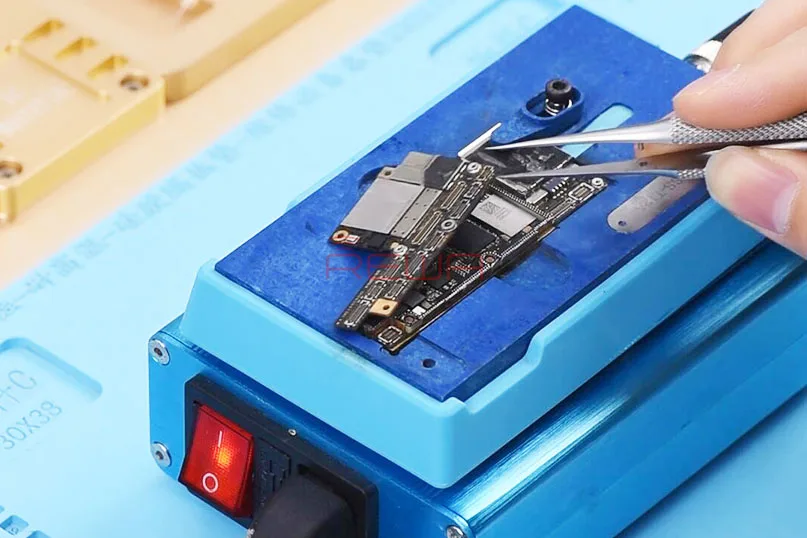
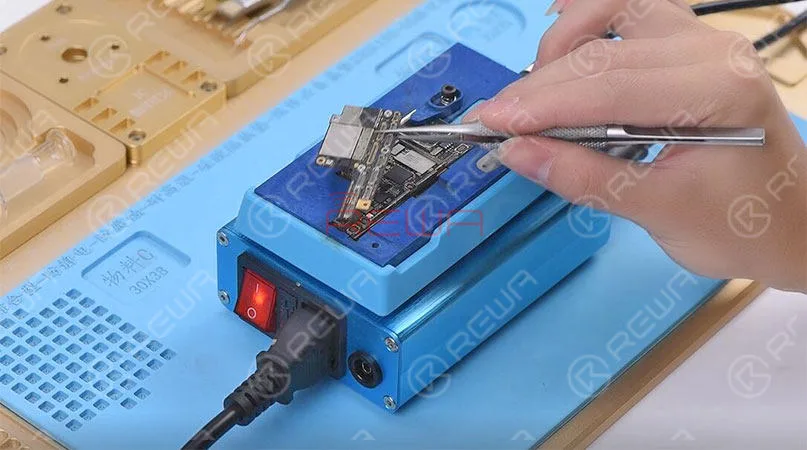
    Hiermit empfehlen wir diese spezialisierte Heizplattform für Ihre doppelstöckige Motherboard-Reparatur.

    Ein unentbehrliches Werkzeug zum Trennen der Hauptplatine bei der Reparatur von doppelt gestapelten Hauptplatinen - 3 in 1 Heizplattform für iPhone X/XS/XS Max

    Sie benötigen die Motherboard-Demontage-Plattform Haupteinheit für iPhone - SS-T12A und Motherboard-Demontage-Plattform Heiznut für iPhone X/XS/XS Max - T12A - X3.

    Die 3 in 1 Heizplattform für iPhone X/XS/XS Max ist geeignet für iPhone X/XS/XS Max Motherboard trennen, CPU und andere Komponenten zu entfernen. Der Temperaturbereich ist 100-280℃.

    Tipps: Die traditionelle Heißluftpistole stellt hohe Anforderungen an die Temperaturregelung.

    Daher kann jede Unachtsamkeit dazu führen, dass Lötstellen abfallen oder überbrückt werden, was dazu führt, dass sich die Hauptplatine nicht einschaltet oder andere Probleme auftreten.
    3 unverzichtbare Werkzeuge für die Reparatur von doppelt gestapelten Motherboards

    Schritt 2: Diagnose und Fehlerbehebung

    Während der Reparatur der doppelt gestapelten Hauptplatine gibt es immer einen Zeitpunkt, an dem wir die Hauptplatine vollständig testen müssen.

    Und dazu müssen wir die beiden Schichten wieder zusammenlöten.

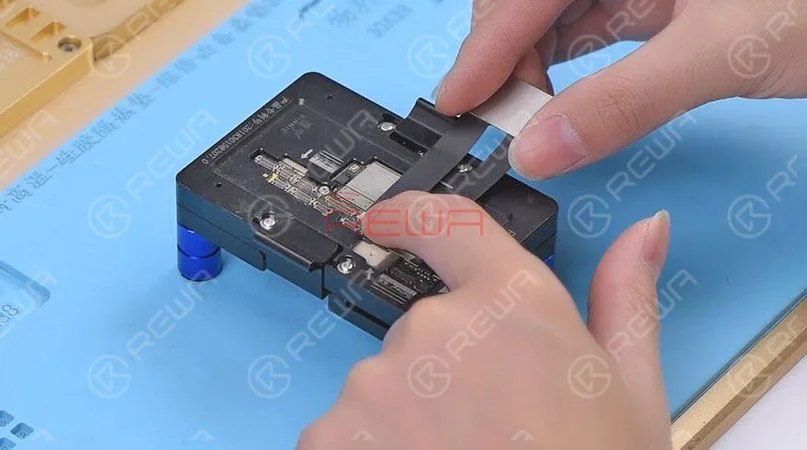
    Mit dieser PCB-Testvorrichtung für den dritten Raum können wir die Hauptplatine nun vollständig testen, ohne die beiden Lagen neu zu kombinieren.

    Ein unverzichtbares Werkzeug zur Diagnose und Fehlersuche bei der Reparatur von doppelt gestapelten Motherboards - 2 in 1 Testhalterung für iPhone XS/XS Max und Testhalterung für iPhone X Mit Hilfe der Testvorrichtung können Reparaturtechniker bei der Fehlersuche an der Hauptplatine die möglichen Fehler eingrenzen.

    Es kann nicht nur die Reparatureffizienz verbessern, sondern auch weniger Schäden an der Hauptplatine verursachen.
    3 unverzichtbare Werkzeuge für die Reparatur von doppelt gestapelten Motherboards

    Schritt 3: Reballing der unteren Schicht

    Nach der Fehlersuche müssen wir die beiden Schichten wieder zusammenlöten.

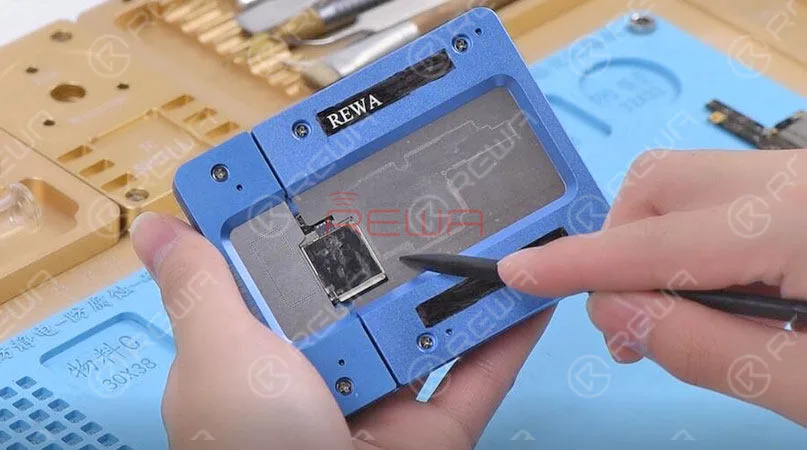
    Ein unverzichtbares Werkzeug für das Reballing der unteren Lagen bei der Reparatur von doppelt gestapelten Motherboards - 3 in 1 BGA-Reballing-Halterung für iPhone X/XS/XS Max

    Mit der 3 in 1 BGA Reballing Fixture können Sie Ihre Reballing-Arbeiten einfach und effizient durchführen.

    Durch die perfekte Anpassung der Reballing-Schablone an die untere Lage können gleichmäßige und volle Lotkugeln gewährleistet werden.
    3 unverzichtbare Werkzeuge für die Reparatur von doppelt gestapelten Motherboards

    Schritt 4: Rekombinieren der Hauptplatine

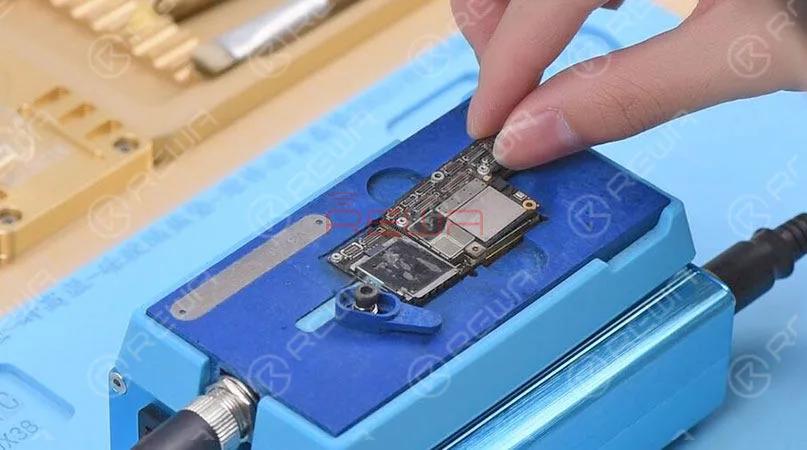
    Nach der Reballing-Arbeit. Wir müssen die beiden Schichten wieder zusammenlöten.

    In diesem Schritt verwenden wir dasselbe Werkzeug wie bei der vorherigen Trennung der Hauptplatine. 3 in 1 Heizplattform für iPhone X/XS/XS Max.
    3 unverzichtbare Werkzeuge für die Reparatur von doppelt gestapelten Motherboards

    Für weitere Details über die iPhone X/XS/XS Max/ 11 Pro/Pro Max Motherboard Reparatur, schauen Sie sich bitte das Video unten.

    Sie können auch den REWA YouTube-Kanal besuchen, um weitere Videos zu sehen.

    Für iPhone X/XS/XS Max/11 Pro/11 Pro Max Motherboard-Reparatur-Kit, bitte bleiben Sie dran an REWA Online Geschäft.

    Bei Fragen und Wünschen können Sie uns gerne kontaktieren: sales@rewatechnology.com

  • Essential Repair Tools You Need for a Newly Opened Shop

    Essential Repair Tools You Need for a Newly Opened Shop

    “a cellphone in the U.S. breaks every two seconds”, reported by SquareTrade, a company that insures smartphones. Thirty percent of cellphone owners will damage their phones in the next 12 months, and one in 10 are currently using a phone with a cracked screen. That is to say, even cell phone shipments are approaching saturation, the market capacity of the repair industry remains large.

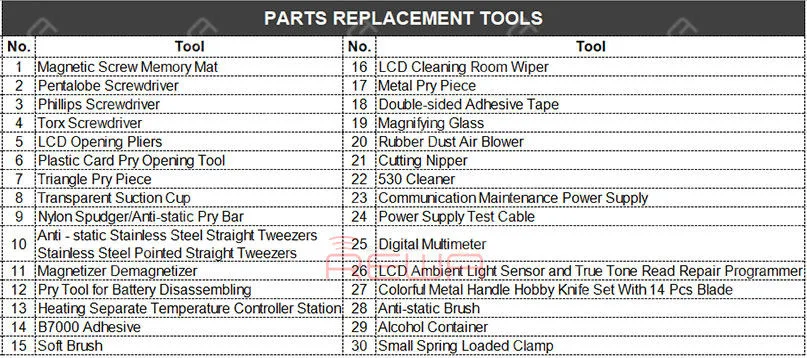
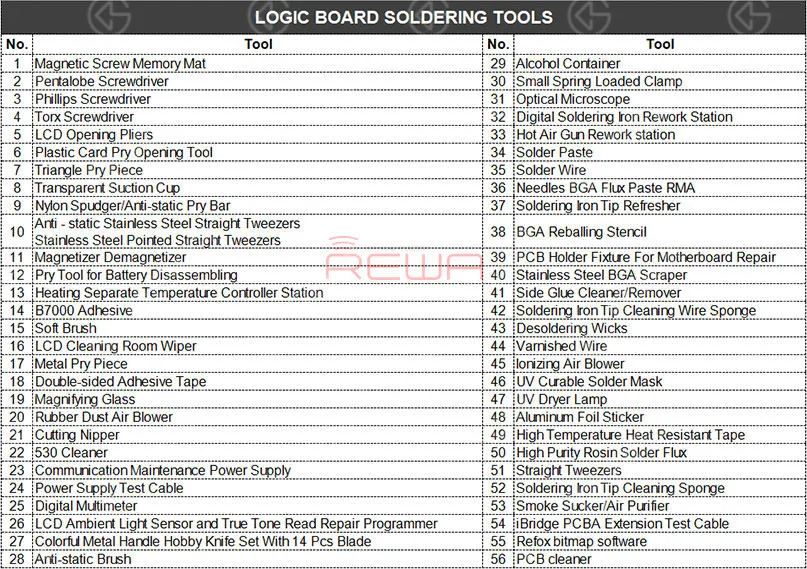
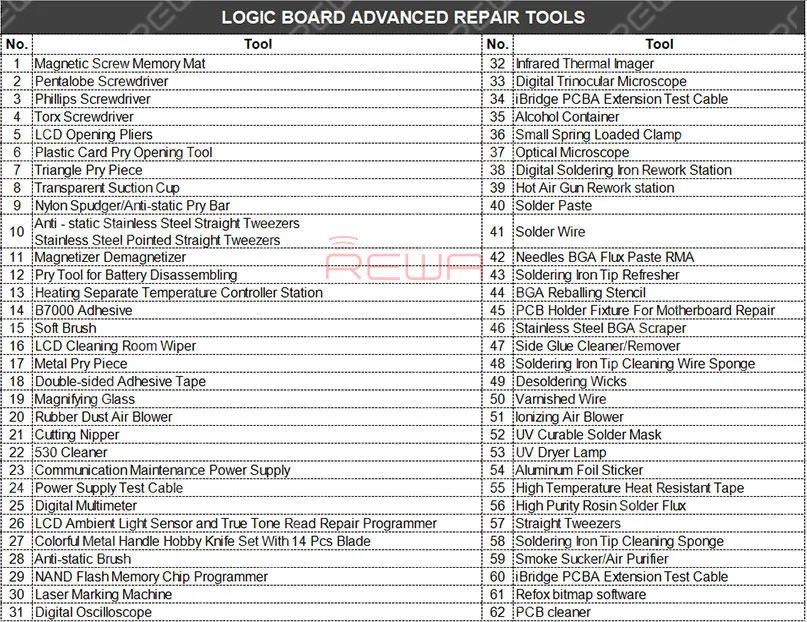
    How many repair tools do I need to have? You may think about the problem when you prepare to open a repair shop. REWA repair technicians with 10+ years of experience have classified repair tools needed into three main categories as following:

    Parts Replacement Tools

    Parts Replacement Tools

    Logic Board Soldering Tools

    Logic Board Soldering Tools

    Logic Board Advanced Repair Tools

    Logic Board Advanced Repair Tools

    Kommunikation Wartung Stromversorgung

    Die communication maintenance power supply is used for logic board repairing and booting test. The communication maintenance power supply is matched with Apple iPhone 4 – XS Max power supply test cable.

    Hot Air Gun Rework station

    Die Hot Air Gun Rework station is suitable for a variety of components. such as SOIC, CHIP, QFP, PLCC, BGA (especially suitable for soldering of circuits and flex cable). The three tools are used to solve the problem that the repair shop faced every day.

    What repairs you can do with the Parts Replacement Tools?

    Replace the screen/battery/back battery cover/flex cable/ear speaker and diagnosis whether can power on, etc..

    What repairs you can do with the Logic Board Soldering Tools?

    Replace the IC/connector Not turning on diagnosing Replace the screen/battery/back battery cover/flex cable/ear speaker, etc..

    What repairs you can do with the Logic Board Advanced Repair Tools?

    Upgrade storage, unlock logic board repair, NAND repair, etc..

    Repair Case Example: “I have lost all the files on my iPhone. The pictures, messages, contacts, and files are very important to me, can you recover the data?” How to recover the data? Let’s take iPhone X data recovery from dead motherboard an example.

    Datenwiederherstellung mit iCloud

    For phones with iCloud backup, you can recover the data from the iCloud.

    Datenwiederherstellung mit Software

    For carelessly deleted data of phones in good conditions, you can recover the data with the help of some software.

    Data recovery with hardware

    However, if the two methods don’t work. How to recover data from a dead logic board?

    Schritt 1. Use screwdrivers nd straight tweezers to detach the dead logic board from the iPhone. And then attach the dead logic board to the PCB holder.

    Schritt 2. Detach the A8 CPU, EEPROM, and NAND Flash from the dead logic board. Please deal with these chips carefully. Because the three well-performed chips are a must of successful data recovery.

    Schritt 3. Use the Soldering iron and the razor blade to clean the three detached chips. Rosin, BGA paste flux and PCB cleaner are also needed during the process. Schritt 4. Complete BGA reballing with the help of the hot air gun rework station, BGA reballing stencil, and straight tweezers.

    Schritt 5. Detach the A8 CPU, NAND Flash, EEPROM from the new logic board.

    Step 6. Transplant chips detached from the dead logic board to the new logic board.

    Schritt 7. Get the logic board installed and test whether the data has been recovered successfully.

    Hinweis:

    1. There are possible risks for the logic board data recovery process.

    2. Für den Betrieb werden qualifizierte Reparaturtechniker benötigt.

    3. Die heruntergefallenen Pads sind leere Pads, die keinen Einfluss auf die Funktion haben.

    4. Apple’s official after-sales support does not accept the phone repaired by third-parties.

    5. Die Daten können nicht wiederhergestellt werden, wenn einer dieser drei Chips (CPU, NAND Flash, EEPROM) defekt ist.

    6. This cellphone is still calling failed until this step because the whole process is for data recovery only. The phone may be faced up with some other problems. Here is a video guide for your reference:

    It has always been our aim to power your repair business. For quick ordering, please visit our online shop – shop.rewa.tech. Any questions and suggestions please feel free to contact sales@rewa.tech.